
Cenit: Profit Calculator vs ReProfit
Two Shopify apps, side by side: detected stores, momentum, reviews, plans, listed features and who runs each. Store counts as of Nov 6, 2026 for Cenit, Oct 14, 2026 for ReProfit.
The short answer
- Only ReProfit lists a free plan.
- ReProfit lists 3 features Cenit’s listing doesn’t mention, including Custom reports, Historical analysis, Purchase tracking.
Head to head

Free
- · Full profit dashboard
- · No store sync
- · Session only — nothing saved
- · Upload Excel / CSV
Starter
- · AI data assistant
- · Data saved / history kept
- · Live sync + real COGS
- · Net profit after COGS, fees & tax
- · Your Shopify store (1 connector slot)
Pro
- · AI data assistant
- · Dead capital + traffic
- · Live sync + real COGS
- · Shopify + eBay (2 connector slots)
- · Unified cross-channel views
Coverage counts what each App Store listing names. Every feature, checked off app by app, is in Shoplist.
See every featureRevenue is not profit. Cenit reads your orders and subtracts what each sale took from you: the payment fee, shipping, your ad spend and what you paid for the products sold. What is left is your real profit and margin, per order, per product and per sales channel. If you also sell on Mercado Libre or Tienda Nube, connect them and compare every channel side by side in your own currency.
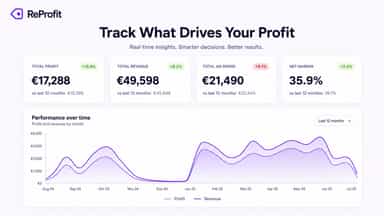
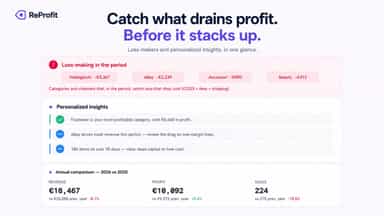
Revenue is a top-line number. ReProfit subtracts goods sold, transaction and payment fees, shipping, taxes, discounts and refunds from every order, so your dashboard shows what you actually keep. Set a value per item to get gross and net margin by product, variant and collection. Track net profit across months, quarters and year to date, and compare periods side by side.
- Profit and margin per order after payment fees, shipping and purchase prices
- Compare profit across Shopify, Mercado Libre and Tienda Nube in one dashboard
- Upload what you paid for each product from Excel or CSV and see every margin
- Split ad spend across products and see which channel returns the most
- Net profit per order after COGS, fees, taxes, discounts and refunds
- True gross and net margin by product, variant and collection
- Historical P&L: compare months, quarters and year to date
- Refunds and discounts subtracted, not hidden in top-line sales


All the numbers
Every figure, side by side
A green dot marks the app ahead on a measured figure. Estimates, gaps and apps that leave no storefront trace never take the lead.
Adoption
| Measure |  ReProfit | |
|---|---|---|
| Detected stores | Not published | Not published |
| Net store change, 28 days | 0 | 0 |
| Stores added, 28 days | Not enough data | Not enough data |
| Big-brand share | Not enough data | Not enough data |
| Top store categories | Not published | Not published |
| Top store countries | Not published | Not published |
Reviews
| Measure | ReProfit | |
|---|---|---|
| App Store rating | Not published | Not published |
| App Store reviews | Not published | Not published |
| New reviews, 28 days | Not enough data | Not enough data |
| Reviewers a year or more in | Not enough data | Not enough data |
FAQ
Cenit and ReProfit: common questions
- Is Cenit or ReProfit cheaper?
- Only ReProfit lists a free plan. Shoplist compares base prices only between monthly plans in the same currency; usage charges and annual plans vary, so check each plan’s limits.
- What features does each app list that the other doesn’t?
- Cenit lists 1 the others don’t mention, such as Profit insights. ReProfit lists 3 the others don’t mention, such as Custom reports, Historical analysis, Purchase tracking. A feature missing from a listing may still be supported; this compares what each App Store listing says.
- Where does this comparison’s data come from?
- Shoplist crawls Shopify storefronts to detect which apps each store runs, and reads each app’s Shopify App Store listing for reviews, pricing, features and integrations. Store counts are as of Nov 6, 2026 for Cenit, Oct 14, 2026 for ReProfit; estimated figures are labeled.
How Shoplist compares apps
Store counts come from Shoplist’s crawl of Shopify storefronts, which detects the apps each store runs; they are as of Nov 6, 2026 for Cenit, Oct 14, 2026 for ReProfit. Reviews, ratings, plans, features and integrations come from each app’s Shopify App Store listing. 28-day figures are labeled when estimated, and a figure that is missing or estimated never decides who leads. Read the methodology.