CCFlow ‑ Cycle Count Flow vs CountKit: Inventory Count
Two Shopify apps, side by side: detected stores, momentum, reviews, plans, listed features and who runs each. Store counts as of Nov 3, 2026 for CCFlow, Oct 14, 2026 for CountKit.
The short answer
- Only CountKit lists a free plan. Paid plans start at $5/month for CCFlow and $3.99/month for CountKit.
- CountKit lists 4 features CCFlow’s listing doesn’t mention, including Barcodes, Multi-location, Scanners.
Head to head

Starter
- · Up to 3 active recurring count rules
Growth
- · Up to 10 active recurring count rules
Scale
- · Up to 25 active recurring count rules
Free
- · 1 count a month
- · Review and apply to Shopify
- · Scan by phone, scanner or camera
- · Up to 100 items per count
Micro
- · CSV export
- · Everything in Free
- · Unlimited counts
- · Up to 1,000 items per count
Pro
- · Blind counts (expected hidden)
- · Everything in Micro
- · Up to 5,000 items per count
Coverage counts what each App Store listing names. Every feature, checked off app by app, is in Shoplist.
See every featureCycleCount helps merchants keep stock records accurate without stopping daily warehouse work. Create focused count sessions by location and select items using inventory conditions. Give staff a blind count sheet that hides system quantities, then enter counts manually or scan barcodes. Review every variance before it is applied and keep a clear history of confirmed stock changes.
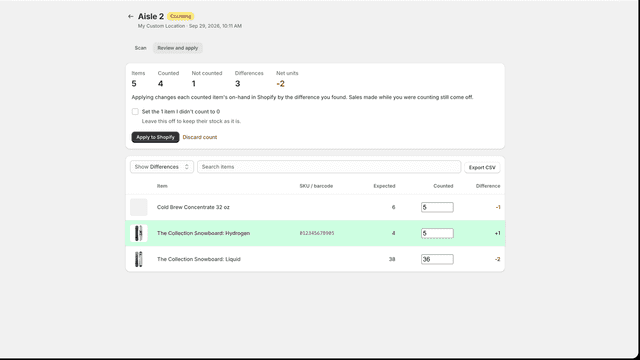
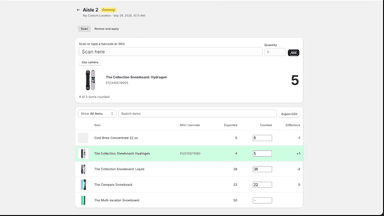
Inventory drifts until Shopify stops matching the shelf. CountKit runs stocktakes and cycle counts in your Shopify admin. Start a count for a location, for every item or one vendor, type or tag. Scan with the Shopify app on your phone, a handheld scanner, or your computer's camera; each scan beeps and shows the item's photo and count. Review the differences with photos, then apply them in one click.
- Blind count sheets that hide system quantities
- Barcode scanning for faster item counts
- Variance review before stock updates
- Recurring rules for regular count sessions
- Scan with the Shopify app, a handheld scanner, or your camera
- See each item's photo and count, and review differences first
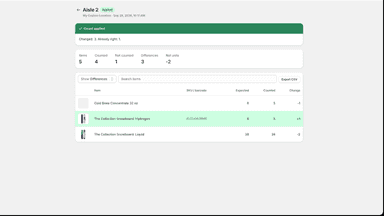
- Apply to Shopify in one click, recorded as a cycle count
All the numbers
Every figure, side by side
A green dot marks the app ahead on a measured figure. Estimates, gaps and apps that leave no storefront trace never take the lead.
Adoption
| Measure |  CountKit | |
|---|---|---|
| Detected stores | Not published | Not published |
| Net store change, 28 days | 0 | 0 |
| Stores added, 28 days | Not enough data | Not enough data |
| Big-brand share | Not enough data | Not enough data |
| Top store categories | Not published | Not published |
| Top store countries | Not published | Not published |
Reviews
| Measure | CountKit | |
|---|---|---|
| App Store rating | Not published | Not published |
| App Store reviews | Not published | Not published |
| New reviews, 28 days | Not enough data | Not enough data |
| Reviewers a year or more in | Not enough data | Not enough data |
FAQ
CCFlow and CountKit: common questions
- Is CCFlow or CountKit cheaper?
- Only CountKit lists a free plan. Paid plans start at $5/month for CCFlow and $3.99/month for CountKit. Shoplist compares base prices only between monthly plans in the same currency; usage charges and annual plans vary, so check each plan’s limits.
- What features does each app list that the other doesn’t?
- CountKit lists 4 the others don’t mention, such as Barcodes, Multi-location, Scanners, SKUs. A feature missing from a listing may still be supported; this compares what each App Store listing says.
- Where does this comparison’s data come from?
- Shoplist crawls Shopify storefronts to detect which apps each store runs, and reads each app’s Shopify App Store listing for reviews, pricing, features and integrations. Store counts are as of Nov 3, 2026 for CCFlow, Oct 14, 2026 for CountKit; estimated figures are labeled.
How Shoplist compares apps
Store counts come from Shoplist’s crawl of Shopify storefronts, which detects the apps each store runs; they are as of Nov 3, 2026 for CCFlow, Oct 14, 2026 for CountKit. Reviews, ratings, plans, features and integrations come from each app’s Shopify App Store listing. 28-day figures are labeled when estimated, and a figure that is missing or estimated never decides who leads. Read the methodology.