
CatalogPic vs Smart Placeholder Images
Two Shopify apps, side by side: detected stores, momentum, reviews, plans, listed features and who runs each. Store counts as of Nov 12, 2026 for CatalogPic, Oct 13, 2026 for Smart Placeholder Images.
The short answer
- Only Smart Placeholder Images lists a free plan.
- CatalogPic lists 1 features Smart Placeholder Images’s listing doesn’t mention, including Bulk edit.
Head to head

CatalogPic
- · Add catalog images to products
- · Find products missing images
- · Rescan products anytime
- · Review images before adding them
- · Search images in your own catalog
FOREVER FREE
- · Auto-fill missing product images
- · Bulk apply images in seconds
- · Industry-based image library
- · Safe & non-destructive updates
- · Unlimited image replacements
Custom Upload
- · Advanced image selection options
- · Brand-consistent image control
- · Mix custom + placeholder images
- · Priority processing speed
- · Upload and use your own images
Coverage counts what each App Store listing names. Every feature, checked off app by app, is in Shoplist.
See every featureCatalogPic scans your active products for missing images and helps you fill the gaps. Filter results by product name, vendor, UPC, or SKU, then search images already in your own Shopify catalog. Review each suggestion before adding it to a product. If no suitable image exists, open the product in Shopify to upload an image you have permission to use.
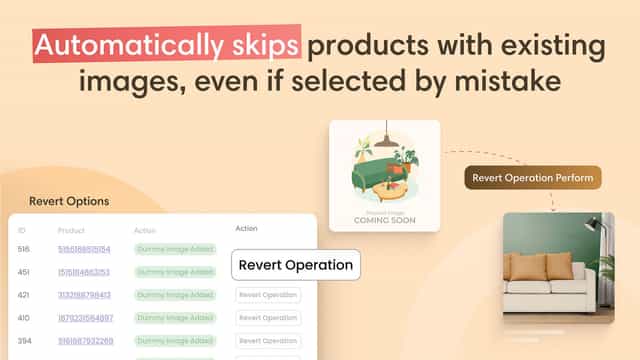
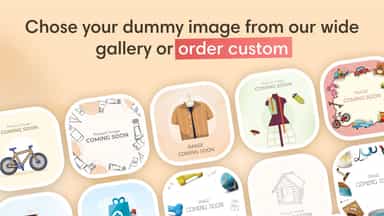
Fix missing product images automatically. This app detects products without images and fills them with high-quality placeholders. Improve store appearance, boost customer trust, and launch products faster. Choose from industry-based images or upload your own to match your brand. Perfect for bulk imports, dropshipping, and new stores.
- Scan active products to find missing images.
- Filter missing-image products by name, vendor, UPC, or SKU.
- Search and reuse suitable images already in your own store catalog.
- Open products in Shopify to upload images you have permission to use.
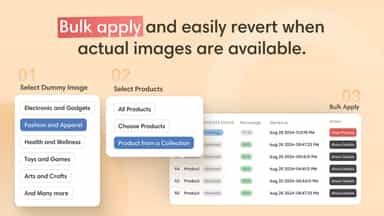
- Bulk apply dummy images to fill product image gaps in your catalog.
- Filter and select placeholder images based on your e-commerce industry.
- Easily manage and deploy dummy images across multiple products in one click.

All the numbers
Every figure, side by side
A green dot marks the app ahead on a measured figure. Estimates, gaps and apps that leave no storefront trace never take the lead.
Adoption
| Measure |  Smart Placeholder Images | |
|---|---|---|
| Detected stores | Not published | Not published |
| Net store change, 28 days | 0 | 0 |
| Stores added, 28 days | Not enough data | Not enough data |
| Big-brand share | Not enough data | Not enough data |
| Top store categories | Not published | Not published |
| Top store countries | Not published | Not published |
Reviews
| Measure | Smart Placeholder Images | |
|---|---|---|
| App Store rating | Not published | Not published |
| App Store reviews | Not published | Not published |
| New reviews, 28 days | Not enough data | Not enough data |
| Reviewers a year or more in | Not enough data | Not enough data |
Pricing
| Measure | Smart Placeholder Images | |
|---|---|---|
| Free plan | Not listed | Yes |
| Lowest paid monthly plan | No monthly plan listed | No monthly plan listed |
| Longest free trial | Not listed | Not listed |
| Plans listed | 1 | 2 |
Listing
| Measure | Smart Placeholder Images | |
|---|---|---|
| Shopify category rank | Not enough data | #358 |
| Shopify App Charts | Not on this week’s charts | Not on this week’s charts |
| Built for Shopify | No | No |
| Launched | Nov 12, 2026 | Sep 19, 2024 |
| Languages | 1 | 1 |
| Developer | RxDx Productions | Manifester Technologies |
FAQ
CatalogPic and Smart Placeholder Images: common questions
- Is CatalogPic or Smart Placeholder Images cheaper?
- Only Smart Placeholder Images lists a free plan. Shoplist compares base prices only between monthly plans in the same currency; usage charges and annual plans vary, so check each plan’s limits.
- What features does each app list that the other doesn’t?
- CatalogPic lists 1 the others don’t mention, such as Bulk edit. Smart Placeholder Images lists 1 the others don’t mention, such as Image optimization. A feature missing from a listing may still be supported; this compares what each App Store listing says.
- Where does this comparison’s data come from?
- Shoplist crawls Shopify storefronts to detect which apps each store runs, and reads each app’s Shopify App Store listing for reviews, pricing, features and integrations. Store counts are as of Nov 12, 2026 for CatalogPic, Oct 13, 2026 for Smart Placeholder Images; estimated figures are labeled.
How Shoplist compares apps
Store counts come from Shoplist’s crawl of Shopify storefronts, which detects the apps each store runs; they are as of Nov 12, 2026 for CatalogPic, Oct 13, 2026 for Smart Placeholder Images. Reviews, ratings, plans, features and integrations come from each app’s Shopify App Store listing. 28-day figures are labeled when estimated, and a figure that is missing or estimated never decides who leads. Read the methodology.