

CatalogExporter vs Firebear Import & Export Tool
Two Shopify apps, side by side: detected stores, momentum, reviews, plans, listed features and who runs each. Store counts as of Oct 13, 2026.
The short answer
- Both list a free plan. Paid plans start at $4.99/month for CatalogExporter and $20/month for Firebear Import & Export Tool.
- Firebear Import & Export Tool lists 10 features CatalogExporter’s listing doesn’t mention, including Auto-update, Bulk import, Bulk updates.
Head to head


Fast import and export tool. Use any CSV file. Apply mapping
Momentum
New reviews each month
Review pace is the clearest public read on how fast an app is winning new merchants.
Free
- · 1 feed
- · Export feeds as CSV or XML
- · Up to 100 products
Starter
- · 3 feeds
- · Export feeds as CSV or XML
- · Include variants & metafields
- · Market localizations
- · Multi-language & market
- · Up to 1,000 products
Pro
- · Export feeds as CSV or XML
- · Include variants & metafields
- · Market localizations
- · Multi-language & market
- · Priority support
- · Unlimited feeds
Free forever
- · Export orders
- · Files (csv, xml, xlsx)
- · Import from Url
- · Import/export customers
- · Import/export products
- · Max export rows 100
Basic
- · + Cron
- · + Email notifications
- · + Export filters
- · + Google Drive & Sheet
- · Max export rows 5,000
- · Max import rows 5,000
Advanced
- · + 5 Parallel jobs
- · + Orders Delta Export
- · Max export rows 100,000
- · Max import rows 100,000
- · all basic features plus:
Coverage counts what each App Store listing names. Every feature, checked off app by app, is in Shoplist.
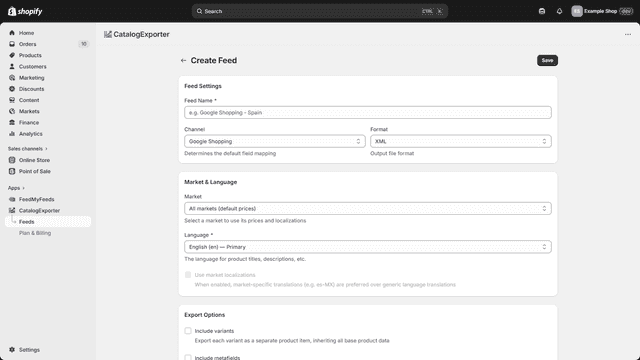
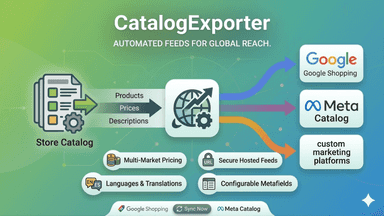
See every featureStop wasting time on manual exports. Catalog Exporter automates your multi-channel growth by syncing store data with Google Shopping, Meta, and more. Generate dynamic XML/CSV feeds with market-specific pricing, translations, and metafields to boost global conversions. Feeds are hosted on secure URLs with optional password protection.
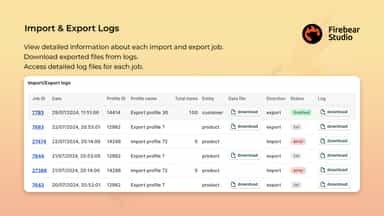
Our AI-driven app simplifies import and export for products, customers, and orders. It supports CSV, XML, XLSX & Google Sheets file formats and Google Drive, FTP & standard file uploads. Automate updates with scheduled profiles and seamlessly map third-party attributes to Shopify fields for efficient data management, saving time on manual tasks.
- Multichannel Feeds: Auto-sync products to Google Shopping, Meta, and more.
- Global Selling: Include market-specific pricing, translations, and locales.
- Flexible Exports: Create XML or CSV feeds with custom field mapping.
- Smart Caching: Set cache duration from 10 min to 24 hours for performance.
- Automation. Use schedules to run imports & exports automatically.
- Mapping. Match third-party columns with system properties & vice versa.
- File Formats. Use XML & XLSX files in addition to CSV.
- Google Sheets. Import & export data between Shopify & Google Sheets.



All the numbers
Every figure, side by side
A green dot marks the app ahead on a measured figure. Estimates, gaps and apps that leave no storefront trace never take the lead.
Adoption
| Measure |  CatalogExporter |  Firebear Import & Export Tool |
|---|---|---|
| Detected stores | Not published | Not published |
| Net store change, 28 days | 0 | 0 |
| Stores added, 28 days | Not enough data | Not enough data |
| Big-brand share | Not enough data | Not enough data |
| Top store categories | Not published | Not published |
| Top store countries | Not published | Not published |
Reviews
| Measure | CatalogExporter | Firebear Import & Export Tool |
|---|---|---|
| App Store rating | Not published | 2.9 ★ |
| App Store reviews | Not published | 8 |
| New reviews, 28 days | Not enough data | 0 |
| Reviewers a year or more in | Not enough data | Not enough data |
Pricing
| Measure | CatalogExporter | Firebear Import & Export Tool |
|---|---|---|
| Free plan | Yes | Yes |
| Lowest paid monthly plan | $4.99/month(ahead) | $20/month |
| Longest free trial | 30 days | Not listed |
| Plans listed | 3 | 3 |
Listing
| Measure | CatalogExporter | Firebear Import & Export Tool |
|---|---|---|
| Shopify category rank | #141(ahead) | #223 |
| Shopify App Charts | Not on this week’s charts | Not on this week’s charts |
| Built for Shopify | No | No |
| Launched | Apr 22, 2026 | Apr 5, 2021 |
| Languages | 1 | 2 |
| Developer | FeedMyFeeds, S.L. | Firebear Studio |
FAQ
CatalogExporter and Firebear Import & Export Tool: common questions
- Is CatalogExporter or Firebear Import & Export Tool cheaper?
- Both list a free plan. Paid plans start at $4.99/month for CatalogExporter and $20/month for Firebear Import & Export Tool. Shoplist compares base prices only between monthly plans in the same currency; usage charges and annual plans vary, so check each plan’s limits.
- What features does each app list that the other doesn’t?
- CatalogExporter lists 2 the others don’t mention, such as Collections, Discounts. Firebear Import & Export Tool lists 10 the others don’t mention, such as Auto-update, Bulk import, Bulk updates, FTP/SFTP. A feature missing from a listing may still be supported; this compares what each App Store listing says.
- Where does this comparison’s data come from?
- Shoplist crawls Shopify storefronts to detect which apps each store runs, and reads each app’s Shopify App Store listing for reviews, pricing, features and integrations. Store counts are as of Oct 13, 2026; estimated figures are labeled.
How Shoplist compares apps
Store counts come from Shoplist’s crawl of Shopify storefronts, which detects the apps each store runs; they are as of Oct 13, 2026. Reviews, ratings, plans, features and integrations come from each app’s Shopify App Store listing. 28-day figures are labeled when estimated, and a figure that is missing or estimated never decides who leads. Read the methodology.