

Catalog Lint vs Fluvia: Catalog Quality Report
Two Shopify apps, side by side: detected stores, momentum, reviews, plans, listed features and who runs each. Store counts as of Oct 14, 2026 for Catalog Lint, Oct 13, 2026 for Fluvia.
The short answer
- Only Catalog Lint lists a free plan. Paid plans start at $29/month for Catalog Lint and $4.99/month for Fluvia.
- Fluvia lists 1 features Catalog Lint’s listing doesn’t mention, including Analytics dashboard.
Head to head


Free
- · 50 most recently created products
- · 9 checks: SEO, images, SKUs, duplicates
- · Read-only. Links to products in admin
Pro
- · CSV export of every finding
- · Read-only, like Free
- · Scans the whole catalogue
- · Shows changes since your last scan
Standard
- · Catalog score and issue totals
- · Five catalog quality checks
- · Open products in Shopify Admin
- · Product-level issue details
- · Refresh and export reports to CSV
Coverage counts what each App Store listing names. Every feature, checked off app by app, is in Shoplist.
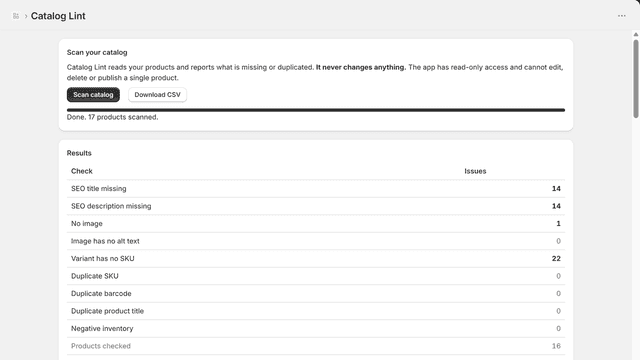
See every featureCatalog Lint reads your product catalogue and tells you what is missing or duplicated, then gets out of the way. It holds no write permission, so it cannot edit or delete a product. Shopify shows you before you install: View, yes. Edit, no. Free checks your 50 newest products. Pro checks the whole catalogue, exports CSV and shows what changed since your last scan. We store no data.
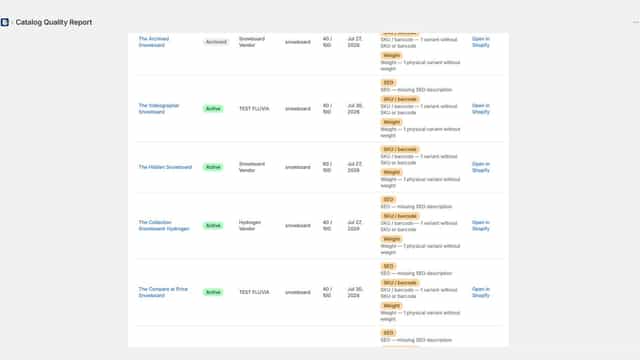
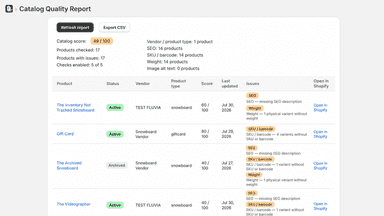
Fluvia: Catalog Quality Report scans your product catalog and highlights missing vendor or product type, SEO content, SKU or barcode, physical variant weight, and image alt text. Review product-level scores, open affected products in Shopify Admin, refresh the report after changes, and export the findings to CSV. The app is read-only: it never edits products or stores report data.
- Nine checks in one pass: missing SEO, images, alt text, SKUs and duplicates
- Read-only and stores nothing: it holds no write permission at all
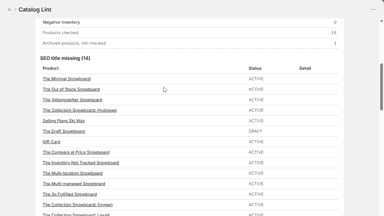
- Every result links straight to that product in your Shopify admin
- Export the full list as CSV, generated in your browser
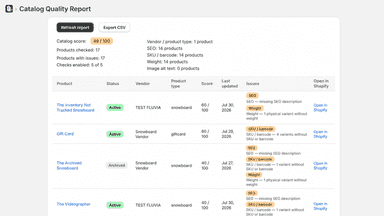
- See a catalog quality score and issue counts at a glance.
- Check vendor, product type, SEO, identifiers, weight, and image alt text.
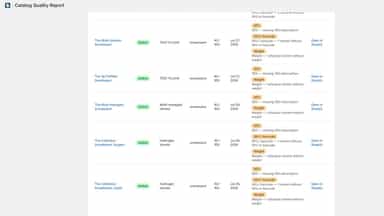
- Review product-level scores and clear issue descriptions.
- Open affected products directly in Shopify Admin.
All the numbers
Every figure, side by side
A green dot marks the app ahead on a measured figure. Estimates, gaps and apps that leave no storefront trace never take the lead.
Adoption
| Measure |  Catalog Lint |  Fluvia |
|---|---|---|
| Detected stores | Not published | Not published |
| Net store change, 28 days | 0 | 0 |
| Stores added, 28 days | Not enough data | Not enough data |
| Big-brand share | Not enough data | Not enough data |
| Top store categories | Not published | Not published |
| Top store countries | Not published | Not published |
Reviews
| Measure | Catalog Lint | Fluvia |
|---|---|---|
| App Store rating | Not published | Not published |
| App Store reviews | Not published | Not published |
| New reviews, 28 days | Not enough data | Not enough data |
| Reviewers a year or more in | Not enough data | Not enough data |
Pricing
| Measure | Catalog Lint | Fluvia |
|---|---|---|
| Free plan | Yes | Not listed |
| Lowest paid monthly plan | $29/month | $4.99/month(ahead) |
| Longest free trial | 7 days | 14 days |
| Plans listed | 2 | 1 |
Listing
| Measure | Catalog Lint | Fluvia |
|---|---|---|
| Shopify category rank | #1671 | #1582(ahead) |
| Shopify App Charts | Not on this week’s charts | Not on this week’s charts |
| Built for Shopify | No | No |
| Launched | Oct 2, 2026 | Aug 28, 2026 |
| Languages | 1 | 1 |
| Developer | Lintwright | Fluvia |
FAQ
Catalog Lint and Fluvia: common questions
- Is Catalog Lint or Fluvia cheaper?
- Only Catalog Lint lists a free plan. Paid plans start at $29/month for Catalog Lint and $4.99/month for Fluvia. Shoplist compares base prices only between monthly plans in the same currency; usage charges and annual plans vary, so check each plan’s limits.
- What features does each app list that the other doesn’t?
- Fluvia lists 1 the others don’t mention, such as Analytics dashboard. A feature missing from a listing may still be supported; this compares what each App Store listing says.
- Where does this comparison’s data come from?
- Shoplist crawls Shopify storefronts to detect which apps each store runs, and reads each app’s Shopify App Store listing for reviews, pricing, features and integrations. Store counts are as of Oct 14, 2026 for Catalog Lint, Oct 13, 2026 for Fluvia; estimated figures are labeled.
How Shoplist compares apps
Store counts come from Shoplist’s crawl of Shopify storefronts, which detects the apps each store runs; they are as of Oct 14, 2026 for Catalog Lint, Oct 13, 2026 for Fluvia. Reviews, ratings, plans, features and integrations come from each app’s Shopify App Store listing. 28-day figures are labeled when estimated, and a figure that is missing or estimated never decides who leads. Read the methodology.