

CartRevive vs Failed Payments: RevivePay
Two Shopify apps, side by side: detected stores, momentum, reviews, plans, listed features and who runs each. Store counts as of Oct 13, 2026.
The short answer
- Only Failed Payments lists a free plan. Paid plans start at $15/month for CartRevive and $14.99/month for Failed Payments.
- CartRevive lists 3 features Failed Payments’s listing doesn’t mention, including Automated workflows, Multi-channel messaging, Personalized campaigns.
Head to head


Starter
Growth
Scale
Free
- · 1 recovery email per failed payment
- · Automatic failed payment detection
- · Recovered revenue tracking
- · Up to 10 recoveries per month
Growth
- · Automatic failed payment detection
- · Recovered revenue tracking
- · Recovery emails with checkout links
Coverage counts what each App Store listing names. Every feature, checked off app by app, is in Shoplist.
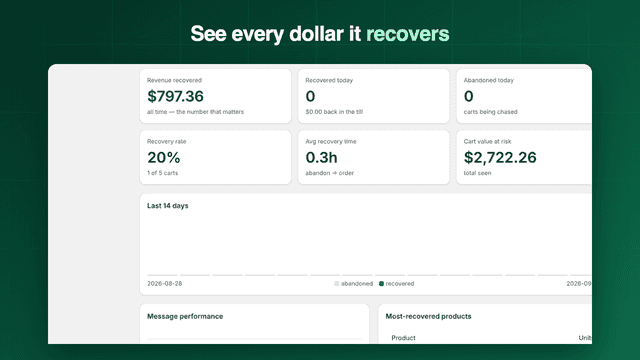
See every featureMost checkouts end without an order. CartRevive wins those carts back with a four-step email sequence that starts working the minute you install: no flows to build, nothing to configure. Discounts are sized to each cart, so big carts get stronger incentives and small carts recover without giving margin away. Every send, skip, open, and click is tracked, and customer consent is enforced automatically.
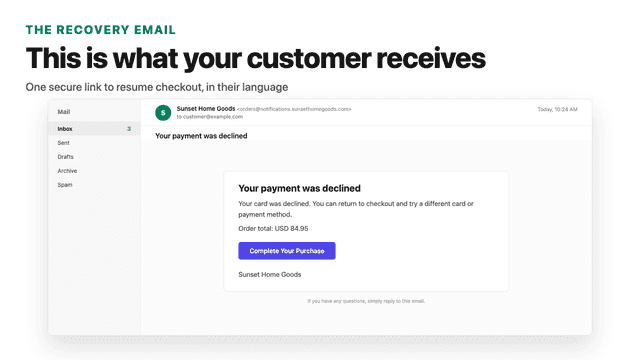
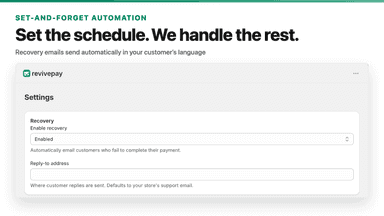
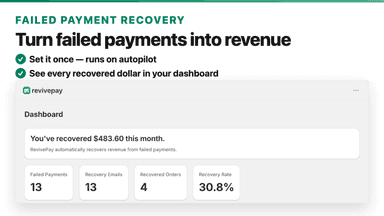
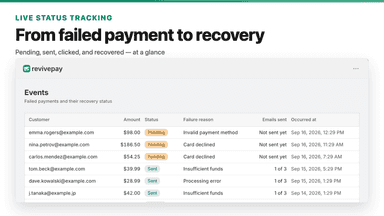
Failed payments happen when a customer's card is declined or an error interrupts checkout. Most of these sales are lost. RevivePay watches your store for failed payments and automatically emails the affected customer a link to resume their checkout. You control the email schedule, and every recovered order is tracked so you can see exactly how much revenue came back.
- Works instantly: ready-made sequences start recovering with zero setup
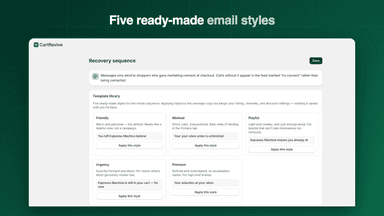
- Five ready-made email styles plus smart discounts sized to each cart
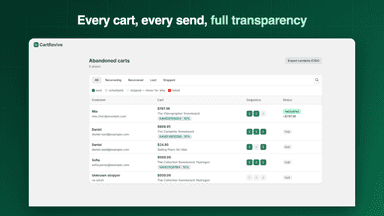
- Track every send, skip, open, click, and recovered order in real time
- Consent-first: only messages customers who opted in, one-click unsubscribe
- Detects failed payments in real time and flags recoverable orders
- Sends recovery emails automatically, 30 minutes and 24 hours later
- Gives customers a secure link to resume their checkout
- Tracks recovered revenue and attributes it to each email
All the numbers
Every figure, side by side
A green dot marks the app ahead on a measured figure. Estimates, gaps and apps that leave no storefront trace never take the lead.
Adoption
| Measure |  CartRevive |  Failed Payments |
|---|---|---|
| Detected stores | Not published | Not published |
| Net store change, 28 days | 0 | 0 |
| Stores added, 28 days | Not enough data | Not enough data |
| Big-brand share | Not enough data | Not enough data |
| Top store categories | Not published | Not published |
| Top store countries | Not published | Not published |
Reviews
| Measure | CartRevive | Failed Payments |
|---|---|---|
| App Store rating | Not published | Not published |
| App Store reviews | Not published | Not published |
| New reviews, 28 days | Not enough data | Not enough data |
| Reviewers a year or more in | Not enough data | Not enough data |
Pricing
| Measure | CartRevive | Failed Payments |
|---|---|---|
| Free plan | Not listed | Yes |
| Lowest paid monthly plan | $15/month | $14.99/month(ahead) |
| Longest free trial | Not listed | 14 days |
| Plans listed | 3 | 2 |
Listing
| Measure | CartRevive | Failed Payments |
|---|---|---|
| Shopify category rank | #363 | #263(ahead) |
| Shopify App Charts | Not on this week’s charts | Not on this week’s charts |
| Built for Shopify | No | No |
| Launched | Sep 14, 2026 | Sep 24, 2026 |
| Languages | 1 | 2 |
| Developer | Merchantry Labs | kumo studio |
FAQ
CartRevive and Failed Payments: common questions
- Is CartRevive or Failed Payments cheaper?
- Only Failed Payments lists a free plan. Paid plans start at $15/month for CartRevive and $14.99/month for Failed Payments. Shoplist compares base prices only between monthly plans in the same currency; usage charges and annual plans vary, so check each plan’s limits.
- What features does each app list that the other doesn’t?
- CartRevive lists 3 the others don’t mention, such as Automated workflows, Multi-channel messaging, Personalized campaigns. A feature missing from a listing may still be supported; this compares what each App Store listing says.
- Where does this comparison’s data come from?
- Shoplist crawls Shopify storefronts to detect which apps each store runs, and reads each app’s Shopify App Store listing for reviews, pricing, features and integrations. Store counts are as of Oct 13, 2026; estimated figures are labeled.
How Shoplist compares apps
Store counts come from Shoplist’s crawl of Shopify storefronts, which detects the apps each store runs; they are as of Oct 13, 2026. Reviews, ratings, plans, features and integrations come from each app’s Shopify App Store listing. 28-day figures are labeled when estimated, and a figure that is missing or estimated never decides who leads. Read the methodology.