

Cappasity 3D and 360 Viewer vs Viewly: 3D Product Viewer & AR
Two Shopify apps, side by side: detected stores, momentum, reviews, plans, listed features and who runs each. Store counts as of Oct 13, 2026 for Cappasity 3D and 360 Viewer, Oct 14, 2026 for Viewly.
The short answer
- Only Viewly lists a free plan.
- Viewly lists 3 features Cappasity 3D and 360 Viewer’s listing doesn’t mention, including 3D models, Augmented reality, Model creation.
Head to head


Free
Free
- · 3 products
- · 3D viewer on storefront
- · AR view on mobile
- · GLB upload with compression
Basic
- · 30 products
- · 3D viewer on storefront
- · AR view on mobile
- · Bulk GLB upload
- · Email support
Pro
- · 3D viewer on storefront
- · AR view on mobile
- · Bulk GLB upload
- · Priority email support
- · Unlimited products
Coverage counts what each App Store listing names. Every feature, checked off app by app, is in Shoplist.
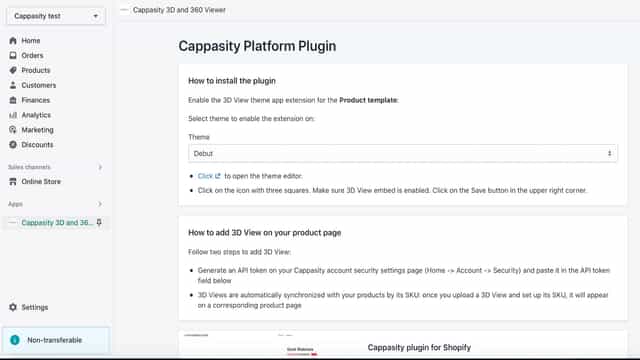
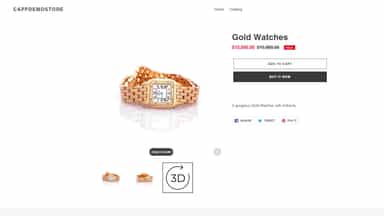
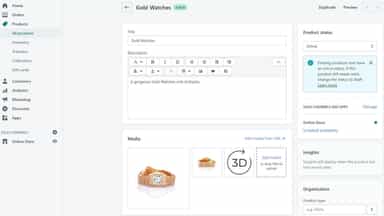
See every featureThe Cappasity 3D and 360 Viewer synchronizes the Shopify product catalog with the Cappasity account. It automatically adds interactive 3D images to products with matching SKU numbers. The 3D content is perfectly optimized for all browsers and devices and loads in seconds on product pages. This app is for existing Cappasity enterprise users only.
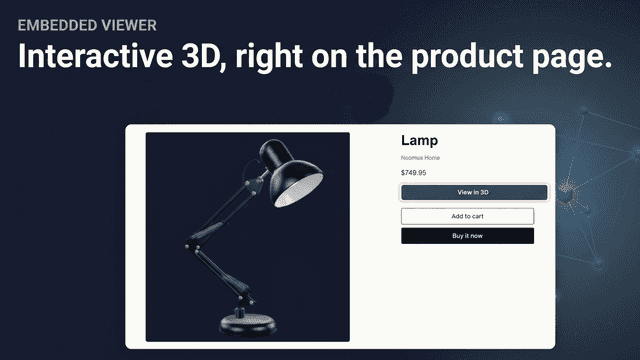
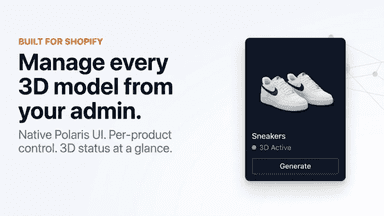
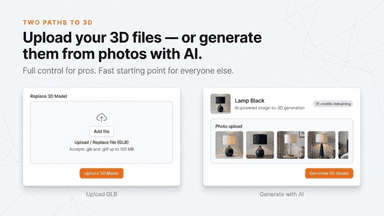
Viewly adds interactive 3D models and AR previews to your Shopify product pages. Customers rotate, zoom, and inspect products before buying, or place them life-size in their room using AR on iOS and Android. Upload your GLB files - models compress automatically for fast loading, bulk upload covers large catalogs, and desktop shoppers get a QR code that opens AR on their phone. Works with every Shopify theme.
- Produce 3D/AR content with any digital camera in just 3-5 minutes.
- Load existing 360 photos.
- Enable HD zoom to show every detail of your product.
- Interactive 3D viewer on any product page with rotation and zoom
- AR mode lets customers place products in their space using a phone
- AI photo-to-3D generation — create models from product images
- Bulk GLB upload to assign 3D models across your entire catalog


All the numbers
Every figure, side by side
A green dot marks the app ahead on a measured figure. Estimates, gaps and apps that leave no storefront trace never take the lead.
Adoption
| Measure |  Cappasity 3D and 360 Viewer |  Viewly |
|---|---|---|
| Detected stores | Not published | Not published |
| Net store change, 28 days | 0 | 0 |
| Stores added, 28 days | Not enough data | Not enough data |
| Big-brand share | Not enough data | Not enough data |
| Top store categories | Not published | Not published |
| Top store countries | Not published | Not published |
Reviews
| Measure | Cappasity 3D and 360 Viewer | Viewly |
|---|---|---|
| App Store rating | Not published | Not published |
| App Store reviews | Not published | Not published |
| New reviews, 28 days | Not enough data | Not enough data |
| Reviewers a year or more in | Not enough data | Not enough data |
Pricing
| Measure | Cappasity 3D and 360 Viewer | Viewly |
|---|---|---|
| Free plan | Not listed | Yes |
| Lowest paid monthly plan | No monthly plan listed | $9/month |
| Longest free trial | Not listed | 7 days |
| Plans listed | 1 | 3 |
Listing
| Measure | Cappasity 3D and 360 Viewer | Viewly |
|---|---|---|
| Shopify category rank | #111 | #62(ahead) |
| Shopify App Charts | Not on this week’s charts | Not on this week’s charts |
| Built for Shopify | No | No |
| Launched | Apr 11, 2023 | May 6, 2026 |
| Languages | 1 | 1 |
| Developer | Cappasity Inc. | Noomua |
FAQ
Cappasity 3D and 360 Viewer and Viewly: common questions
- Is Cappasity 3D and 360 Viewer or Viewly cheaper?
- Only Viewly lists a free plan. Shoplist compares base prices only between monthly plans in the same currency; usage charges and annual plans vary, so check each plan’s limits.
- What features does each app list that the other doesn’t?
- Viewly lists 3 the others don’t mention, such as 3D models, Augmented reality, Model creation. A feature missing from a listing may still be supported; this compares what each App Store listing says.
- Where does this comparison’s data come from?
- Shoplist crawls Shopify storefronts to detect which apps each store runs, and reads each app’s Shopify App Store listing for reviews, pricing, features and integrations. Store counts are as of Oct 13, 2026 for Cappasity 3D and 360 Viewer, Oct 14, 2026 for Viewly; estimated figures are labeled.
How Shoplist compares apps
Store counts come from Shoplist’s crawl of Shopify storefronts, which detects the apps each store runs; they are as of Oct 13, 2026 for Cappasity 3D and 360 Viewer, Oct 14, 2026 for Viewly. Reviews, ratings, plans, features and integrations come from each app’s Shopify App Store listing. 28-day figures are labeled when estimated, and a figure that is missing or estimated never decides who leads. Read the methodology.