

CA: WhatsApp Chat Order Button vs DivoChat
Two Shopify apps, side by side: detected stores, momentum, reviews, plans, listed features and who runs each. Store counts as of Nov 7, 2026 for CA, Oct 14, 2026 for DivoChat.
The short answer
- On the Shopify App Store: CA 5.0 from 80 reviews and DivoChat 5.0 from 3 reviews.
- Only CA lists a free plan. Paid plans start at $4.99/month for CA and $10/month for DivoChat.
- CA lists 15 features DivoChat’s listing doesn’t mention, including Agent analytics, Business hours, Cart recovery.
Head to head


Momentum
New reviews each month
Review pace is the clearest public read on how fast an app is winning new merchants.
Free
- · Choose Icon or Rectangle Floating Widget
- · Device & Page Visibility Settings
- · Dynamic Chat Messaging by Source
- · Include URL with WhatsApp messages
- · Monthly Manual 200 Abandoned Checkout
- · Monthly Manual 200 Order Confirmations
Advanced
- · Add to My WhatsApp Order Cross-Sell Page
- · Contact & Purchase Meta Events Tracking
- · Everything in the Free Plan
- · Full Analytics Dashboard
- · Manual Back in Stock Alert Messages
- · Product & Cart Order on WhatsApp Button
Pro
- · 1000 Monthly Automation Messages
- · Automatic Abandoned Checkout Recovery
- · Automatic Order & COD Confirmation
- · Automatic Order Delivered Confirmation
- · Automatic Order Shipped Notification
- · Automatic Review Request
Growth
- · 5000 Monthly Automation Messages
- · Automatic Abandoned Checkout Recovery
- · Automatic Order & COD Confirmation
- · Automatic Order Delivered Confirmation
- · Automatic Order Shipped Notification
- · Automatic Review Request
Premium
- · Advanced click analytics
- · Top products ranking
- · UTM traffic tracking
Coverage counts what each App Store listing names. Every feature, checked off app by app, is in Shoplist.
See every featureCA WhatsApp Order Chat Button to start WhatsApp chat, WatsApp contact, Order on whatssapp button from product & cart drawer The whatapp chat button “buy button” & WhatsApp icon, whats app, COD WhatsApp floating can customized in appearance, placement & wha message content Track whatsup clicks in real time by device, country, referral, whatsa Meta Pixel API track & WhatsApp Business Run WhatsApp automation for COD…
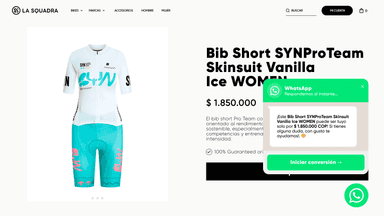
DivoChat adds a floating WhatsApp button to your store so customers can start a conversation with one tap. You can customize the button color, position, and message — including a product-specific message that automatically includes the product name and details.
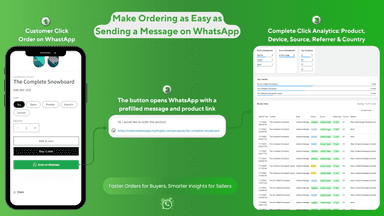
- Enable customers to order instantly via WhatsApp from product pages
- Enable customers to order instantly via chat from product pages
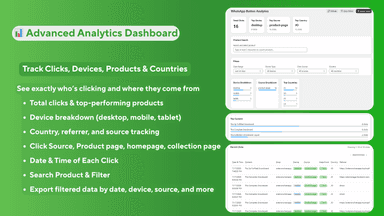
- Comprehensive click analytics by product, device, country, and source
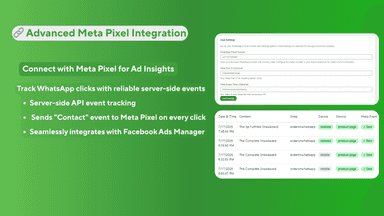
- Advanced analytics & server-side Meta Pixel tracking of Chat clicks
- Floating WhatsApp button with custom color, position, and message
- Product-aware messages with automatic product name and variant
- Meta Pixel integration via Conversions API for accurate ad tracking
- Click analytics dashboard with UTM source and campaign tracking




All the numbers
Every figure, side by side
A green dot marks the app ahead on a measured figure. Estimates, gaps and apps that leave no storefront trace never take the lead.
Adoption
| Measure |  CA |  DivoChat |
|---|---|---|
| Detected stores | Not published | Not published |
| Net store change, 28 days | 0 | 0 |
| Stores added, 28 days | Not enough data | Not enough data |
| Big-brand share | Not enough data | Not enough data |
| Top store categories | Not published | Not published |
| Top store countries | Not published | Not published |
Reviews
| Measure | CA | DivoChat |
|---|---|---|
| App Store rating | 5.0 ★ | 5.0 ★ |
| App Store reviews | 80(ahead) | 3 |
| New reviews, 28 days | Not enough data | Not enough data |
| Reviewers a year or more in | 0% | Not enough data |
FAQ
CA and DivoChat: common questions
- Is CA or DivoChat cheaper?
- Only CA lists a free plan. Paid plans start at $4.99/month for CA and $10/month for DivoChat. Shoplist compares base prices only between monthly plans in the same currency; usage charges and annual plans vary, so check each plan’s limits.
- Which has better reviews, CA or DivoChat?
- On the Shopify App Store: CA 5.0 from 80 reviews and DivoChat 5.0 from 3 reviews.
- What features does each app list that the other doesn’t?
- CA lists 15 the others don’t mention, such as Agent analytics, Business hours, Cart recovery, Chat assignment. DivoChat lists 1 the others don’t mention, such as Chat window. A feature missing from a listing may still be supported; this compares what each App Store listing says.
- Where does this comparison’s data come from?
- Shoplist crawls Shopify storefronts to detect which apps each store runs, and reads each app’s Shopify App Store listing for reviews, pricing, features and integrations. Store counts are as of Nov 7, 2026 for CA, Oct 14, 2026 for DivoChat; estimated figures are labeled.
How Shoplist compares apps
Store counts come from Shoplist’s crawl of Shopify storefronts, which detects the apps each store runs; they are as of Nov 7, 2026 for CA, Oct 14, 2026 for DivoChat. Reviews, ratings, plans, features and integrations come from each app’s Shopify App Store listing. 28-day figures are labeled when estimated, and a figure that is missing or estimated never decides who leads. Read the methodology.