

Bulk Track vs Excel CSV Tracking MassImport
Two Shopify apps, side by side: detected stores, momentum, reviews, plans, listed features and who runs each. Store counts as of Oct 13, 2026.
The short answer
- On the Shopify App Store: Bulk Track 5.0 from 1 reviews and Excel CSV Tracking MassImport 3.3 from 12 reviews.
- Only Excel CSV Tracking MassImport lists a free plan. Paid plans start at $7/month for Bulk Track and $8.90/month for Excel CSV Tracking MassImport.
- Excel CSV Tracking MassImport lists 4 features Bulk Track’s listing doesn’t mention, including Auto-sync data, Custom tracking link, Dashboards.
Head to head


Easily Import thousands of tracking numbers in one click
Momentum
New reviews each month
Review pace is the clearest public read on how fast an app is winning new merchants.
Starter
- · 1 Store
- · Includes CSV uploads and Dry-run preview
- · Up to 100 fulfillments per month
Growth
- · 1 Store
- · Up to 500 fulfillments per month
Pro
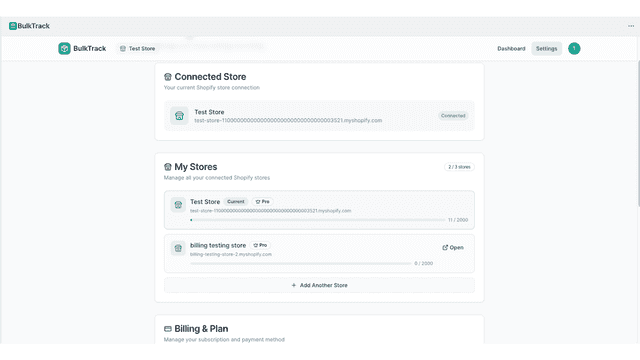
- · 3 Stores
- · Up to 2,000 fulfillments per month
Agency
- · Team Access
- · Unlimited Stores
- · Unlimited fulfillments and stores
Free Plan
- · Bulk import tracking numbers
Paid Plan
- · Bulk import tracking numbers
Coverage counts what each App Store listing names. Every feature, checked off app by app, is in Shoplist.
See every featureBulkTrack lets Shopify merchants upload tracking numbers in bulk using a CSV file. Simply upload a spreadsheet with order IDs and tracking numbers, and BulkTrack automatically detects carriers like UPS, USPS, FedEx, DHL, Amazon Logistics, and Canada Post. Preview updates before applying them, then create Shopify fulfillments in seconds instead of updating orders one by one.
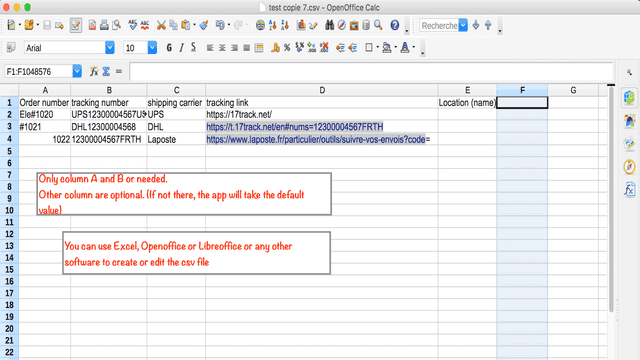
Quick start: 1) After installing the app, just download the sample file by clicking the link above the "upload" button 2) Modify this file with your order numbers and at least fill in the tracking numbers column (other columns or optional, it's advised to also fill the shipping company at least) 3) Click upload and wait a few minutes.
- Dry-run preview shows which orders will fulfill, skip, or fail before applying
- Bulk add tracking numbers to Shopify orders from a CSV file
- Smart column auto-mapping with saved mappings per store
- Supports multiple stores with upload history and audit logs
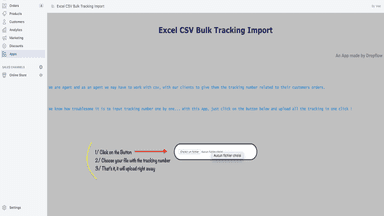
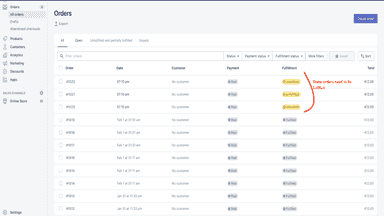
- Import your tracking in bulk with one click and a simple Excel/csv sheet
- If you have an agent let him easily import tracking when he fulfill the orders
- If a fulfillment center pack the order for you let them import tracking in bulk
- Shipping carriers and tracking link Customizable but you don't have to use them


All the numbers
Every figure, side by side
A green dot marks the app ahead on a measured figure. Estimates, gaps and apps that leave no storefront trace never take the lead.
Adoption
| Measure |  Bulk Track |  Excel CSV Tracking MassImport |
|---|---|---|
| Detected stores | Not published | Not published |
| Net store change, 28 days | 0 | 0 |
| Stores added, 28 days | Not enough data | Not enough data |
| Big-brand share | Not enough data | Not enough data |
| Top store categories | Not published | Not published |
| Top store countries | Not published | Not published |
Reviews
| Measure | Bulk Track | Excel CSV Tracking MassImport |
|---|---|---|
| App Store rating | 5.0 ★(ahead) | 3.3 ★ |
| App Store reviews | 1 | 12(ahead) |
| New reviews, 28 days | Not enough data | 0 |
| Reviewers a year or more in | Not enough data | Not enough data |
Pricing
| Measure | Bulk Track | Excel CSV Tracking MassImport |
|---|---|---|
| Free plan | Not listed | Yes |
| Lowest paid monthly plan | $7/month(ahead) | $8.90/month |
| Longest free trial | Not listed | 3 days |
| Plans listed | 4 | 2 |
Listing
| Measure | Bulk Track | Excel CSV Tracking MassImport |
|---|---|---|
| Shopify category rank | #88 | #96 |
| Shopify App Charts | Not on this week’s charts | Not on this week’s charts |
| Built for Shopify | No | No |
| Launched | Feb 25, 2026 | May 12, 2020 |
| Languages | 1 | 1 |
| Developer | Temple Solutions LLC | Dropflow |
FAQ
Bulk Track and Excel CSV Tracking MassImport: common questions
- Is Bulk Track or Excel CSV Tracking MassImport cheaper?
- Only Excel CSV Tracking MassImport lists a free plan. Paid plans start at $7/month for Bulk Track and $8.90/month for Excel CSV Tracking MassImport. Shoplist compares base prices only between monthly plans in the same currency; usage charges and annual plans vary, so check each plan’s limits.
- Which has better reviews, Bulk Track or Excel CSV Tracking MassImport?
- On the Shopify App Store: Bulk Track 5.0 from 1 reviews and Excel CSV Tracking MassImport 3.3 from 12 reviews.
- What features does each app list that the other doesn’t?
- Excel CSV Tracking MassImport lists 4 the others don’t mention, such as Auto-sync data, Custom tracking link, Dashboards, Order fulfillment. A feature missing from a listing may still be supported; this compares what each App Store listing says.
- Where does this comparison’s data come from?
- Shoplist crawls Shopify storefronts to detect which apps each store runs, and reads each app’s Shopify App Store listing for reviews, pricing, features and integrations. Store counts are as of Oct 13, 2026; estimated figures are labeled.
How Shoplist compares apps
Store counts come from Shoplist’s crawl of Shopify storefronts, which detects the apps each store runs; they are as of Oct 13, 2026. Reviews, ratings, plans, features and integrations come from each app’s Shopify App Store listing. 28-day figures are labeled when estimated, and a figure that is missing or estimated never decides who leads. Read the methodology.