

Bulk Price Manager ‑ Valventus vs Pricer — Bulk Price Manager
Two Shopify apps, side by side: detected stores, momentum, reviews, plans, listed features and who runs each. Store counts as of Oct 13, 2026 for Bulk Price Manager, Nov 4, 2026 for Pricer.
The short answer
- Pricer lists 8 features Bulk Price Manager’s listing doesn’t mention, including Bulk deletion, Collections, CSV import and export.
Head to head


Momentum
New reviews each month
Review pace is the clearest public read on how fast an app is winning new merchants.
Pro
- · 3-day free trial included
- · Bulk price updates for unlimited product
- · Filter by vendor, type, status & tags
- · Percentage-based price adjustments
- · Real-time preview before applying
- · Smart rounding
Coverage counts what each App Store listing names. Every feature, checked off app by app, is in Shoplist.
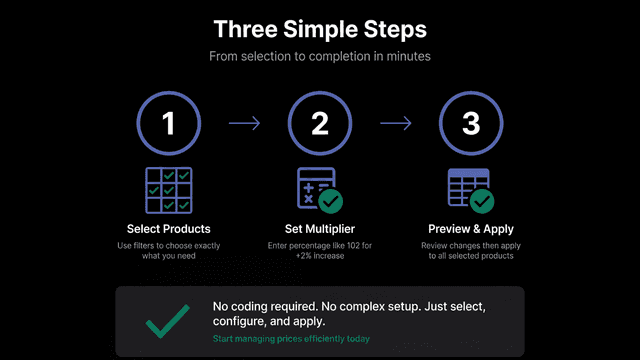
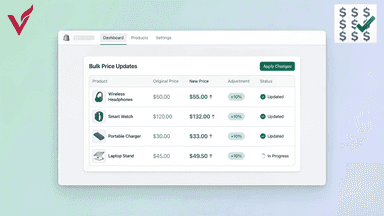
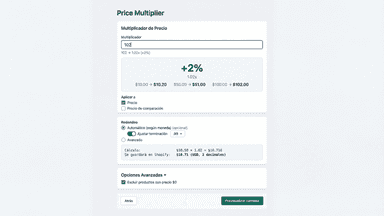
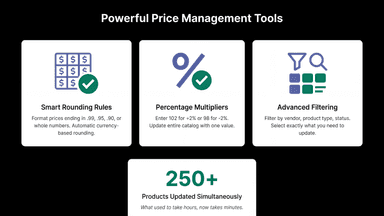
See every featureUpdate hundreds of product prices at once instead of editing them individually. Set percentage-based multipliers to increase or decrease prices across your entire catalog. Apply smart rounding rules to end prices in .99, .95, .90, or whole numbers for consistent pricing. Preview all changes before applying them to ensure accuracy. Filter products by vendor, type, or status to update only the items you need.
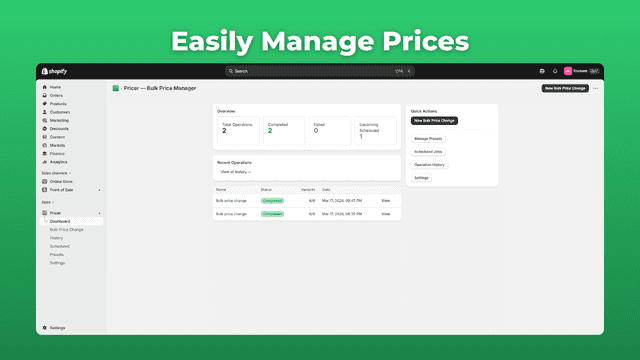
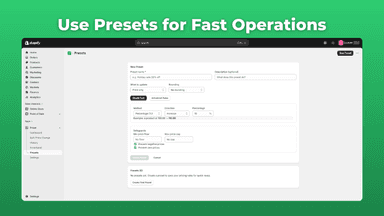
Pricer helps merchants update product prices quickly and accurately across their store. Instead of editing prices one by one, you can apply changes in bulk using flexible rules based on collections, product types, SKUs, or manual selection. Adjust prices by percentage or fixed amounts, apply consistent rounding, and schedule changes to run automatically.
- Update hundreds of product prices at once with percentage multipliers
- Apply smart rounding rules to format prices ending in .99, .95, or .90
- Filter and select products by vendor, type, or status for targeted updates
- Preview all price changes in a detailed table before applying them
- Bulk price edits across collections, products, or variants
- Change prices by percentage or fixed amounts
- Schedule price changes to run automatically at any time
- Apply smart rounding rules for consistent pricing


All the numbers
Every figure, side by side
A green dot marks the app ahead on a measured figure. Estimates, gaps and apps that leave no storefront trace never take the lead.
Adoption
| Measure |  Bulk Price Manager |  Pricer |
|---|---|---|
| Detected stores | Not published | Not published |
| Net store change, 28 days | 0 | 0 |
| Stores added, 28 days | Not enough data | Not enough data |
| Big-brand share | Not enough data | Not enough data |
| Top store categories | Not published | Not published |
| Top store countries | Not published | Not published |
Reviews
| Measure | Bulk Price Manager | Pricer |
|---|---|---|
| App Store rating | Not published | 5.0 ★ |
| App Store reviews | Not published | 9 |
| New reviews, 28 days | Not enough data | Not enough data |
| Reviewers a year or more in | Not enough data | Not enough data |
Pricing
| Measure | Bulk Price Manager | Pricer |
|---|---|---|
| Free plan | Not listed | Not listed |
| Lowest paid monthly plan | $4.99/month | No monthly plan listed |
| Longest free trial | 3 days | Not listed |
| Plans listed | 1 | Not published |
Listing
| Measure | Bulk Price Manager | Pricer |
|---|---|---|
| Shopify category rank | #271 | #14(ahead) |
| Shopify App Charts | Not on this week’s charts | Not on this week’s charts |
| Built for Shopify | No | Yes |
| Launched | Jan 6, 2026 | Apr 27, 2026 |
| Languages | 1 | 1 |
| Developer | Valventus | Studio Enchant |
FAQ
Bulk Price Manager and Pricer: common questions
- What features does each app list that the other doesn’t?
- Pricer lists 8 the others don’t mention, such as Bulk deletion, Collections, CSV import and export, Inventory. A feature missing from a listing may still be supported; this compares what each App Store listing says.
- Where does this comparison’s data come from?
- Shoplist crawls Shopify storefronts to detect which apps each store runs, and reads each app’s Shopify App Store listing for reviews, pricing, features and integrations. Store counts are as of Oct 13, 2026 for Bulk Price Manager, Nov 4, 2026 for Pricer; estimated figures are labeled.
How Shoplist compares apps
Store counts come from Shoplist’s crawl of Shopify storefronts, which detects the apps each store runs; they are as of Oct 13, 2026 for Bulk Price Manager, Nov 4, 2026 for Pricer. Reviews, ratings, plans, features and integrations come from each app’s Shopify App Store listing. 28-day figures are labeled when estimated, and a figure that is missing or estimated never decides who leads. Read the methodology.