

Bulk Image Importer vs PixBatch ‑ Batch Add Images
Two Shopify apps, side by side: detected stores, momentum, reviews, plans, listed features and who runs each. Store counts as of May 25, 2026 for Bulk Image Importer, Oct 14, 2026 for PixBatch.
The short answer
Head to head


Pay Per Use
Coverage counts what each App Store listing names. Every feature, checked off app by app, is in Shoplist.
See every featureBulk Images Importer lets you upload hundreds of product images at once without editing each product manually. Prepare a ZIP file of images with filenames that match your SKUs, upload it alongside a CSV mapping file, and the app automatically assigns each image to the correct product in your Shopify store.
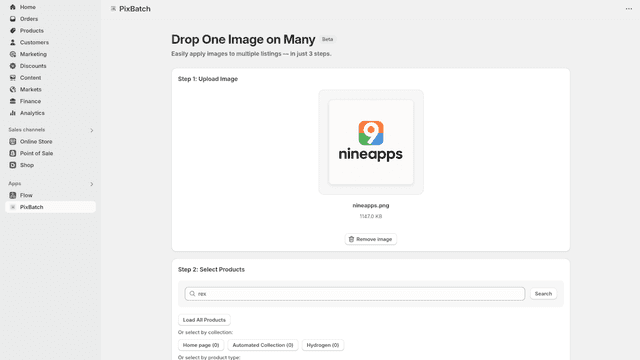
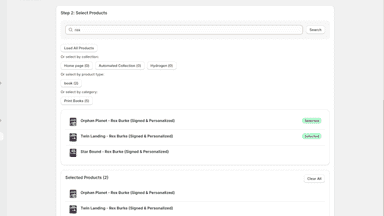
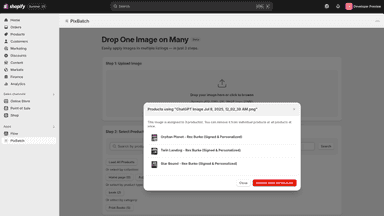
Managing product images across large catalogs is time-consuming. Merchants need to add the same image to multiple products, like size charts or promotional banners. PixBatch streamlines this process by letting you upload once and apply to many products simultaneously. Filter products by collection, type, or category to target specific groups. Track where each image is used and remove images just as easily.
- ZIP-based bulk import — Upload a ZIP file containing hundreds of product images
- Automatic SKU matching — Images are matched to products by SKU using a CSV
- Monitor upload progress with live success and failure counts for every import
- Shopify staged uploads — Images stream directly to Shopify's infrastructure
- Bulk apply one image to unlimited products with a single upload
- Filter products by collection, type, or category for targeted uploads
- Track image usage across products and manage assignments from one dashboard


All the numbers
Every figure, side by side
A green dot marks the app ahead on a measured figure. Estimates, gaps and apps that leave no storefront trace never take the lead.
Adoption
| Measure |  Bulk Image Importer |  PixBatch |
|---|---|---|
| Detected stores | Not published | Not published |
| Net store change, 28 days | 0 | 0 |
| Stores added, 28 days | Not enough data | Not enough data |
| Big-brand share | Not enough data | Not enough data |
| Top store categories | Not published | Not published |
| Top store countries | Not published | Not published |
Reviews
| Measure | Bulk Image Importer | PixBatch |
|---|---|---|
| App Store rating | Not published | Not published |
| App Store reviews | Not published | Not published |
| New reviews, 28 days | Not enough data | Not enough data |
| Reviewers a year or more in | Not enough data | Not enough data |
Pricing
| Measure | Bulk Image Importer | PixBatch |
|---|---|---|
| Free plan | Not listed | Not listed |
| Lowest paid monthly plan | No monthly plan listed | No monthly plan listed |
| Longest free trial | Not listed | Not listed |
| Plans listed | Not published | 1 |
Listing
| Measure | Bulk Image Importer | PixBatch |
|---|---|---|
| Shopify category rank | #61(ahead) | #113 |
| Shopify App Charts | Not on this week’s charts | Not on this week’s charts |
| Built for Shopify | No | No |
| Launched | May 25, 2026 | Jul 17, 2025 |
| Languages | 1 | 1 |
| Developer | eShock IT Solution | Nineapps |
FAQ
Bulk Image Importer and PixBatch: common questions
- Where does this comparison’s data come from?
- Shoplist crawls Shopify storefronts to detect which apps each store runs, and reads each app’s Shopify App Store listing for reviews, pricing, features and integrations. Store counts are as of May 25, 2026 for Bulk Image Importer, Oct 14, 2026 for PixBatch; estimated figures are labeled.
How Shoplist compares apps
Store counts come from Shoplist’s crawl of Shopify storefronts, which detects the apps each store runs; they are as of May 25, 2026 for Bulk Image Importer, Oct 14, 2026 for PixBatch. Reviews, ratings, plans, features and integrations come from each app’s Shopify App Store listing. 28-day figures are labeled when estimated, and a figure that is missing or estimated never decides who leads. Read the methodology.