

Buddha Mega Menu & Navigation vs Left side menu
Two Shopify apps, side by side: detected stores, momentum, reviews, plans, listed features and who runs each. Store counts as of Nov 8, 2026 for Buddha Mega Menu & Navigation, Oct 14, 2026 for Left side menu.
The short answer
- Only Buddha Mega Menu & Navigation lists a free plan. Paid plans start at $9.95/month for Buddha Mega Menu & Navigation and $5/month for Left side menu.
- Buddha Mega Menu & Navigation lists 9 features Left side menu’s listing doesn’t mention, including Badges and labels, Custom CSS, Dropdown.
Head to head


FREE Mega Menu: cool design, easy dropdown navigation


- United States
- United Kingdom
- Canada
Momentum
New reviews each month
Review pace is the clearest public read on how fast an app is winning new merchants.
Free
- · 2 Mega Menu types Tree (Flyout) · Simple
- · 5 Featured Collections
- · 5 Featured Products
- · Customizable Mobile / Desktop Design
- · Icons Library
- · No watermark & FREE Tech Support
Mega Zen
- · 1-Click Menu translation
- · Animated Icons Library + Labels / Badges
- · Countdown timers for promotions
- · Embed videos directly in menus
- · Everything in Free + Tabbed · Contact
- · FREE for dev. stores
Basic
Coverage counts what each App Store listing names. Every feature, checked off app by app, is in Shoplist.
See every featureBuddha Mega Menu helps merchants create clear and organized store navigation for desktop and mobile devices. Merchants can build multi-level mega menus with images, products, collections, tabs, and custom content without coding. The app supports responsive layouts, mobile-friendly navigation, and flexible menu design to help customers browse stores and find products more easily.
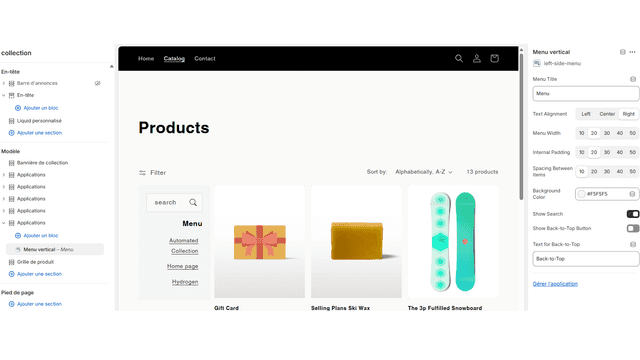
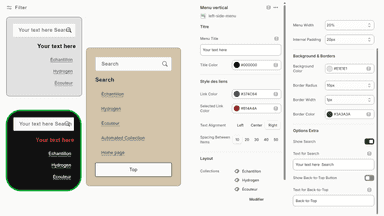
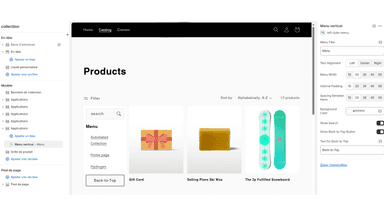
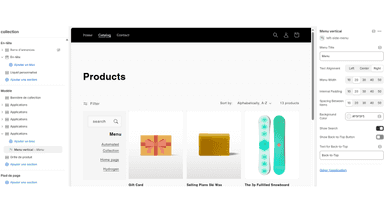
This app makes it easy for customers to browse collections with a vertical menu placed on the left side of your store. Unlike traditional dropdowns, it keeps navigation visible at all times, helping shoppers quickly find products. Merchants can customize the menu’s look to match their theme, improving usability and increasing sales by reducing friction in the shopping experience
- 4 submenu designs: Tree, Simple, Tabbed, Contact
- Simple menu items or lists linked to any product, collection, page of your store
- Image on Collections, Products, Blogs, Pages, Custom, Banner
- Countdown timer, labels, badges, icons, videos to showcase your promotions
- Display a left-side menu with all your collections for quick navigation.
- Keep navigation always visible to help customers find products faster.
- Customize menu style and colors to match your store’s theme





All the numbers
Every figure, side by side
A green dot marks the app ahead on a measured figure. Estimates, gaps and apps that leave no storefront trace never take the lead.
Adoption
| Measure |  Buddha Mega Menu & Navigation |  Left side menu |
|---|---|---|
| Detected stores | 4,991 | Not published |
| Net store change, 28 days | −78 | 0 |
| Stores added, 28 days | 19 | Not enough data |
| Big-brand share | 10% | Not enough data |
| Top store categories | Apparel & Accessories, Home & Garden, Health & Beauty | Not published |
| Top store countries | United States, United Kingdom, Canada | Not published |
Reviews
| Measure | Buddha Mega Menu & Navigation | Left side menu |
|---|---|---|
| App Store rating | 4.7 ★ | Not published |
| App Store reviews | 618 | Not published |
| New reviews, 28 days | 2 | Not enough data |
| Reviewers a year or more in | 50% | Not enough data |
Pricing
| Measure | Buddha Mega Menu & Navigation | Left side menu |
|---|---|---|
| Free plan | Yes | Not listed |
| Lowest paid monthly plan | $9.95/month | $5/month(ahead) |
| Longest free trial | 14 days | 15 days |
| Plans listed | 2 | 1 |
Listing
| Measure | Buddha Mega Menu & Navigation | Left side menu |
|---|---|---|
| Shopify category rank | #18(ahead) | #90 |
| Shopify App Charts | #3 in Navigation and menus | Not on this week’s charts |
| Built for Shopify | No | No |
| Launched | Aug 19, 2016 | Sep 10, 2025 |
| Languages | 1 | 1 |
| Developer | Buddha Apps (Zero Carbon) | Solidem |
FAQ
Buddha Mega Menu & Navigation and Left side menu: common questions
- Is Buddha Mega Menu & Navigation or Left side menu cheaper?
- Only Buddha Mega Menu & Navigation lists a free plan. Paid plans start at $9.95/month for Buddha Mega Menu & Navigation and $5/month for Left side menu. Shoplist compares base prices only between monthly plans in the same currency; usage charges and annual plans vary, so check each plan’s limits.
- What features does each app list that the other doesn’t?
- Buddha Mega Menu & Navigation lists 9 the others don’t mention, such as Badges and labels, Custom CSS, Dropdown, Icons. Left side menu lists 3 the others don’t mention, such as Scroll to top, Sidebar, Sticky navbar. A feature missing from a listing may still be supported; this compares what each App Store listing says.
- Where does this comparison’s data come from?
- Shoplist crawls Shopify storefronts to detect which apps each store runs, and reads each app’s Shopify App Store listing for reviews, pricing, features and integrations. Store counts are as of Nov 8, 2026 for Buddha Mega Menu & Navigation, Oct 14, 2026 for Left side menu; estimated figures are labeled.
How Shoplist compares apps
Store counts come from Shoplist’s crawl of Shopify storefronts, which detects the apps each store runs; they are as of Nov 8, 2026 for Buddha Mega Menu & Navigation, Oct 14, 2026 for Left side menu. Reviews, ratings, plans, features and integrations come from each app’s Shopify App Store listing. 28-day figures are labeled when estimated, and a figure that is missing or estimated never decides who leads. Read the methodology.