
Brightshelf Catalog Backup vs TimeVault Backup & Restore
Two Shopify apps, side by side: detected stores, momentum, reviews, plans, listed features and who runs each. Store counts as of Nov 6, 2026 for Brightshelf Catalog Backup, Oct 14, 2026 for TimeVault Backup & Restore.
The short answer
- Only Brightshelf Catalog Backup lists a free plan. Paid plans start at $8.99/month for Brightshelf Catalog Backup and $9/month for TimeVault Backup & Restore.
Head to head

Free
- · 1 on-demand backup a day
- · 7 days of history
- · Change log, compare and restore
- · Saved image copies
- · Up to 100 products
Starter
- · 1 year of history
- · Everything in Free
- · Restore a group of changes
- · Stock counts kept 14 days
- · Unlimited on-demand backups
- · Up to 2,500 products
Pro
- · 1 year of history
- · Everything in Starter
- · Up to 15,000 products
Starter
Growth
Pro
Coverage counts what each App Store listing names. Every feature, checked off app by app, is in Shoplist.
See every featureCatalog Backup saves your products, variants, metafields, collections and product images every night, and saves each product change as it happens. Home shows what changed since yesterday. Open a product to compare versions side by side, tick the fields to bring back, and preview the restore before anything is written. After a bad import or bulk edit, restore a group of changes at once.
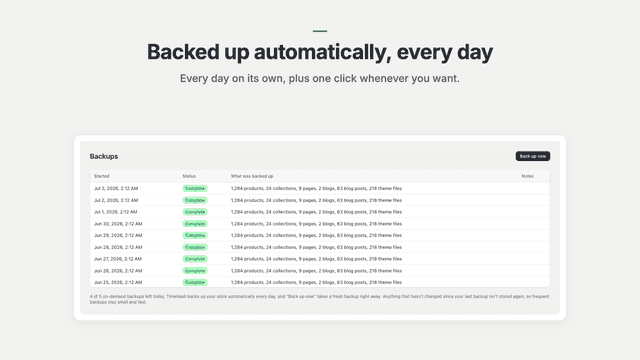
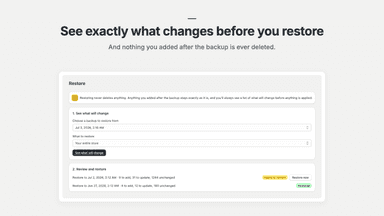
One bad bulk edit, app update, or AI-assisted change can wipe out hours of work. Unlimited version history on every plan, restore never gated. TimeVault backs up your products, collections, theme code, pages, blogs, and metafields every day, and on demand before risky changes. Before a restore, you see exactly what will change; nothing you created later gets deleted.
- See what changed since yesterday, product by product, side by side
- Restore one product, just the fields you pick, or a whole group of changes
- Preview every restore; the current version is kept so you can undo it
- Backs up products, variants, metafields, collections, sort order and images
- Automatic daily backups, plus one click on demand backups anytime
- Restore your whole store, or just the products, theme, or pages you need
- Preview every change before you restore, with nothing deleted by surprise
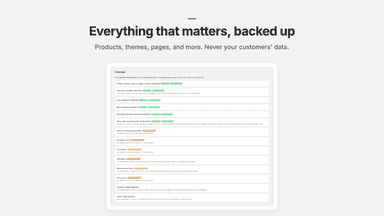
- Covers products, collections, themes, pages, blogs, and metafields
All the numbers
Every figure, side by side
A green dot marks the app ahead on a measured figure. Estimates, gaps and apps that leave no storefront trace never take the lead.
Adoption
| Measure |  TimeVault Backup & Restore | |
|---|---|---|
| Detected stores | Not published | Not published |
| Net store change, 28 days | 0 | 0 |
| Stores added, 28 days | Not enough data | Not enough data |
| Big-brand share | Not enough data | Not enough data |
| Top store categories | Not published | Not published |
| Top store countries | Not published | Not published |
Reviews
| Measure | TimeVault Backup & Restore | |
|---|---|---|
| App Store rating | Not published | Not published |
| App Store reviews | Not published | Not published |
| New reviews, 28 days | Not enough data | Not enough data |
| Reviewers a year or more in | Not enough data | Not enough data |
Pricing
| Measure | TimeVault Backup & Restore | |
|---|---|---|
| Free plan | Yes | Not listed |
| Lowest paid monthly plan | $8.99/month(ahead) | $9/month |
| Longest free trial | 14 days | 14 days |
| Plans listed | 3 | 3 |
Listing
| Measure | TimeVault Backup & Restore | |
|---|---|---|
| Shopify category rank | Not enough data | #131 |
| Shopify App Charts | Not on this week’s charts | Not on this week’s charts |
| Built for Shopify | No | No |
| Launched | Nov 4, 2026 | Jul 14, 2026 |
| Languages | 1 | 1 |
| Developer | Brightshelf | Sizzle |
FAQ
Brightshelf Catalog Backup and TimeVault Backup & Restore: common questions
- Is Brightshelf Catalog Backup or TimeVault Backup & Restore cheaper?
- Only Brightshelf Catalog Backup lists a free plan. Paid plans start at $8.99/month for Brightshelf Catalog Backup and $9/month for TimeVault Backup & Restore. Shoplist compares base prices only between monthly plans in the same currency; usage charges and annual plans vary, so check each plan’s limits.
- Where does this comparison’s data come from?
- Shoplist crawls Shopify storefronts to detect which apps each store runs, and reads each app’s Shopify App Store listing for reviews, pricing, features and integrations. Store counts are as of Nov 6, 2026 for Brightshelf Catalog Backup, Oct 14, 2026 for TimeVault Backup & Restore; estimated figures are labeled.
How Shoplist compares apps
Store counts come from Shoplist’s crawl of Shopify storefronts, which detects the apps each store runs; they are as of Nov 6, 2026 for Brightshelf Catalog Backup, Oct 14, 2026 for TimeVault Backup & Restore. Reviews, ratings, plans, features and integrations come from each app’s Shopify App Store listing. 28-day figures are labeled when estimated, and a figure that is missing or estimated never decides who leads. Read the methodology.