

Boxbook vs Stocky
Two Shopify apps, side by side: detected stores, momentum, reviews, plans, listed features and who runs each. Store counts as of Oct 13, 2026 for Boxbook, Oct 23, 2026 for Stocky.
The short answer
- Stocky lists 5 features Boxbook’s listing doesn’t mention, including Backorders, Custom reports, Insights.
Head to head


Momentum
New reviews each month
Review pace is the clearest public read on how fast an app is winning new merchants.
Boxbook Starter
- · 24/7 customer support
- · Drag-and-drop fulfillment editor
- · Material inventory exports and reports
- · Unlimited material tracking
- · Unlimited order splitting
- · Unlimited order tagging
Free
Coverage counts what each App Store listing names. Every feature, checked off app by app, is in Shoplist.
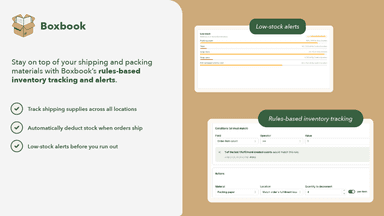
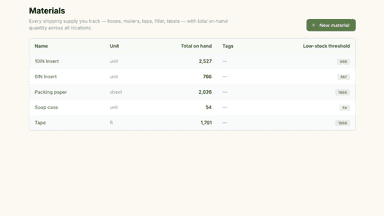
See every featureBoxbook automates order tagging, order splitting, and live tracking of shipping materials. Split order items into fulfillments by SKU, weight, tag, or other property. Start with a template or build your own, plus use a drag-and-drop canvas for easy edits. Track every box, mailer, packing slip and other materials as orders ship, and get low-stock alerts and a per-warehouse audit trail for every item.
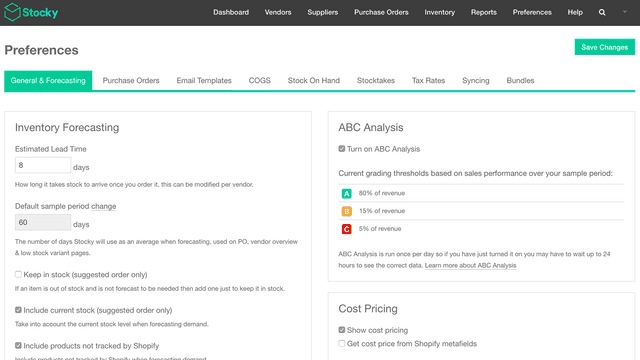
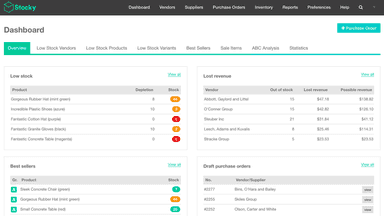
Effective inventory management is a strategic advantage to your brick and mortar retail business. Selling out of in-demand products can be harmful to your sales—but keeping too much inventory on hand can drain your resources. Leverage Stocky by Shopify to optimize your inventory decisions.
- Track shipping supplies across all locations
- Automatically deduct stock when orders ship
- Low-stock alerts before you run out
- Create and manage purchase orders and communicate with suppliers.
- Conduct stocktakes by counting or scanning stock on hand and make adjustments.
- Use in-depth reporting to make good inventory decisions through stock analytics.
- Review and receive incoming inventory in Shopify POS.




All the numbers
Every figure, side by side
A green dot marks the app ahead on a measured figure. Estimates, gaps and apps that leave no storefront trace never take the lead.
Adoption
| Measure |  Boxbook |  Stocky |
|---|---|---|
| Detected stores | Not published | Not published |
| Net store change, 28 days | 0 | 0 |
| Stores added, 28 days | Not enough data | Not enough data |
| Big-brand share | Not enough data | Not enough data |
| Top store categories | Not published | Not published |
| Top store countries | Not published | Not published |
Reviews
| Measure | Boxbook | Stocky |
|---|---|---|
| App Store rating | Not published | 3.0 ★ |
| App Store reviews | Not published | 210 |
| New reviews, 28 days | Not enough data | Not enough data |
| Reviewers a year or more in | Not enough data | Not enough data |
FAQ
Boxbook and Stocky: common questions
- What features does each app list that the other doesn’t?
- Boxbook lists 3 the others don’t mention, such as Inventory planning, Out of stock notifications, Replenishment reminders. Stocky lists 5 the others don’t mention, such as Backorders, Custom reports, Insights, Purchase orders. A feature missing from a listing may still be supported; this compares what each App Store listing says.
- Where does this comparison’s data come from?
- Shoplist crawls Shopify storefronts to detect which apps each store runs, and reads each app’s Shopify App Store listing for reviews, pricing, features and integrations. Store counts are as of Oct 13, 2026 for Boxbook, Oct 23, 2026 for Stocky; estimated figures are labeled.
How Shoplist compares apps
Store counts come from Shoplist’s crawl of Shopify storefronts, which detects the apps each store runs; they are as of Oct 13, 2026 for Boxbook, Oct 23, 2026 for Stocky. Reviews, ratings, plans, features and integrations come from each app’s Shopify App Store listing. 28-day figures are labeled when estimated, and a figure that is missing or estimated never decides who leads. Read the methodology.