

Bomi AI vs Nimora AI
Two Shopify apps, side by side: detected stores, momentum, reviews, plans, listed features and who runs each. Store counts as of Oct 13, 2026.
The short answer
- Nimora AI lists 5 features Bomi AI’s listing doesn’t mention, including Auto-optimization, Custom backgrounds, Generative fill.
Head to head


Basic
Professional
Premium
Silver
- · 100 images at 512px resolution
- · 28 images at 2K resolution
- · 50 images at 1K resolution
- · Modelling image generation
- · Product image generation
Gold
- · 150 images at 1K resolution
- · 300 images at 512px resolution
- · 85 images at 2K resolution
- · Modelling image generation
- · Product image generation
platinum
- · 171 images at 2K resolution
- · 300 images at 1K resolution
- · 600 images at 512px resolution
- · Modelling image generation
- · Product image generation
Coverage counts what each App Store listing names. Every feature, checked off app by app, is in Shoplist.
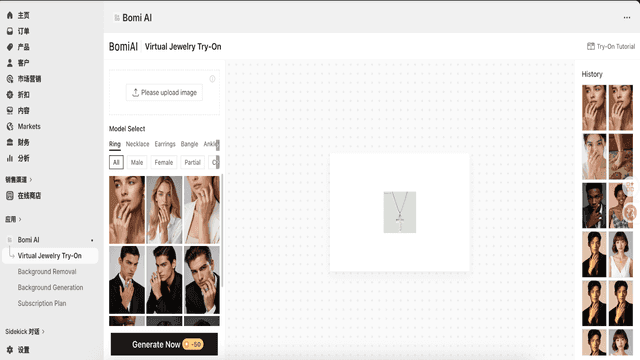
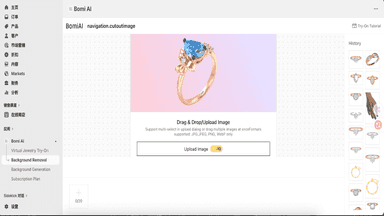
See every featureBomi AI, One-stop Jewelry Design Platform. Virtual Jewelry Try-On: AI Jewelry Model Try-On Eliminate photo shoots – transform a single product image into professional model try-on visualizations with one click. Create ready-to-use images for e-commerce listings. Background Removal: AI-Powered Background RemovalSpecially optimized for jewelry with 10,000+ jewelry images in our training dataset.
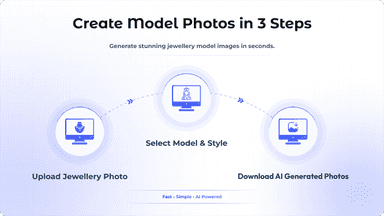
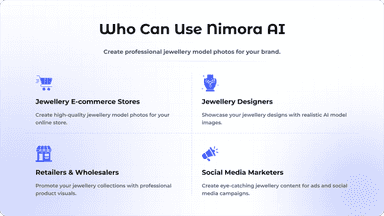
Turn any jewelry photo into professional AI model photos and product images. Nimora AI helps jewellery businesses on Shopify create stunning visuals and realistic model photos using AI jewellery photography, all from a single jewelry image. Upload your photo, choose your style, background, and model look, then generate multiple professional image variations in minutes. No photoshoot. No expensive models.
- Virtual Jewelry Try-On
- Background Removal
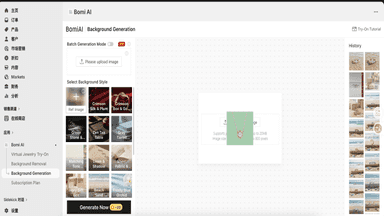
- Background Generation
- Generate realistic model photos wearing your jewelry
- Create luxury jewelry product images from a single photo
- Choose backgrounds, styles, and model looks
- Generate multiple image variations for marketing


All the numbers
Every figure, side by side
A green dot marks the app ahead on a measured figure. Estimates, gaps and apps that leave no storefront trace never take the lead.
Adoption
| Measure |  Bomi AI |  Nimora AI |
|---|---|---|
| Detected stores | Not published | Not published |
| Net store change, 28 days | 0 | 0 |
| Stores added, 28 days | Not enough data | Not enough data |
| Big-brand share | Not enough data | Not enough data |
| Top store categories | Not published | Not published |
| Top store countries | Not published | Not published |
Reviews
| Measure | Bomi AI | Nimora AI |
|---|---|---|
| App Store rating | Not published | Not published |
| App Store reviews | Not published | Not published |
| New reviews, 28 days | Not enough data | Not enough data |
| Reviewers a year or more in | Not enough data | Not enough data |
FAQ
Bomi AI and Nimora AI: common questions
- What features does each app list that the other doesn’t?
- Bomi AI lists 1 the others don’t mention, such as Background removal. Nimora AI lists 5 the others don’t mention, such as Auto-optimization, Custom backgrounds, Generative fill, Quality control. A feature missing from a listing may still be supported; this compares what each App Store listing says.
- Where does this comparison’s data come from?
- Shoplist crawls Shopify storefronts to detect which apps each store runs, and reads each app’s Shopify App Store listing for reviews, pricing, features and integrations. Store counts are as of Oct 13, 2026; estimated figures are labeled.
How Shoplist compares apps
Store counts come from Shoplist’s crawl of Shopify storefronts, which detects the apps each store runs; they are as of Oct 13, 2026. Reviews, ratings, plans, features and integrations come from each app’s Shopify App Store listing. 28-day figures are labeled when estimated, and a figure that is missing or estimated never decides who leads. Read the methodology.