
Blackout Dates: Delivery Dates vs Pickup : Delivery Date Picker
Two Shopify apps, side by side: detected stores, momentum, reviews, plans, listed features and who runs each. Store counts as of Nov 5, 2026 for Blackout Dates, Nov 8, 2026 for Pickup.
The short answer
- On the Shopify App Store: Blackout Dates 5.0 from 1 reviews and Pickup 5.0 from 60 reviews.
- Both list a free plan. Paid plans start at $14.99/month for Blackout Dates and $4.99/month for Pickup.
- Pickup lists 19 features Blackout Dates’s listing doesn’t mention, including Address validation, Countdown timers, Curbside.
Head to head


Momentum
New reviews each month
Review pace is the clearest public read on how fast an app is winning new merchants.
Free
- · Days' notice before an order
- · Pickup or local delivery, with times
- · Postcode check for local delivery
- · Unlimited Orders, no per order fees
- · Up to 10 closed dates + 2 weekly closed
Plus
- · Closure notice + per product rules
- · Cut-off times and peak surcharges
- · Order limits per time slot
- · Pickup, local delivery, and postal
- · Unlimited orders and closed dates
Pro
- · Calendar sync (Google, Microsoft & ICS)
- · Customers can reschedule their own order
- · Daily limits per product
- · Daily production prep sheet
- · Order by banner and product badge
Free
- · 200 orders/month
- · Cut-off and Preparation Time
- · Disable or add specific dates
- · Display on Cart or Product page
- · Locations up to Shopify limit
- · Multi-language support
Basic
- · 24x7 priority Support
- · Auto-Tag Orders by Date & Time
- · Everything in Free +
- · Holidays / Blocked dates
- · Include Date & Time on Packaging Slip
- · Set Daily Availability & Cut-Off Times
Premium
- · Dedicated 24/7 Support
- · Everything in Basic plan
- · Location-Specific Availability Control
- · Order Adjustment After Purchase
- · Per day and Per slots Order Limits
- · Product & Date Specific All Controls
Coverage counts what each App Store listing names. Every feature, checked off app by app, is in Shoplist.
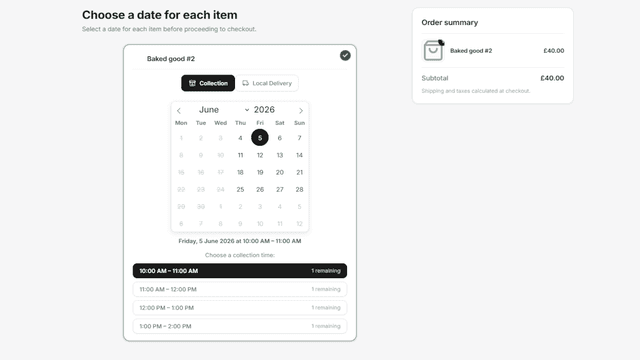
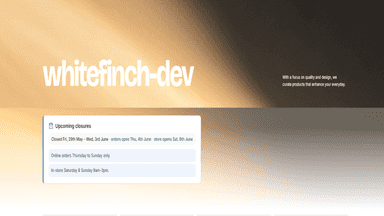
See every featureBlackout Dates adds a delivery date picker to your cart, so customers choose a pickup, local delivery or shipping date and only see days you can fulfill. Block holidays and closed days, set notice and a same-day cut-off, and give seasonal or made-to-order products their own dates. Cap orders per time slot, check postcodes before local delivery, and let customers move their own date.
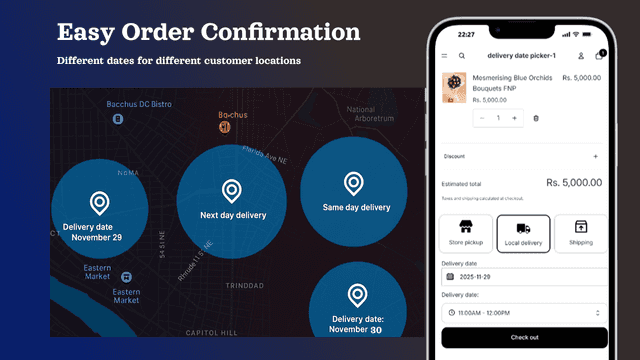
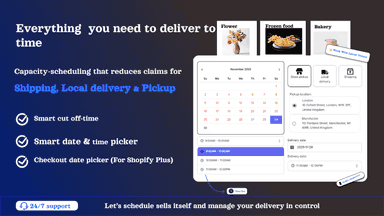
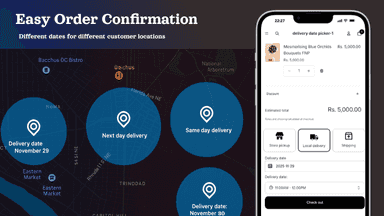
Add a delivery date and time picker to your store, allowing customers to choose their preferred delivery date and time slot on the product or cart page. Manage local delivery, store pickup, and click and collect with weekly schedules, cut-off times, and order limits. Set delivery surcharges for specific days or express delivery, block holidays, and customize schedules for products or collections.
- Block dates store-wide
- Collection, delivery, or postal - Give customers a choice
- Calendar sync - Connect Google Calendar or Microsoft Outlook
- Delivery costs & thresholds
- Can be shown either on the product or cart page , highly customisable
- Define order preparation and cut-off times, limit orders per day or time-slot.
- Different dates and time slots schedules for specific products or collections
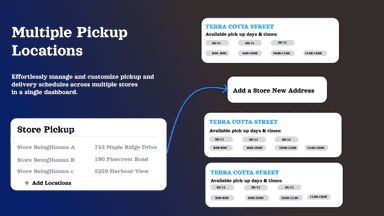
- Pickup locations, Let your customers choose where to collect your products.

All the numbers
Every figure, side by side
A green dot marks the app ahead on a measured figure. Estimates, gaps and apps that leave no storefront trace never take the lead.
Adoption
| Measure |  Blackout Dates |  Pickup |
|---|---|---|
| Detected stores | Not published | Not published |
| Net store change, 28 days | 0 | 0 |
| Stores added, 28 days | Not enough data | Not enough data |
| Big-brand share | Not enough data | Not enough data |
| Top store categories | Not published | Not published |
| Top store countries | Not published | Not published |
Reviews
| Measure | Blackout Dates | Pickup |
|---|---|---|
| App Store rating | 5.0 ★ | 5.0 ★ |
| App Store reviews | 1 | 60(ahead) |
| New reviews, 28 days | Not enough data | Not enough data |
| Reviewers a year or more in | Not enough data | 0% |
Pricing
| Measure | Blackout Dates | Pickup |
|---|---|---|
| Free plan | Yes | Yes |
| Lowest paid monthly plan | $14.99/month | $4.99/month(ahead) |
| Longest free trial | 14 days | 14 days |
| Plans listed | 3 | 3 |
Listing
| Measure | Blackout Dates | Pickup |
|---|---|---|
| Shopify category rank | #322 | #12(ahead) |
| Shopify App Charts | Not on this week’s charts | #1 on Climbers in Delivery and pickup |
| Built for Shopify | No | Yes |
| Launched | Jul 28, 2026 | Dec 22, 2025 |
| Languages | 1 | 1 |
| Developer | Layton Labs | one8 commerce |
FAQ
Blackout Dates and Pickup: common questions
- Is Blackout Dates or Pickup cheaper?
- Both list a free plan. Paid plans start at $14.99/month for Blackout Dates and $4.99/month for Pickup. Shoplist compares base prices only between monthly plans in the same currency; usage charges and annual plans vary, so check each plan’s limits.
- Which has better reviews, Blackout Dates or Pickup?
- On the Shopify App Store: Blackout Dates 5.0 from 1 reviews and Pickup 5.0 from 60 reviews.
- What features does each app list that the other doesn’t?
- Blackout Dates lists 1 the others don’t mention, such as Time slots. Pickup lists 19 the others don’t mention, such as Address validation, Countdown timers, Curbside, Custom messages. A feature missing from a listing may still be supported; this compares what each App Store listing says.
- Where does this comparison’s data come from?
- Shoplist crawls Shopify storefronts to detect which apps each store runs, and reads each app’s Shopify App Store listing for reviews, pricing, features and integrations. Store counts are as of Nov 5, 2026 for Blackout Dates, Nov 8, 2026 for Pickup; estimated figures are labeled.
How Shoplist compares apps
Store counts come from Shoplist’s crawl of Shopify storefronts, which detects the apps each store runs; they are as of Nov 5, 2026 for Blackout Dates, Nov 8, 2026 for Pickup. Reviews, ratings, plans, features and integrations come from each app’s Shopify App Store listing. 28-day figures are labeled when estimated, and a figure that is missing or estimated never decides who leads. Read the methodology.