

Bintech vs WhichBox: Bin & Box Locations
Two Shopify apps, side by side: detected stores, momentum, reviews, plans, listed features and who runs each. Store counts as of Oct 13, 2026 for Bintech, Oct 14, 2026 for WhichBox.
The short answer
- Only Bintech lists a free plan. Paid plans start at $3.99/month for Bintech and $3/month for WhichBox.
Head to head


Free
- · 1 Location
- · 25 Low stock alerts
- · 25 SKUs
- · Cycle counts
- · Pick lists & mobile scanning
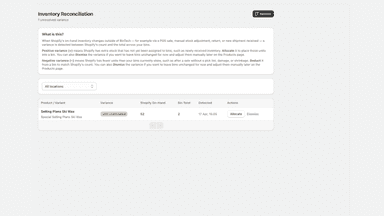
- · Variance reconciliation
Basic
- · 2 Locations
- · 50 Low stock alerts
- · 50 SKUs
- · Everything in Free
Pro
- · 250 Low stock alerts
- · 250 SKUs
- · CSV bulk import / export
- · Everything in Basic
- · Unlimited locations
Unlimited
- · Everything in Pro
- · Unlimited SKUs
- · Unlimited low stock alerts
Standard
Coverage counts what each App Store listing names. Every feature, checked off app by app, is in Shoplist.
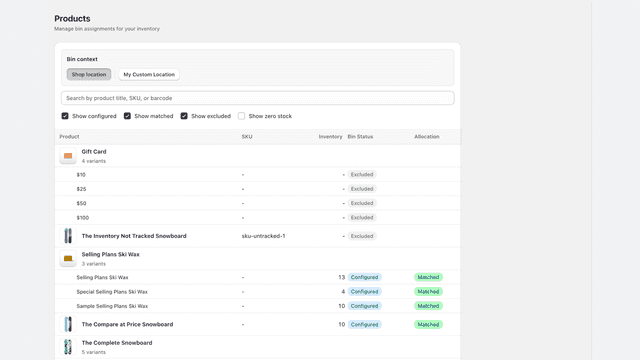
See every featureShopify can assign a product variant to one bin per Location. BinTech is for merchants who keep the same SKU in several physical places within that Location, such as a pick shelf and backstock. Record how many units sit in each bin while Shopify keeps the overall inventory total. When Shopify routes an order, BinTech creates a Location-specific pick list from those bin quantities.
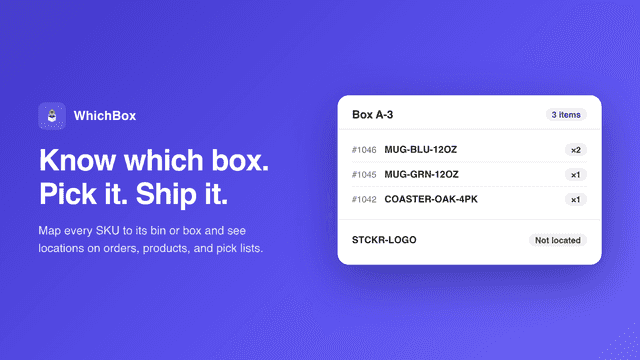
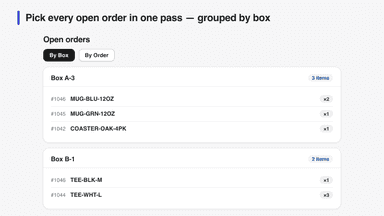
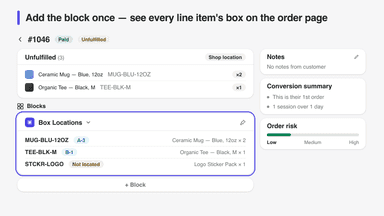
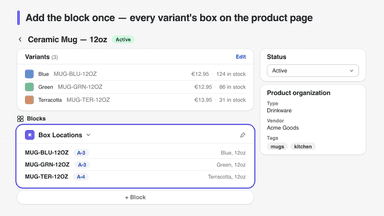
WhichBox keeps track of where every product lives — bin, box, shelf, or tote. Pick a product and give it a box (no SKUs or spreadsheets needed) or bulk-import a CSV, then see locations everywhere you fulfill: a pick list of open orders grouped by box, location badges on each order, and app blocks directly on order and product pages in your admin.
- Organize products into named bins across one or more locations.
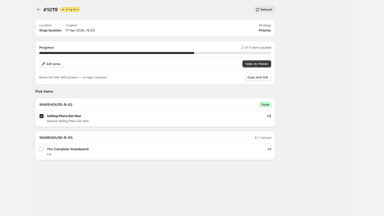
- Generate pick lists from unfulfilled orders, grouped by bin for optimal picking.
- Share a phone-friendly link so pickers can work without a Shopify login.
- Count a bin, location, or SKU subset and update Shopify inventory in one step.
- Pick list groups open orders by box so you collect everything in one pass
- Location badges on every order line item — spot unlocated items instantly
- App blocks put every variant's box directly on product and order pages
- CSV import and export moves hundreds of SKU mappings in seconds
All the numbers
Every figure, side by side
A green dot marks the app ahead on a measured figure. Estimates, gaps and apps that leave no storefront trace never take the lead.
Adoption
| Measure |  Bintech |  WhichBox |
|---|---|---|
| Detected stores | Not published | Not published |
| Net store change, 28 days | 0 | 0 |
| Stores added, 28 days | Not enough data | Not enough data |
| Big-brand share | Not enough data | Not enough data |
| Top store categories | Not published | Not published |
| Top store countries | Not published | Not published |
Reviews
| Measure | Bintech | WhichBox |
|---|---|---|
| App Store rating | Not published | Not published |
| App Store reviews | Not published | Not published |
| New reviews, 28 days | Not enough data | Not enough data |
| Reviewers a year or more in | Not enough data | Not enough data |
FAQ
Bintech and WhichBox: common questions
- Is Bintech or WhichBox cheaper?
- Only Bintech lists a free plan. Paid plans start at $3.99/month for Bintech and $3/month for WhichBox. Shoplist compares base prices only between monthly plans in the same currency; usage charges and annual plans vary, so check each plan’s limits.
- Where does this comparison’s data come from?
- Shoplist crawls Shopify storefronts to detect which apps each store runs, and reads each app’s Shopify App Store listing for reviews, pricing, features and integrations. Store counts are as of Oct 13, 2026 for Bintech, Oct 14, 2026 for WhichBox; estimated figures are labeled.
How Shoplist compares apps
Store counts come from Shoplist’s crawl of Shopify storefronts, which detects the apps each store runs; they are as of Oct 13, 2026 for Bintech, Oct 14, 2026 for WhichBox. Reviews, ratings, plans, features and integrations come from each app’s Shopify App Store listing. 28-day figures are labeled when estimated, and a figure that is missing or estimated never decides who leads. Read the methodology.