
Barline: Barcode Labels vs PrintMyLabels
Two Shopify apps, side by side: detected stores, momentum, reviews, plans, listed features and who runs each. Store counts as of Oct 13, 2026 for Barline, Nov 13, 2026 for PrintMyLabels.
The short answer
- Only PrintMyLabels lists a free plan. Paid plans start at $4.99/month for Barline and $4.99/month for PrintMyLabels.
- PrintMyLabels lists 3 features Barline’s listing doesn’t mention, including Custom size, Images, QR codes.
Head to head

All features
- · Avery, Dymo and Zebra label types
- · Every feature included
- · Generate missing barcodes
- · No limit on labels printed
Free
- · 1 custom label design
- · 250 labels a month
- · Every barcode type, including QR codes
- · Label sheets and thermal rolls
- · Print from products or a CSV file
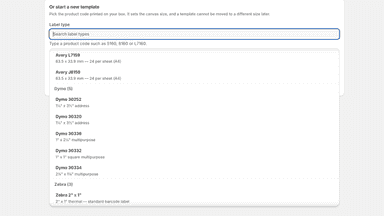
- · Ready-made label templates
Scale
- · 2,500 labels a month
- · 5 custom label designs
- · Everything in Free
Accelerate
- · 25 custom label designs
- · 25,000 labels a month
- · Everything in Free
Coverage counts what each App Store listing names. Every feature, checked off app by app, is in Shoplist.
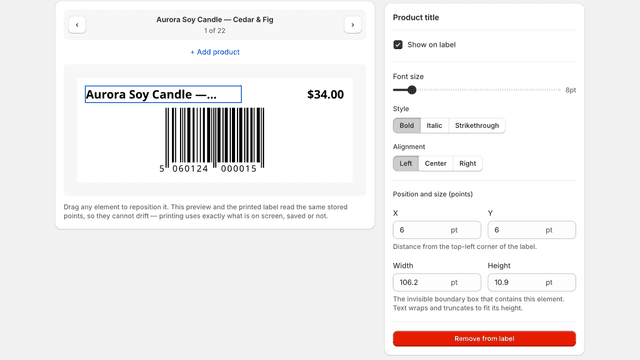
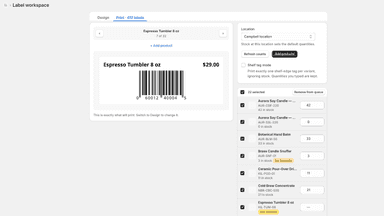
See every featureTake complete control of your label layouts and how they reach the printer. A WYSIWYG editor gives the title, price, SKU, variant options, barcode and custom text each their own position, font size and weight, wrapped in its own box. Print counts default to stock at the location you select. Override any row, or switch to shelf tag mode for one label per variant.
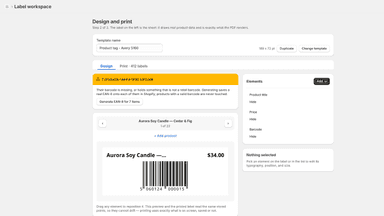
Pick a design, pick products, print. Labels are filled from your product data: title, SKU, barcode, price, cost, weight, options and your own metafields. Design your own in the label editor, with barcodes, QR codes, images and shapes, or start from a ready-made template. Before anything prints you see the PDF that will print, laid out on the label sheet or roll you use.
- Position, size and style every field on the label independently
- Print counts follow stock at the location you choose, or one per product
- Labels print at the exact size of your stock, with barcodes that stay sharp
- Generate in-store EAN-8s, or EAN-13/UPC-A from your own GS1 prefix
- Labels filled from your product data, including your own metafields.
- A label editor with barcodes, QR codes, images, shapes and alignment tools.
- See the exact PDF before it prints, on label sheets or thermal rolls.
- A warning when a barcode is likely too small to scan.
All the numbers
Every figure, side by side
A green dot marks the app ahead on a measured figure. Estimates, gaps and apps that leave no storefront trace never take the lead.
Adoption
| Measure |  Barline | |
|---|---|---|
| Detected stores | Not published | Not published |
| Net store change, 28 days | 0 | Not enough data |
| Stores added, 28 days | Not enough data | Not enough data |
| Big-brand share | Not enough data | Not enough data |
| Top store categories | Not published | Not published |
| Top store countries | Not published | Not published |
Reviews
| Measure | Barline | |
|---|---|---|
| App Store rating | Not published | Not published |
| App Store reviews | Not published | Not published |
| New reviews, 28 days | Not enough data | Not enough data |
| Reviewers a year or more in | Not enough data | Not enough data |
Pricing
| Measure | Barline | |
|---|---|---|
| Free plan | Not listed | Yes |
| Lowest paid monthly plan | $4.99/month | $4.99/month |
| Longest free trial | 14 days | Not listed |
| Plans listed | 1 | 3 |
Listing
| Measure | Barline | |
|---|---|---|
| Shopify category rank | #62 | Not enough data |
| Shopify App Charts | Not on this week’s charts | Not on this week’s charts |
| Built for Shopify | No | No |
| Launched | Sep 16, 2026 | Nov 13, 2026 |
| Languages | 1 | 1 |
| Developer | ShopCraft Labs | PrintMyLabels |
FAQ
Barline and PrintMyLabels: common questions
- Is Barline or PrintMyLabels cheaper?
- Only PrintMyLabels lists a free plan. Paid plans start at $4.99/month for Barline and $4.99/month for PrintMyLabels. Shoplist compares base prices only between monthly plans in the same currency; usage charges and annual plans vary, so check each plan’s limits.
- What features does each app list that the other doesn’t?
- Barline lists 2 the others don’t mention, such as Auto-generation, Bulk generation. PrintMyLabels lists 3 the others don’t mention, such as Custom size, Images, QR codes. A feature missing from a listing may still be supported; this compares what each App Store listing says.
- Where does this comparison’s data come from?
- Shoplist crawls Shopify storefronts to detect which apps each store runs, and reads each app’s Shopify App Store listing for reviews, pricing, features and integrations. Store counts are as of Oct 13, 2026 for Barline, Nov 13, 2026 for PrintMyLabels; estimated figures are labeled.
How Shoplist compares apps
Store counts come from Shoplist’s crawl of Shopify storefronts, which detects the apps each store runs; they are as of Oct 13, 2026 for Barline, Nov 13, 2026 for PrintMyLabels. Reviews, ratings, plans, features and integrations come from each app’s Shopify App Store listing. 28-day figures are labeled when estimated, and a figure that is missing or estimated never decides who leads. Read the methodology.