
BadgeFlow vs BadgeKit
Two Shopify apps, side by side: detected stores, momentum, reviews, plans, listed features and who runs each. Store counts as of Apr 8, 2026 for BadgeFlow, Oct 13, 2026 for BadgeKit.
The short answer
- BadgeKit lists 11 features BadgeFlow’s listing doesn’t mention, including Announcement bar, Collection pages, Fonts.
Head to head


Basic
- · 2 badge rules
- · All badge types (text, image, countdown)
- · All shapes & positions
- · Full style editor
- · Unlimited conditions
Starter
- · 25 badge rules
- · Announcement bars (up to 3)
- · Everything in Basic
- · Scheduling (start/end dates)
Growth
- · 100 badge rules
- · Analytics dashboard
- · Animated badges (pulse, shake, glow)
- · Announcement bars (up to 10)
- · Badge stacking
- · Custom CSS injection
Coverage counts what each App Store listing names. Every feature, checked off app by app, is in Shoplist.
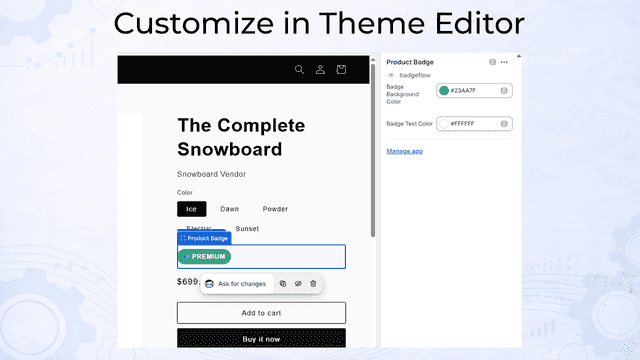
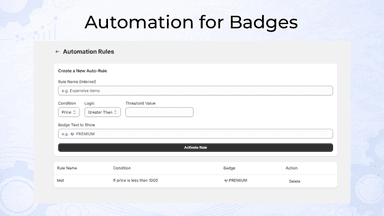
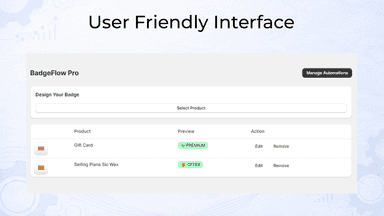
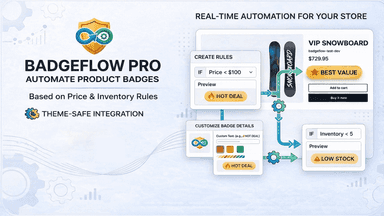
See every featureManaging product badges manually is time-consuming as your inventory and pricing constantly fluctuate. BadgeFlow Pro solves this by automatically applying and removing storefront badges based on custom automation rules you control. You can set specific conditions for price or stock levels to instantly highlight premium products, sale items, or low-stock alerts.
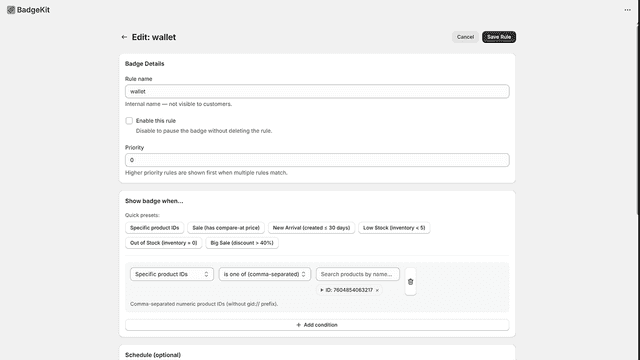
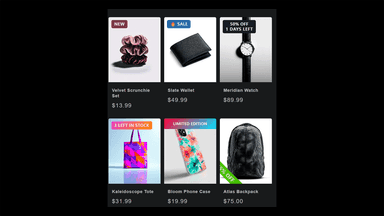
BadgeKit lets you create eye-catching product badges that update automatically based on your store's data. Set conditions like discount percentage, inventory level, product tags, or collections, and badges appear on matching products without manual work. Schedule badges to start and stop at specific times for flash sales or seasonal promotions.
- Create custom rules to trigger badges based on price and inventory levels.
- Badges automatically disappear when products no longer match your rules.
- Manually design and assign custom badges to specific products with ease.
- Customize badge text, shapes, and icons to match your storefront branding.
- Automated badge rules based on price, inventory, tags, and collections
- Schedule badges with start and end times for sales and promotions
- Fully customizable styles with colors, fonts, shapes, and positioning
- Announcement bars with countdown timers and geo-targeting


All the numbers
Every figure, side by side
A green dot marks the app ahead on a measured figure. Estimates, gaps and apps that leave no storefront trace never take the lead.
Adoption
| Measure |  BadgeFlow |  BadgeKit |
|---|---|---|
| Detected stores | Not published | Not published |
| Net store change, 28 days | 0 | 0 |
| Stores added, 28 days | Not enough data | Not enough data |
| Big-brand share | Not enough data | Not enough data |
| Top store categories | Not published | Not published |
| Top store countries | Not published | Not published |
Reviews
| Measure | BadgeFlow | BadgeKit |
|---|---|---|
| App Store rating | Not published | Not published |
| App Store reviews | Not published | Not published |
| New reviews, 28 days | Not enough data | Not enough data |
| Reviewers a year or more in | Not enough data | Not enough data |
FAQ
BadgeFlow and BadgeKit: common questions
- What features does each app list that the other doesn’t?
- BadgeKit lists 11 the others don’t mention, such as Announcement bar, Collection pages, Fonts, Footer. A feature missing from a listing may still be supported; this compares what each App Store listing says.
- Where does this comparison’s data come from?
- Shoplist crawls Shopify storefronts to detect which apps each store runs, and reads each app’s Shopify App Store listing for reviews, pricing, features and integrations. Store counts are as of Apr 8, 2026 for BadgeFlow, Oct 13, 2026 for BadgeKit; estimated figures are labeled.
How Shoplist compares apps
Store counts come from Shoplist’s crawl of Shopify storefronts, which detects the apps each store runs; they are as of Apr 8, 2026 for BadgeFlow, Oct 13, 2026 for BadgeKit. Reviews, ratings, plans, features and integrations come from each app’s Shopify App Store listing. 28-day figures are labeled when estimated, and a figure that is missing or estimated never decides who leads. Read the methodology.