
Backstep: Backup & AI Undo vs Rollback: Backup & Undo
Two Shopify apps, side by side: detected stores, momentum, reviews, plans, listed features and who runs each. Store counts as of Nov 10, 2026 for Backstep, Oct 14, 2026 for Rollback.
The short answer
- Only Rollback lists a free plan.
Head to head

Free
- · 14 days of history
- · Up to 50 products
Starter
- · 90 days of history
- · Up to 1,000 products
Growth
- · 1 year of history
- · Up to 10,000 products
Scale
- · 1 year of history
- · Up to 50,000 products
Coverage counts what each App Store listing names. Every feature, checked off app by app, is in Shoplist.
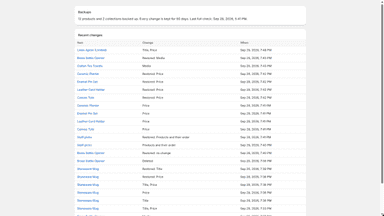
See every featureShopify has no undo for product edits and no recycle bin for deleted products. Backstep backs up your products, collections and pages every day and records every change as it happens, with the old and new value. Changes made together, by an app, a bulk edit or an import, appear as one batch you can undo at once.
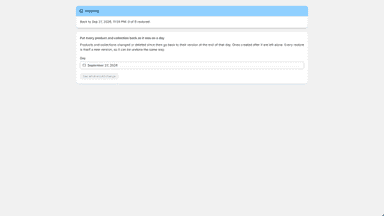
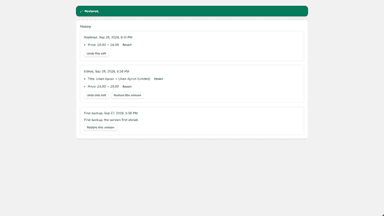
Rollback saves a new version of a product or collection each time it changes, whether the edit came from your staff, an import, a bulk editor or another app. Open a product to see what changed and when, field by field. Undo one edit or one field, bring back a deleted product with its variants, images, metafields and stock, or put the whole catalogue back as it was at the end of a chosen day.
- Undo a bad bulk edit, import or app change as one batch, in one click
- Safe AI sessions: review and undo everything an AI tool changed
- Restore deleted products with variants, prices, SKUs, images and collections
- Daily automatic backups of products, collections and pages
- Backs up products and collections automatically, every time they change
- Each product's history: what changed and when, field by field
- Undo one edit or a single field, leaving the rest of the product as it is
- Bring back deleted products with their variants, images, metafields and stock

All the numbers
Every figure, side by side
A green dot marks the app ahead on a measured figure. Estimates, gaps and apps that leave no storefront trace never take the lead.
Adoption
| Measure |  Rollback | |
|---|---|---|
| Detected stores | Not published | Not published |
| Net store change, 28 days | 0 | 0 |
| Stores added, 28 days | Not enough data | Not enough data |
| Big-brand share | Not enough data | Not enough data |
| Top store categories | Not published | Not published |
| Top store countries | Not published | Not published |
Reviews
| Measure | Rollback | |
|---|---|---|
| App Store rating | Not published | Not published |
| App Store reviews | Not published | Not published |
| New reviews, 28 days | Not enough data | Not enough data |
| Reviewers a year or more in | Not enough data | Not enough data |
FAQ
Backstep and Rollback: common questions
- Is Backstep or Rollback cheaper?
- Only Rollback lists a free plan. Shoplist compares base prices only between monthly plans in the same currency; usage charges and annual plans vary, so check each plan’s limits.
- Where does this comparison’s data come from?
- Shoplist crawls Shopify storefronts to detect which apps each store runs, and reads each app’s Shopify App Store listing for reviews, pricing, features and integrations. Store counts are as of Nov 10, 2026 for Backstep, Oct 14, 2026 for Rollback; estimated figures are labeled.
How Shoplist compares apps
Store counts come from Shoplist’s crawl of Shopify storefronts, which detects the apps each store runs; they are as of Nov 10, 2026 for Backstep, Oct 14, 2026 for Rollback. Reviews, ratings, plans, features and integrations come from each app’s Shopify App Store listing. 28-day figures are labeled when estimated, and a figure that is missing or estimated never decides who leads. Read the methodology.