

AssetGuard: Fix Broken Links vs LinkGuard : SEO protection
Two Shopify apps, side by side: detected stores, momentum, reviews, plans, listed features and who runs each. Store counts as of Oct 24, 2026 for AssetGuard, Jun 23, 2026 for LinkGuard.
The short answer
- Only AssetGuard lists a free plan.
- LinkGuard lists 3 features AssetGuard’s listing doesn’t mention, including Analytics, Automations, Redirects.
Head to head


Free
- · 2 scans per month
- · Basic email support
- · Detect & repair broken links and images
Starter Plan
- · 3 scans per day
- · Detect & repair broken links and images
- · Priority support
Pro
- · Detect & repair broken links and images
- · Premium support
- · Unlimited scans
Coverage counts what each App Store listing names. Every feature, checked off app by app, is in Shoplist.
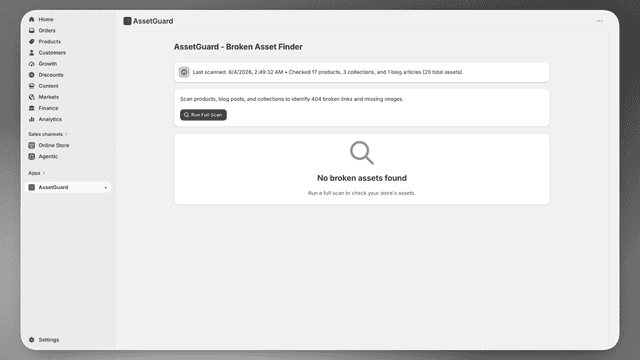
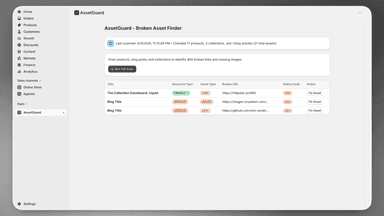
See every featureUnlike redirect apps, AssetGuard repairs broken links and missing images at the source — no redirects, just fixed content. AssetGuard keeps your Shopify store clean and SEO-friendly by scanning your product pages, collections, and blog posts for broken 404 links and missing image assets.
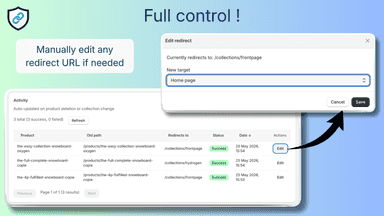
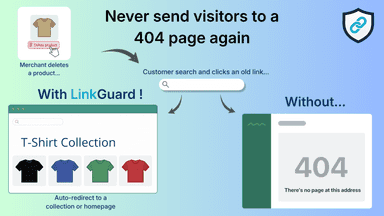
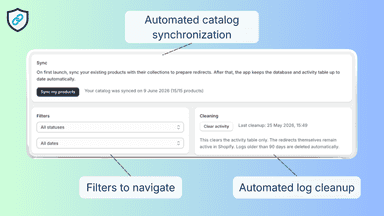
Deleting store products often leaves broken links that confuse shoppers and hurt search engine visibility. LinkGuard prevents this by automatically routing visitors to the parent collection page the exact moment an item is removed. A dedicated dashboard displays redirection activity, allowing you to filter logs or manually change destinations as your catalog evolves.
- Automated Detection & Repair of Broken Links
- Detect Missing Images in Products, Collections & Blogs
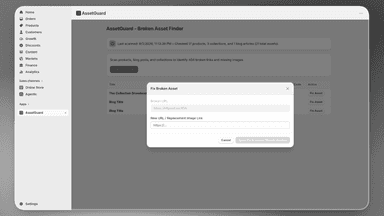
- One-Click Repair for Broken Assets
- Fixes the Actual Content — No Redirects
- Instantly redirects buyers to parent collections when a product is deleted.
- Track redirection history and update target destinations at any time.
- Automatically pre-maps products to collections to ensure accurate routing.
- Automatically updates existing links instead of failing on duplicate paths.
All the numbers
Every figure, side by side
A green dot marks the app ahead on a measured figure. Estimates, gaps and apps that leave no storefront trace never take the lead.
Adoption
| Measure |  AssetGuard |  LinkGuard |
|---|---|---|
| Detected stores | Not published | Not published |
| Net store change, 28 days | 0 | 0 |
| Stores added, 28 days | Not enough data | Not enough data |
| Big-brand share | Not enough data | Not enough data |
| Top store categories | Not published | Not published |
| Top store countries | Not published | Not published |
Reviews
| Measure | AssetGuard | LinkGuard |
|---|---|---|
| App Store rating | Not published | Not published |
| App Store reviews | Not published | Not published |
| New reviews, 28 days | Not enough data | Not enough data |
| Reviewers a year or more in | Not enough data | Not enough data |
Pricing
| Measure | AssetGuard | LinkGuard |
|---|---|---|
| Free plan | Yes | Not listed |
| Lowest paid monthly plan | $9/month | No monthly plan listed |
| Longest free trial | 7 days | Not listed |
| Plans listed | 3 | Not published |
Listing
| Measure | AssetGuard | LinkGuard |
|---|---|---|
| Shopify category rank | #1039 | #451(ahead) |
| Shopify App Charts | Not on this week’s charts | Not on this week’s charts |
| Built for Shopify | No | No |
| Launched | Aug 31, 2026 | Jun 23, 2026 |
| Languages | 1 | 1 |
| Developer | Nevarion Technologies LTD | PL Dev |
FAQ
AssetGuard and LinkGuard: common questions
- Is AssetGuard or LinkGuard cheaper?
- Only AssetGuard lists a free plan. Shoplist compares base prices only between monthly plans in the same currency; usage charges and annual plans vary, so check each plan’s limits.
- What features does each app list that the other doesn’t?
- AssetGuard lists 2 the others don’t mention, such as ALT text, Audits. LinkGuard lists 3 the others don’t mention, such as Analytics, Automations, Redirects. A feature missing from a listing may still be supported; this compares what each App Store listing says.
- Where does this comparison’s data come from?
- Shoplist crawls Shopify storefronts to detect which apps each store runs, and reads each app’s Shopify App Store listing for reviews, pricing, features and integrations. Store counts are as of Oct 24, 2026 for AssetGuard, Jun 23, 2026 for LinkGuard; estimated figures are labeled.
How Shoplist compares apps
Store counts come from Shoplist’s crawl of Shopify storefronts, which detects the apps each store runs; they are as of Oct 24, 2026 for AssetGuard, Jun 23, 2026 for LinkGuard. Reviews, ratings, plans, features and integrations come from each app’s Shopify App Store listing. 28-day figures are labeled when estimated, and a figure that is missing or estimated never decides who leads. Read the methodology.