

AR Try‑on vs liptry
Two Shopify apps, side by side: detected stores, momentum, reviews, plans, listed features and who runs each. Store counts as of Oct 13, 2026.
The short answer
- Only liptry lists a free plan. Paid plans start at $30/month for AR Try‑on and $3.99/month for liptry.
- AR Try‑on lists 9 features liptry’s listing doesn’t mention, including 3D models, Augmented reality, Dynamic scaling.
Head to head


Starter
- · 10 free AI 3D models, then $5 each
- · 7-day free trial
- · On-device tracking, nothing uploaded
- · Real-time 3D try-on on phone and desktop
- · Try-on for up to 10 products
Growth
- · 40 free AI 3D models, then $5 each
- · 7-day free trial
- · On-device tracking, nothing uploaded
- · Real-time 3D try-on on phone and desktop
- · Try-on for up to 40 products
Pro
- · 7-day free trial
- · On-device tracking, nothing uploaded
- · Real-time 3D try-on on phone and desktop
- · Unlimited AI 3D models
- · Unlimited products with try-on
Free
- · 8 models
- · Managed in theme editor
- · Virtual Lipstick Try On block
- · custom colors
- · live / model / upload modes
Pro Plan
- · Everything in Free
- · Pro code snippets in-app after upgrade
- · Same powerful try-on engine
- · copy-paste CSS, Liquid wrapper notes
- · styling patterns for your brand
Coverage counts what each App Store listing names. Every feature, checked off app by app, is in Shoplist.
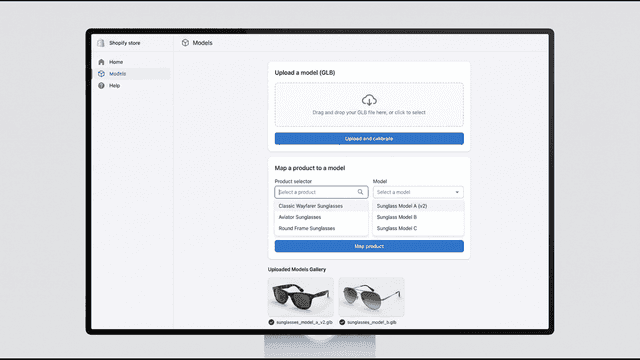
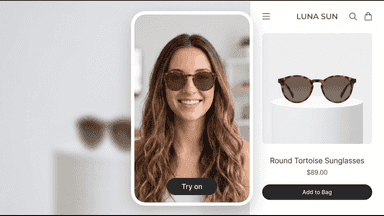
See every featureAR Try-on lets shoppers see how sunglasses actually look on their own face before adding to cart. Using real-time face tracking, the app overlays a 3D model of each product onto the customer's live camera feed directly on the product page. All face tracking runs locally in the shopper's browser, so no photos or video are ever uploaded or stored.
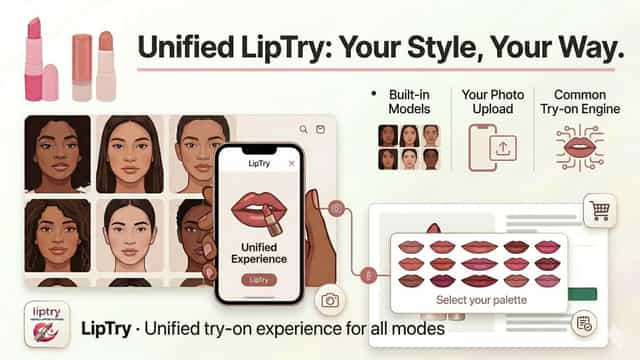
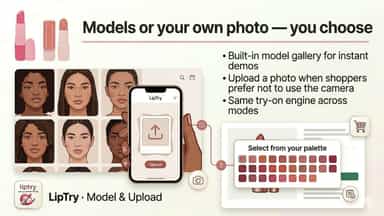
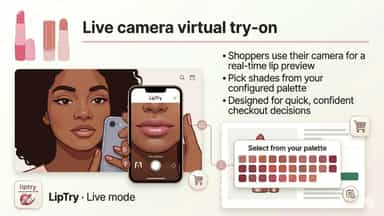
Many customers hesitate to buy lipstick online because they cannot see how a shade looks on a real face. LipTry adds virtual try-on to your Online Store: customers can use a live camera, built-in model photos, or an uploaded image. You add a theme app block from the theme editor, set your heading and background, and list custom hex colors to match your products.
- Real-time try-on using the shopper's own camera, no extra app install needed
- All face tracking runs on-device, so no photos or video are ever uploaded
- Map any product to a 3D model directly from the Shopify admin
- Works on the product page shoppers already visit, with no redirect or popup
- Live camera try-on so shoppers see lipstick on their own face in real time.
- Model gallery and photo upload for shoppers who prefer not to use the camera.
- Theme app block with colors and layout you control from the theme editor.
- Pro user adds copy-paste embed snippets and optional Custom Liquid workflows.



All the numbers
Every figure, side by side
A green dot marks the app ahead on a measured figure. Estimates, gaps and apps that leave no storefront trace never take the lead.
Adoption
| Measure |  AR Try‑on |  liptry |
|---|---|---|
| Detected stores | Not published | Not published |
| Net store change, 28 days | 0 | 0 |
| Stores added, 28 days | Not enough data | Not enough data |
| Big-brand share | Not enough data | Not enough data |
| Top store categories | Not published | Not published |
| Top store countries | Not published | Not published |
Reviews
| Measure | AR Try‑on | liptry |
|---|---|---|
| App Store rating | Not published | Not published |
| App Store reviews | Not published | Not published |
| New reviews, 28 days | Not enough data | Not enough data |
| Reviewers a year or more in | Not enough data | Not enough data |
FAQ
AR Try‑on and liptry: common questions
- Is AR Try‑on or liptry cheaper?
- Only liptry lists a free plan. Paid plans start at $30/month for AR Try‑on and $3.99/month for liptry. Shoplist compares base prices only between monthly plans in the same currency; usage charges and annual plans vary, so check each plan’s limits.
- What features does each app list that the other doesn’t?
- AR Try‑on lists 9 the others don’t mention, such as 3D models, Augmented reality, Dynamic scaling, Embedded viewer. A feature missing from a listing may still be supported; this compares what each App Store listing says.
- Where does this comparison’s data come from?
- Shoplist crawls Shopify storefronts to detect which apps each store runs, and reads each app’s Shopify App Store listing for reviews, pricing, features and integrations. Store counts are as of Oct 13, 2026; estimated figures are labeled.
How Shoplist compares apps
Store counts come from Shoplist’s crawl of Shopify storefronts, which detects the apps each store runs; they are as of Oct 13, 2026. Reviews, ratings, plans, features and integrations come from each app’s Shopify App Store listing. 28-day figures are labeled when estimated, and a figure that is missing or estimated never decides who leads. Read the methodology.