AppSupermarket‑Bulk Editor vs Bulk Edit Mojo
Two Shopify apps, side by side: detected stores, momentum, reviews, plans, listed features and who runs each. Store counts as of May 28, 2026 for AppSupermarket‑Bulk Editor, Oct 13, 2026 for Bulk Edit Mojo.
The short answer
- Bulk Edit Mojo lists 7 features AppSupermarket‑Bulk Editor’s listing doesn’t mention, including Descriptions, Image optimization, Orders.
Head to head

Momentum
New reviews each month
Review pace is the clearest public read on how fast an app is winning new merchants.
Standard
Coverage counts what each App Store listing names. Every feature, checked off app by app, is in Shoplist.
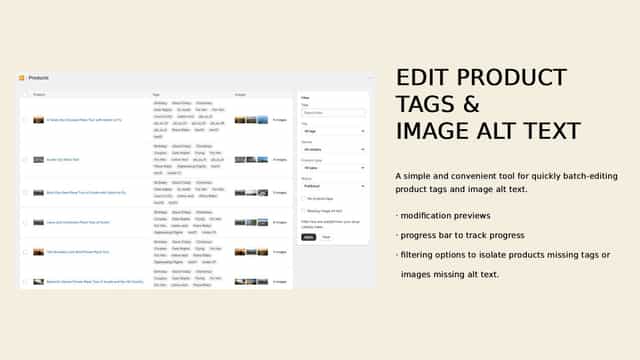
See every featureAppSupermarket-Bulk Editor helps you clean up and organize your product catalog in minutes instead of hours. Quickly bulk-edit product tags and product image alt text with a simple, focused interface designed for speed. Filter products that are missing tags or images without alt text, then apply consistent, SEO‑friendly changes across many products at once.
Within a single app you'll find multiple features focused on saving your team huge amounts of time by making common store management tasks easy and effective. Unlimited product edits, unlimited scheduled tasks, unlimited images SEO optimizations, sort variants by custom criteria, merge unlimited product filters. Run tasks on multiple shops at once.
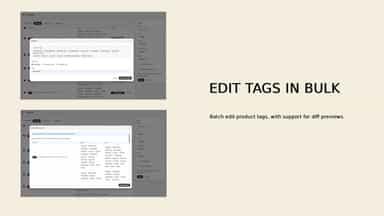
- Bulk add, remove, or replace product tags
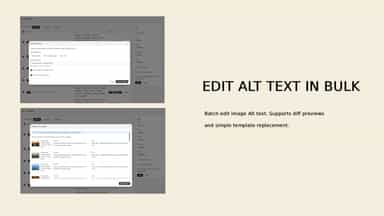
- Bulk edit product image alt text
- Filter products with no tags
- Filter images with no alt text
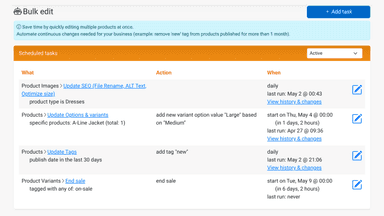
- Bulk edit product information such as tags, types, description, vendor & prices
- Schedule tasks at desired time and intervals (once, daily, or weekly)
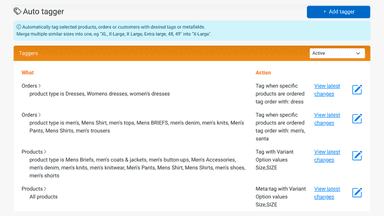
- Automatically tag selected products or orders with tags or metafields
- Optimize SEO and performance: URLs, meta tags, image filenames, alt text, size


All the numbers
Every figure, side by side
A green dot marks the app ahead on a measured figure. Estimates, gaps and apps that leave no storefront trace never take the lead.
Adoption
| Measure |  AppSupermarket‑Bulk Editor | Bulk Edit Mojo |
|---|---|---|
| Detected stores | Not published | Not published |
| Net store change, 28 days | 0 | 0 |
| Stores added, 28 days | Not enough data | Not enough data |
| Big-brand share | Not enough data | Not enough data |
| Top store categories | Not published | Not published |
| Top store countries | Not published | Not published |
Reviews
| Measure | AppSupermarket‑Bulk Editor | Bulk Edit Mojo |
|---|---|---|
| App Store rating | Not published | 4.6 ★ |
| App Store reviews | Not published | 17 |
| New reviews, 28 days | Not enough data | 0 |
| Reviewers a year or more in | Not enough data | Not enough data |
Pricing
| Measure | AppSupermarket‑Bulk Editor | Bulk Edit Mojo |
|---|---|---|
| Free plan | Not listed | Not listed |
| Lowest paid monthly plan | No monthly plan listed | $4.99/month |
| Longest free trial | Not listed | 14 days |
| Plans listed | Not published | 1 |
Listing
| Measure | AppSupermarket‑Bulk Editor | Bulk Edit Mojo |
|---|---|---|
| Shopify category rank | #426 | #161(ahead) |
| Shopify App Charts | Not on this week’s charts | Not on this week’s charts |
| Built for Shopify | No | No |
| Launched | May 28, 2026 | Mar 7, 2022 |
| Languages | 1 | 1 |
| Developer | PromoBrain | Eushopa |
FAQ
AppSupermarket‑Bulk Editor and Bulk Edit Mojo: common questions
- What features does each app list that the other doesn’t?
- AppSupermarket‑Bulk Editor lists 2 the others don’t mention, such as Metafields, Search and filter. Bulk Edit Mojo lists 7 the others don’t mention, such as Descriptions, Image optimization, Orders, Prices. A feature missing from a listing may still be supported; this compares what each App Store listing says.
- Where does this comparison’s data come from?
- Shoplist crawls Shopify storefronts to detect which apps each store runs, and reads each app’s Shopify App Store listing for reviews, pricing, features and integrations. Store counts are as of May 28, 2026 for AppSupermarket‑Bulk Editor, Oct 13, 2026 for Bulk Edit Mojo; estimated figures are labeled.
How Shoplist compares apps
Store counts come from Shoplist’s crawl of Shopify storefronts, which detects the apps each store runs; they are as of May 28, 2026 for AppSupermarket‑Bulk Editor, Oct 13, 2026 for Bulk Edit Mojo. Reviews, ratings, plans, features and integrations come from each app’s Shopify App Store listing. 28-day figures are labeled when estimated, and a figure that is missing or estimated never decides who leads. Read the methodology.