
Announcely: Announcement Bar vs Quicky Announcement Bars
Two Shopify apps, side by side: detected stores, momentum, reviews, plans, listed features and who runs each. Store counts as of Oct 13, 2026 for Announcely, Nov 8, 2026 for Quicky Announcement Bars.
The short answer
- Both list a free plan. Paid plans start at $2.99/month for Announcely and $4.99/month for Quicky Announcement Bars.
- Quicky Announcement Bars lists 32 features Announcely’s listing doesn’t mention, including A/B testing, Animations, Announcement bar.
Head to head


- United States
- United Kingdom
- Australia
Momentum
New reviews each month
Review pace is the clearest public read on how fast an app is winning new merchants.
Free
- · 1 active announcement bar
- · Basic background & text colors
- · Close button toggle
- · Live bar preview in the editor
- · Sticky or scrolling display
- · Text banner type
Pro
- · 6 bar types with live preview
- · Analytics charts & custom CSS
- · Countdown timer with live clock
- · Free shipping goal with cart sync
- · Rotating messages & 6 animations
- · Schedule by date, time & day
Premium
- · All 7 bar types unlocked
- · Conversion & subscriber tracking
- · Email capture bar with subscribe
- · Everything in Pro plan
- · Full analytics dashboard
- · Priority WhatsApp support
Free
- · 1 active bar
- · Announcement and slider bars
- · Basic customization
- · Countdown timer bars
- · Coupon and signup bars
- · Free shipping bars
Basic
- · All bar types and templates
- · Analytics dashboard
- · Customer support
- · Theme-specific customization
- · Unlimited active bars
- · Unlimited storefront views
Premium
- · A/B testing
- · Advanced analytics
- · Campaign scheduling
- · Device and audience targeting
- · Everything in Basic
- · Localized campaigns
Coverage counts what each App Store listing names. Every feature, checked off app by app, is in Shoplist.
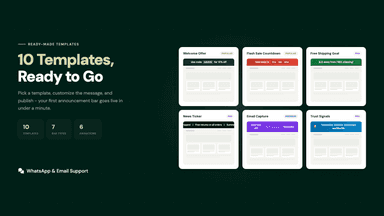
See every featureAdd announcement bars to your store in minutes. Choose from 7 types including countdown timers, free shipping goals that update with cart value, rotating messages with 6 animations, scrolling marquee, and email capture. Schedule bars by date, timezone, or day of week. Target specific pages, products, or collections by device.
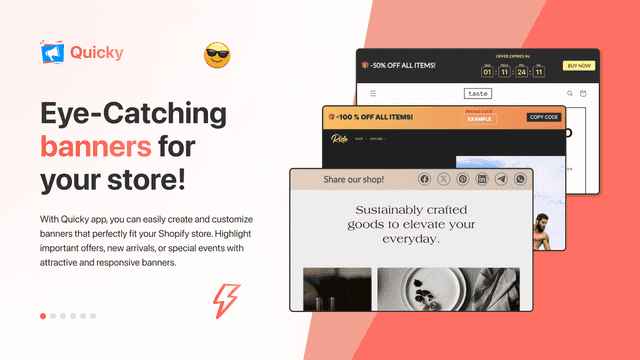
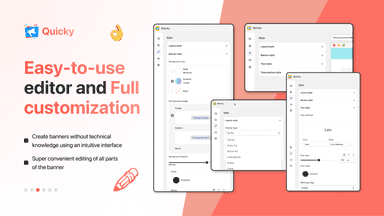
Quicky helps merchants promote offers and important updates without editing theme code. Create announcement bars, a countdown timer bar, and free shipping, coupon, email signup, cookie consent, and multi-message bars from one editor. Customize each design for desktop and mobile, schedule campaigns, localize messages, and target shoppers by page, device, location, domain, or market.
- 7 bar types: text, countdown, free shipping, rotating, email capture, marquee
- Live cart tracking for free shipping bars updates as customers add items
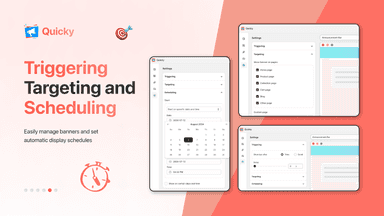
- Schedule bars by date range, timezone, and day of week
- Target specific pages, products, or collections with device filtering
- Multiple types - from Cookie Bar to Sales Motivation Multi-Announcement campaign
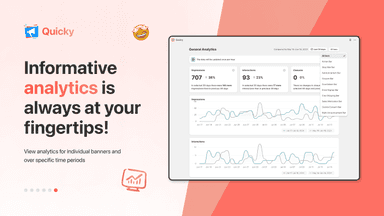
- Analytics and A/B testing - see which offer generates more sales and revenue
- Customizable and responsive - select colors, fonts, alignment, position and more
- Possibility of scheduling - start showing at the required time automatically




All the numbers
Every figure, side by side
A green dot marks the app ahead on a measured figure. Estimates, gaps and apps that leave no storefront trace never take the lead.
Adoption
| Measure |  Announcely | Quicky Announcement Bars |
|---|---|---|
| Detected stores | Not published | 688 |
| Net store change, 28 days | 0 | −11 |
| Stores added, 28 days | Not enough data | 4 |
| Big-brand share | Not enough data | 10% |
| Top store categories | Not published | Apparel & Accessories, Home & Garden, Health & Beauty |
| Top store countries | Not published | United States, United Kingdom, Australia |
Reviews
| Measure | Announcely | Quicky Announcement Bars |
|---|---|---|
| App Store rating | Not published | 5.0 ★ |
| App Store reviews | Not published | 125 |
| New reviews, 28 days | Not enough data | 0 |
| Reviewers a year or more in | Not enough data | Not enough data |
Pricing
| Measure | Announcely | Quicky Announcement Bars |
|---|---|---|
| Free plan | Yes | Yes |
| Lowest paid monthly plan | $2.99/month(ahead) | $4.99/month |
| Longest free trial | Not listed | 7 days |
| Plans listed | 3 | 3 |
Listing
| Measure | Announcely | Quicky Announcement Bars |
|---|---|---|
| Shopify category rank | #276 | #40(ahead) |
| Shopify App Charts | Not on this week’s charts | #12 in Banners |
| Built for Shopify | No | Yes |
| Launched | May 5, 2026 | Mar 17, 2022 |
| Languages | 1 | 4 |
| Developer | Appishore | Paper Planes |
FAQ
Announcely and Quicky Announcement Bars: common questions
- Is Announcely or Quicky Announcement Bars cheaper?
- Both list a free plan. Paid plans start at $2.99/month for Announcely and $4.99/month for Quicky Announcement Bars. Shoplist compares base prices only between monthly plans in the same currency; usage charges and annual plans vary, so check each plan’s limits.
- What features does each app list that the other doesn’t?
- Announcely lists 1 the others don’t mention, such as Performance tracking. Quicky Announcement Bars lists 32 the others don’t mention, such as A/B testing, Animations, Announcement bar, Behavior targeting. A feature missing from a listing may still be supported; this compares what each App Store listing says.
- Where does this comparison’s data come from?
- Shoplist crawls Shopify storefronts to detect which apps each store runs, and reads each app’s Shopify App Store listing for reviews, pricing, features and integrations. Store counts are as of Oct 13, 2026 for Announcely, Nov 8, 2026 for Quicky Announcement Bars; estimated figures are labeled.
How Shoplist compares apps
Store counts come from Shoplist’s crawl of Shopify storefronts, which detects the apps each store runs; they are as of Oct 13, 2026 for Announcely, Nov 8, 2026 for Quicky Announcement Bars. Reviews, ratings, plans, features and integrations come from each app’s Shopify App Store listing. 28-day figures are labeled when estimated, and a figure that is missing or estimated never decides who leads. Read the methodology.