AfterRevenue vs Order Edit & Upsell
Two Shopify apps, side by side: detected stores, momentum, reviews, plans, listed features and who runs each. Store counts as of Oct 13, 2026 for AfterRevenue, Oct 14, 2026 for Order Edit & Upsell.
The short answer
- Only Order Edit & Upsell lists a free plan. Paid plans start at $69/month for AfterRevenue and $3.99/month for Order Edit & Upsell.
- Order Edit & Upsell lists 4 features AfterRevenue’s listing doesn’t mention, including Custom attributes, Refunds, Shipping fees.
Head to head


Launch
- · Order edits, address fixes, cancel-save
- · Reorders, upsells, analytics, helpdesks
- · Up to 1,500 orders each month
Growth
- · Order edits, address fixes, cancel-save
- · Reorders, upsells, analytics, helpdesks
- · Up to 5,000 orders each month
Scale
- · Order edits, address fixes, cancel-save
- · Reorders, upsells, analytics, helpdesks
- · Up to 10,000 orders each month
High Volume
- · Order edits, address fixes, cancel-save
- · Reorders, upsells, analytics, helpdesks
- · Up to 20,000 orders each month
Free
- · Access all order editing features
- · Enjoy 24/7 dedicated customer support
- · Handle up to 10 orders per month
Standard
- · Access all order editing features
- · Enjoy 24/7 dedicated customer support
- · Handle up to 1,000 orders per month
Advanced
- · 24/7 priority customer support
- · Automatically revert unpaid order edits
- · Enable post-purchase upsell offers
- · Process up to 10,000 orders per month
- · Seamless 3PL and WMS integrations
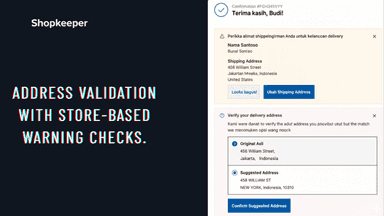
- · Validate addresses with smart warnings
Premium
- · 24/7 dedicated support access
- · Advanced address validation with smart a
- · Auto-revert unpaid order changes
- · Priority customer support
- · Process up to 100,000 orders per month
- · Seamless 3PL and WMS integrations
Coverage counts what each App Store listing names. Every feature, checked off app by app, is in Shoplist.
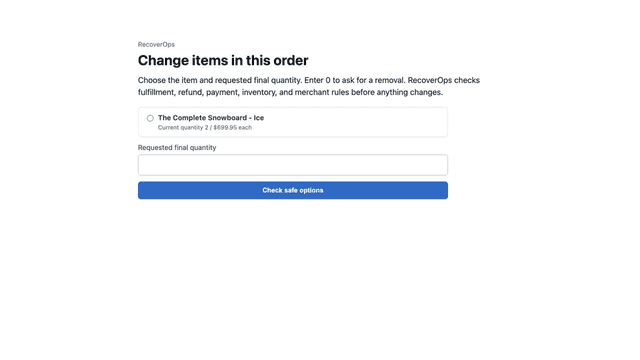
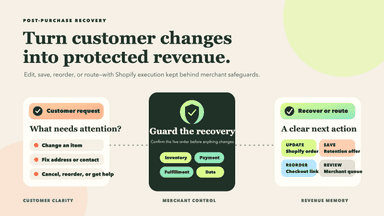
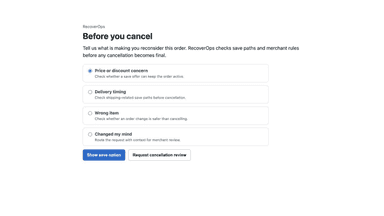
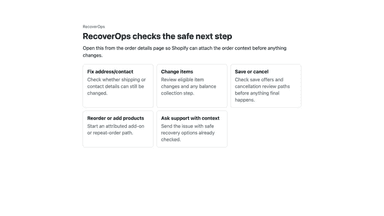
See every featureAfterRevenue gives merchants one post-purchase recovery workspace for customer order edits, address and contact corrections, cancellation save offers, reorder and upsell links, and support handoffs. Every Shopify action follows merchant rules, payment and refund checks, fulfillment safeguards, and protected-data controls.
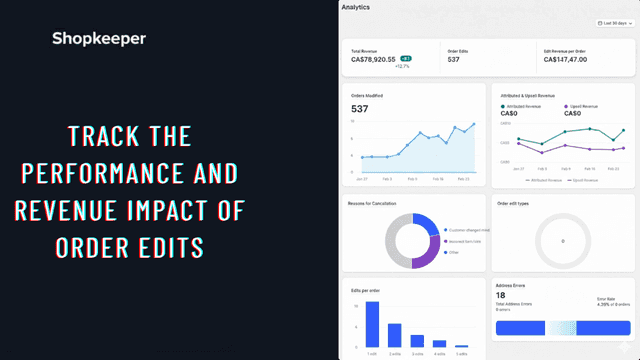
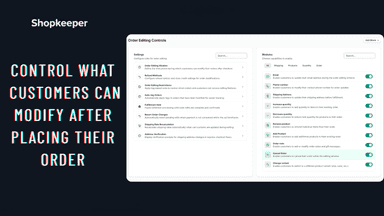
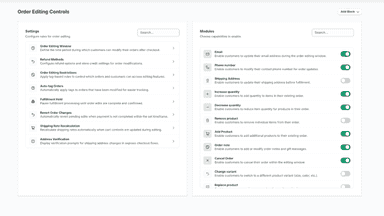
Enhance post-purchase experience by letting customers edit orders from Thank You & Order Status pages. Control what they can change address, products, variants, shipping method and set editing duration. Offer post-purchase upsells to boost AOV. Supports size/variant swaps with price adjustments and integrates with Shopify Flow for advanced order editing and marketing automation.
- Let customers request guarded order edits before fulfillment
- Fix address and contact details with protected-data controls
- Turn cancellation intent into save offers or safe review
- Create attributed reorder and upsell checkout links
- Allow customers to edit shipping address, products, variants, and shipping metho
- Set how long customers can edit orders and what changes they are allowed to make
- Create post-purchase upsell offers on Thank You and Order Status pages
- Allow size or variant changes and quick swaps with instant price adjustments
All the numbers
Every figure, side by side
A green dot marks the app ahead on a measured figure. Estimates, gaps and apps that leave no storefront trace never take the lead.
Adoption
| Measure |  AfterRevenue |  Order Edit & Upsell |
|---|---|---|
| Detected stores | Not published | Not published |
| Net store change, 28 days | 0 | 0 |
| Stores added, 28 days | Not enough data | Not enough data |
| Big-brand share | Not enough data | Not enough data |
| Top store categories | Not published | Not published |
| Top store countries | Not published | Not published |
Reviews
| Measure | AfterRevenue | Order Edit & Upsell |
|---|---|---|
| App Store rating | Not published | Not published |
| App Store reviews | Not published | Not published |
| New reviews, 28 days | Not enough data | Not enough data |
| Reviewers a year or more in | Not enough data | Not enough data |
Pricing
| Measure | AfterRevenue | Order Edit & Upsell |
|---|---|---|
| Free plan | Not listed | Yes |
| Lowest paid monthly plan | $69/month | $3.99/month(ahead) |
| Longest free trial | 60 days | 4 days |
| Plans listed | 4 | 4 |
Listing
| Measure | AfterRevenue | Order Edit & Upsell |
|---|---|---|
| Shopify category rank | #133 | #114(ahead) |
| Shopify App Charts | Not on this week’s charts | Not on this week’s charts |
| Built for Shopify | No | No |
| Launched | Jul 28, 2026 | May 12, 2026 |
| Languages | 1 | 3 |
| Developer | 6ix Merchandise | ShopKeeper |
FAQ
AfterRevenue and Order Edit & Upsell: common questions
- Is AfterRevenue or Order Edit & Upsell cheaper?
- Only Order Edit & Upsell lists a free plan. Paid plans start at $69/month for AfterRevenue and $3.99/month for Order Edit & Upsell. Shoplist compares base prices only between monthly plans in the same currency; usage charges and annual plans vary, so check each plan’s limits.
- What features does each app list that the other doesn’t?
- AfterRevenue lists 2 the others don’t mention, such as Re-orders, Status updates. Order Edit & Upsell lists 4 the others don’t mention, such as Custom attributes, Refunds, Shipping fees, Tagging. A feature missing from a listing may still be supported; this compares what each App Store listing says.
- Where does this comparison’s data come from?
- Shoplist crawls Shopify storefronts to detect which apps each store runs, and reads each app’s Shopify App Store listing for reviews, pricing, features and integrations. Store counts are as of Oct 13, 2026 for AfterRevenue, Oct 14, 2026 for Order Edit & Upsell; estimated figures are labeled.
How Shoplist compares apps
Store counts come from Shoplist’s crawl of Shopify storefronts, which detects the apps each store runs; they are as of Oct 13, 2026 for AfterRevenue, Oct 14, 2026 for Order Edit & Upsell. Reviews, ratings, plans, features and integrations come from each app’s Shopify App Store listing. 28-day figures are labeled when estimated, and a figure that is missing or estimated never decides who leads. Read the methodology.