

COS ‑ Social Share Images vs Image Mapper ‑ Shoppable Image
Two Shopify apps, side by side: detected stores, momentum, reviews, plans, listed features and who runs each. Store counts as of Oct 21, 2026 for COS, Oct 14, 2026 for Image Mapper.
The short answer
- On the Shopify App Store: COS 2.5 from 3 reviews and Image Mapper 4.0 from 9 reviews.
- Paid plans start at $5/month for COS and $9.99/month for Image Mapper.
Head to head


Your personal custom social share images generator
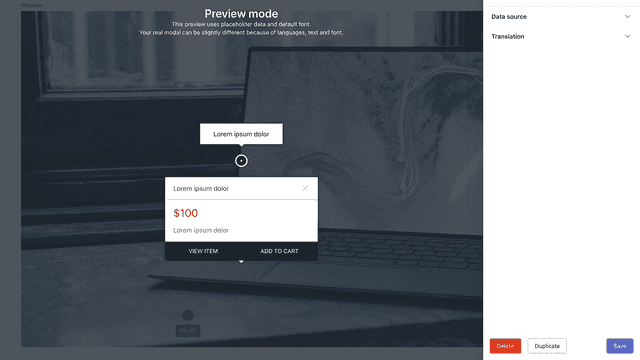
Easily pin products to your banner image, slider and gallery
Momentum
New reviews each month
Review pace is the clearest public read on how fast an app is winning new merchants.
Standard plan
- · Add your logo, colors & backgrounds
- · Custom template per page type
- · Share and click counts per page type
- · Theme conflict check with the exact fix
- · Unlimited branded images for every page
Image Mapper
Coverage counts what each App Store listing names. Every feature, checked off app by app, is in Shoplist.
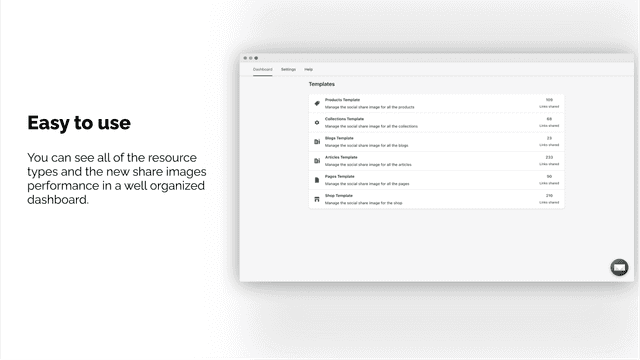
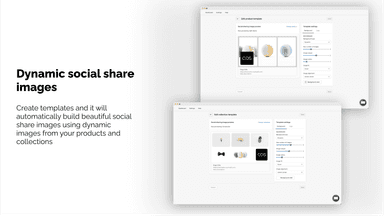
See every featureShared links often show a random photo or none. Build one template per page type (shop, products, collections, pages, blogs, articles) with your logo and backgrounds, and the app serves a 1200x630 image for every link. Most themes print their own share image first, and social networks take that one. The dashboard checks your theme, lists the exact lines to comment out and gives you the corrected file to paste.
Easily pin products to your banner image, slider and gallery
- Combine multiple product images into a single mosaic-like image.
- Add your store logo alongside any product image
- Simple analytics to monitor each link’s share performance
- Great and fast support
- Easy to use – Beginner friendly interface
- Step-by-step instructions
- Engages the customer in your website
- Interactive browsing through products




All the numbers
Every figure, side by side
A green dot marks the app ahead on a measured figure. Estimates, gaps and apps that leave no storefront trace never take the lead.
Adoption
| Measure |  COS |  Image Mapper |
|---|---|---|
| Detected stores | Not published | Not published |
| Net store change, 28 days | 0 | 0 |
| Stores added, 28 days | Not enough data | Not enough data |
| Big-brand share | Not enough data | Not enough data |
| Top store categories | Not published | Not published |
| Top store countries | Not published | Not published |
Reviews
| Measure | COS | Image Mapper |
|---|---|---|
| App Store rating | 2.5 ★ | 4.0 ★(ahead) |
| App Store reviews | 3 | 9(ahead) |
| New reviews, 28 days | Not enough data | 0 |
| Reviewers a year or more in | Not enough data | Not enough data |
Pricing
| Measure | COS | Image Mapper |
|---|---|---|
| Free plan | Not listed | Not listed |
| Lowest paid monthly plan | $5/month(ahead) | $9.99/month |
| Longest free trial | 30 days | 7 days |
| Plans listed | 1 | 1 |
Listing
| Measure | COS | Image Mapper |
|---|---|---|
| Shopify category rank | #551 | #184 |
| Shopify App Charts | Not on this week’s charts | Not on this week’s charts |
| Built for Shopify | No | No |
| Launched | Feb 2, 2022 | Mar 6, 2018 |
| Languages | 1 | 1 |
| Developer | Relaunch Studio | Luke |
FAQ
COS and Image Mapper: common questions
- Is COS or Image Mapper cheaper?
- Paid plans start at $5/month for COS and $9.99/month for Image Mapper. Shoplist compares base prices only between monthly plans in the same currency; usage charges and annual plans vary, so check each plan’s limits.
- Which has better reviews, COS or Image Mapper?
- On the Shopify App Store: COS 2.5 from 3 reviews and Image Mapper 4.0 from 9 reviews.
- Where does this comparison’s data come from?
- Shoplist crawls Shopify storefronts to detect which apps each store runs, and reads each app’s Shopify App Store listing for reviews, pricing, features and integrations. Store counts are as of Oct 21, 2026 for COS, Oct 14, 2026 for Image Mapper; estimated figures are labeled.
How Shoplist compares apps
Store counts come from Shoplist’s crawl of Shopify storefronts, which detects the apps each store runs; they are as of Oct 21, 2026 for COS, Oct 14, 2026 for Image Mapper. Reviews, ratings, plans, features and integrations come from each app’s Shopify App Store listing. 28-day figures are labeled when estimated, and a figure that is missing or estimated never decides who leads. Read the methodology.