

UpBump ‑ Upsell Checkboxes vs bumper
Two Shopify apps, side by side: detected stores, momentum, reviews, plans, listed features and who runs each. Store counts as of Oct 13, 2026.
The short answer
- Paid plans start at $6.99/month for UpBump and $10/month for bumper.
- UpBump lists 6 features bumper’s listing doesn’t mention, including Funnel performance, Gift wrap, Priority processing.
Head to head


Momentum
New reviews each month
Review pace is the clearest public read on how fast an app is winning new merchants.
STARTER
- · 0-200 Orders
GROWTH
- · + Customized look for your store
- · >200 Orders
Basic
- · 1 Bump Sequence
- · No Support
Standard
- · 5 Bump Sequences
- · Support
Enterprise
- · 20 Bump Sequences
- · Support
Coverage counts what each App Store listing names. Every feature, checked off app by app, is in Shoplist.
See every featureBoost your revenue with easy add-ons directly on your product pages! Customers can conveniently upgrade their purchases with options like insured shipping, gift wrapping, priority support, express handling, certificates of authenticity, warranty protection, professional installation, and on-site services – all displayed as simple checkboxes.
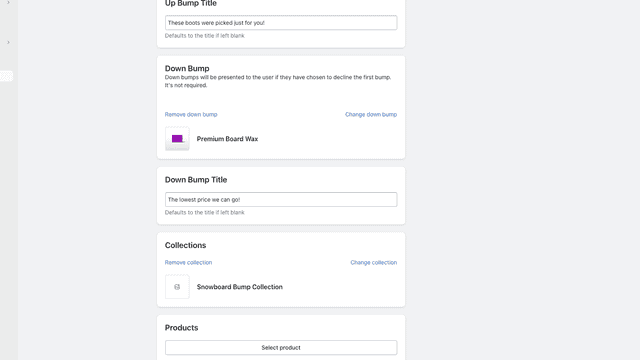
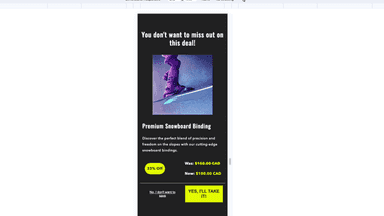
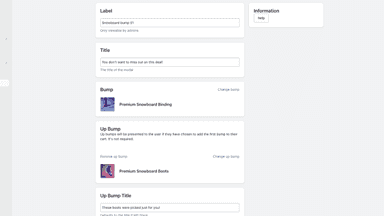
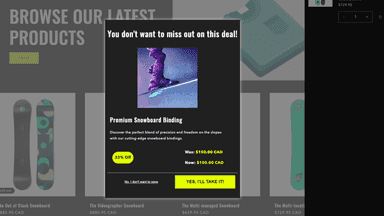
Bumper offers a seamless sequence of product bumps, akin to an upsell sales funnel, streamlining the experience for customers. Create bump records that connect to a product list or collection. As customers proceed to checkout and select specific products, the app triggers a tailored bump sequence, presenting additional relevant offers to enhance their shopping experience.
- Instantly add profitable upsells with easy checkboxes.
- Easily let the customers opt for add-ons without leaving the product page
- Control what add-ons to show on which product page with conditional logic
- Analyze which add-ons are making the most money with our analytics
- Craft bump sequences displayed at checkout.
- up/down bumps contingent on the customer's initial bump acceptance or rejection
- Explore a wide array of theme setting options, allowing extensive customization.


All the numbers
Every figure, side by side
A green dot marks the app ahead on a measured figure. Estimates, gaps and apps that leave no storefront trace never take the lead.
Adoption
| Measure |  UpBump |  bumper |
|---|---|---|
| Detected stores | Not published | Not published |
| Net store change, 28 days | 0 | 0 |
| Stores added, 28 days | Not enough data | Not enough data |
| Big-brand share | Not enough data | Not enough data |
| Top store categories | Not published | Not published |
| Top store countries | Not published | Not published |
Reviews
| Measure | UpBump | bumper |
|---|---|---|
| App Store rating | 4.7 ★ | Not published |
| App Store reviews | 6 | Not published |
| New reviews, 28 days | 0 | Not enough data |
| Reviewers a year or more in | Not enough data | Not enough data |
FAQ
UpBump and bumper: common questions
- Is UpBump or bumper cheaper?
- Paid plans start at $6.99/month for UpBump and $10/month for bumper. Shoplist compares base prices only between monthly plans in the same currency; usage charges and annual plans vary, so check each plan’s limits.
- What features does each app list that the other doesn’t?
- UpBump lists 6 the others don’t mention, such as Funnel performance, Gift wrap, Priority processing, Product add-ons. A feature missing from a listing may still be supported; this compares what each App Store listing says.
- Where does this comparison’s data come from?
- Shoplist crawls Shopify storefronts to detect which apps each store runs, and reads each app’s Shopify App Store listing for reviews, pricing, features and integrations. Store counts are as of Oct 13, 2026; estimated figures are labeled.
How Shoplist compares apps
Store counts come from Shoplist’s crawl of Shopify storefronts, which detects the apps each store runs; they are as of Oct 13, 2026. Reviews, ratings, plans, features and integrations come from each app’s Shopify App Store listing. 28-day figures are labeled when estimated, and a figure that is missing or estimated never decides who leads. Read the methodology.