NS Revenue Heatmap & Replay logo

NS Revenue Heatmap & Replay Shopify App: Features & First-Adopter Watch

Analytics

Updated May 15, 2026

No signal

By NestScale LLC

Launched April 24, 2026. Shoplist is monitoring first merchant evidence, feature details, and listing changes for this Shopify app.

Shoplist public signals

What is visible for NS Revenue Heatmap & Replay right now

Signal date May 15, 2026

Monitoring status

First-adopter watch

Monitoring first merchant evidence

As of May 15, 2026

Momentum

0 No signal

Install trend held steady over the last 28 days

As of Jun 13, 2026

No signal0% confidence

0 momentum score

Install trend held steady over the latest 28-day window.

Updated Jun 13, 2026

0 installs

Momentum inputs

28d installs

0

Prev. 28d

0

New 28d

0

30d reviews

0

Installs
0
Growth
50
Adoption
0
Reviews
0
Fit
71

Quick answer

NS Revenue Heatmap & Replay launched on April 24, 2026. Shoplist is monitoring first public merchant evidence and listing changes.

Activity and changes

Recent signals for NS Revenue Heatmap & Replay

Recent detections and listing changes are public signals captured by crawl history.

App Store listing

Listing changes

2 updates

Detected May 15, 2026

Listing title changed +3 more

Positioning

Listing title changed

Know what clicks actually bring sales with revenue-based heatmaps. Reduce abandoned sessions.Stop guessing which buttons work. Visualize conversions with heatmaps & session replays.

Description rewritten

Understand how visitor behavior connects directly to revenue. Revenue-based heatmaps reveal NS Revenue Heatmap reveals click or and scroll activity, showing the financial impact behind every element. connect heatmaps with profitability metrics (sales generated, average order value, conversion rate). Session record helps records let you replay customer journeys to identify drop-off points and highlight key events such as add-to-cart "Add-to-cart" or checkout steps. A revenue "View product". An analytics dashboard delivers page-level metrics, helping you interpret behavioral data, refine UI/UX decisions, improve conversion quality, and strengthen customer retention.

Callouts updated

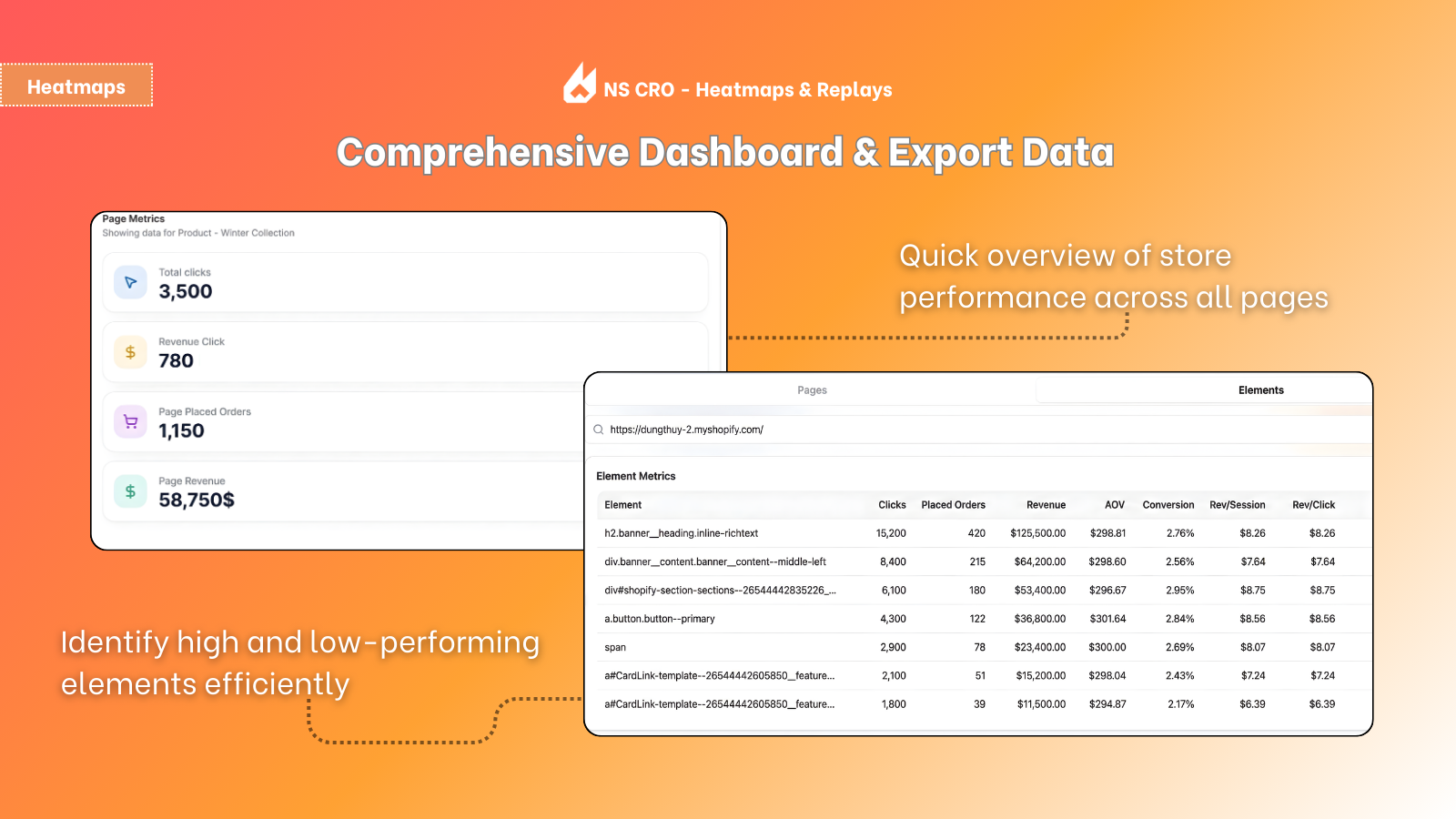
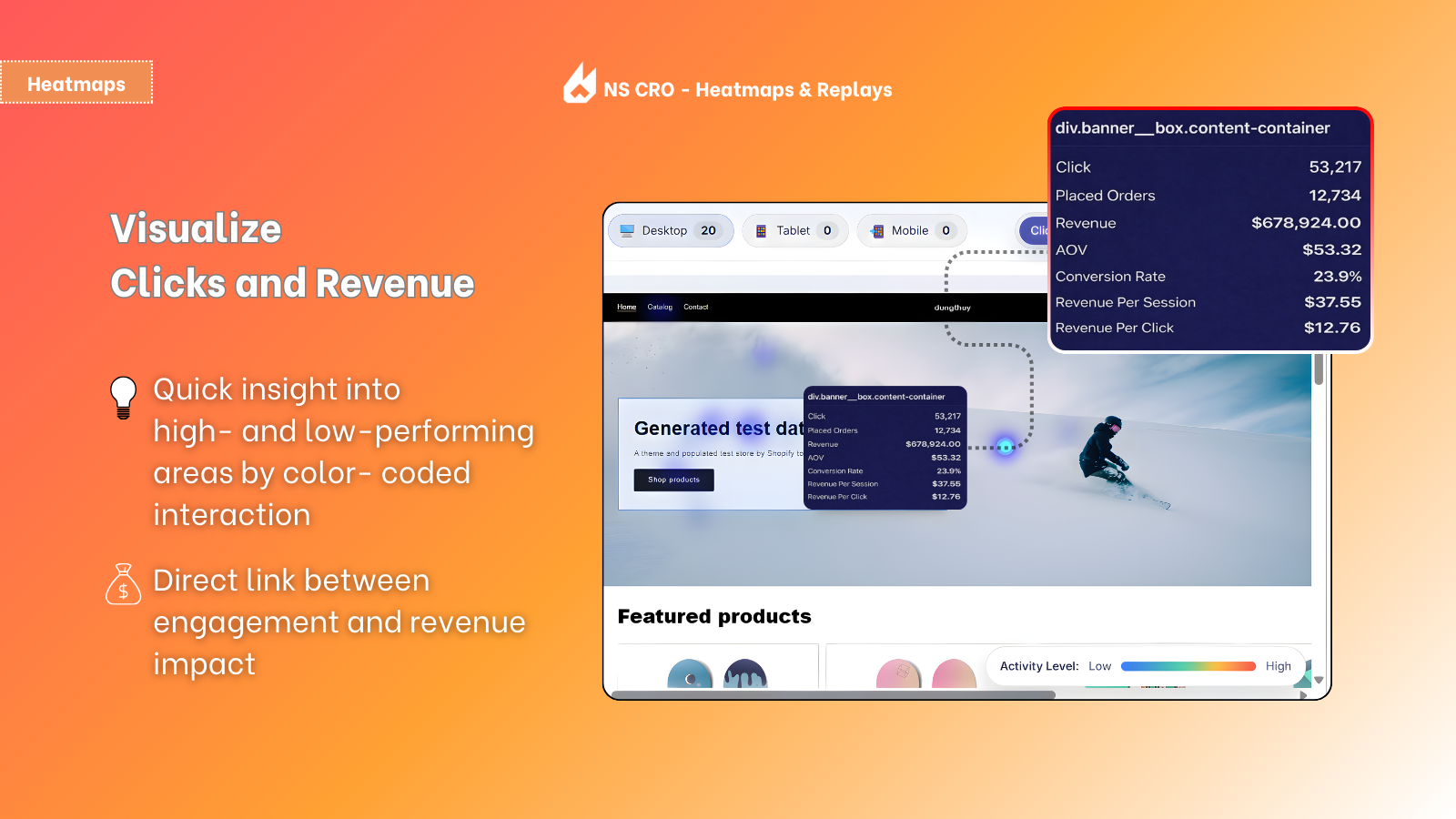
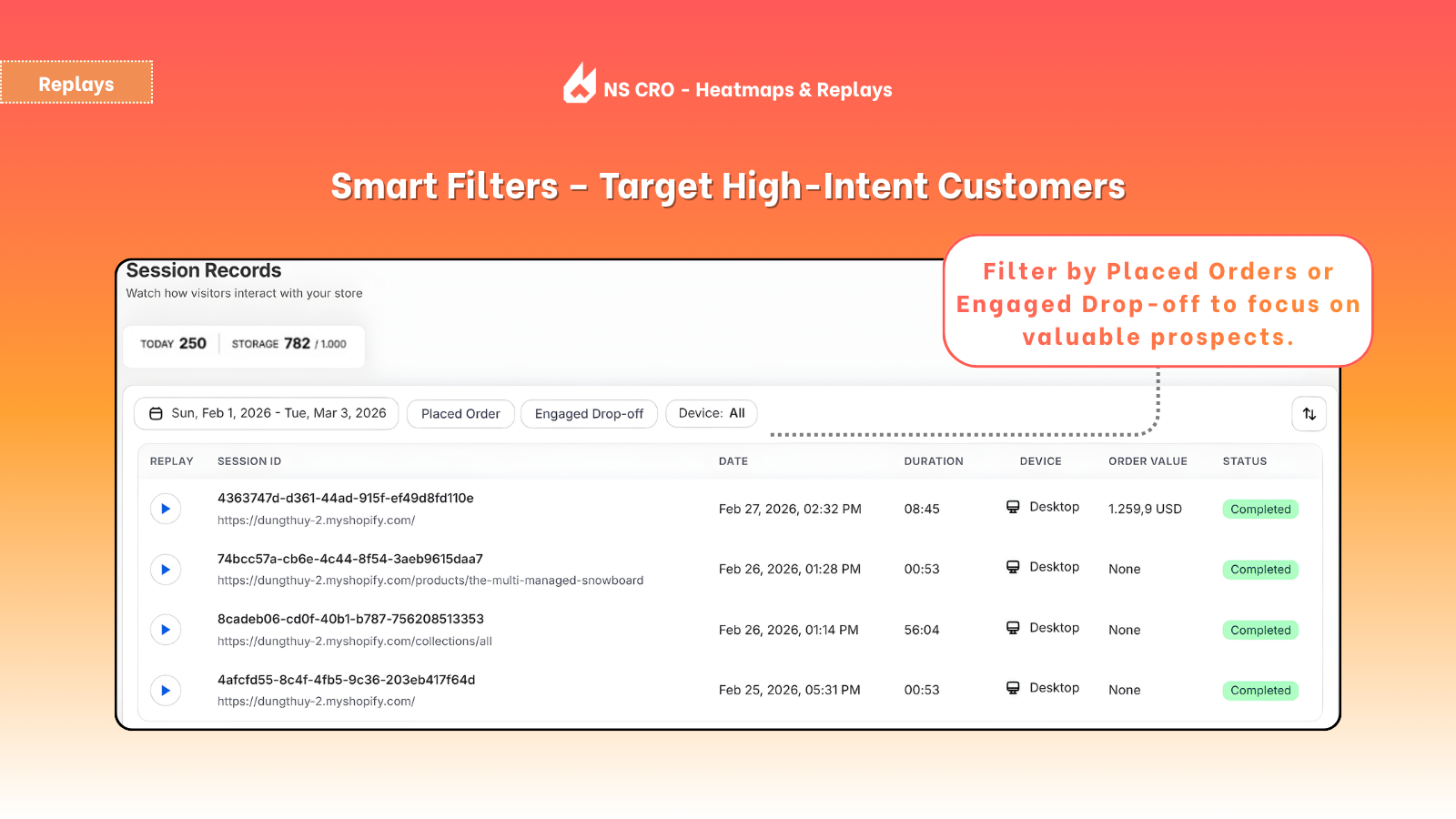
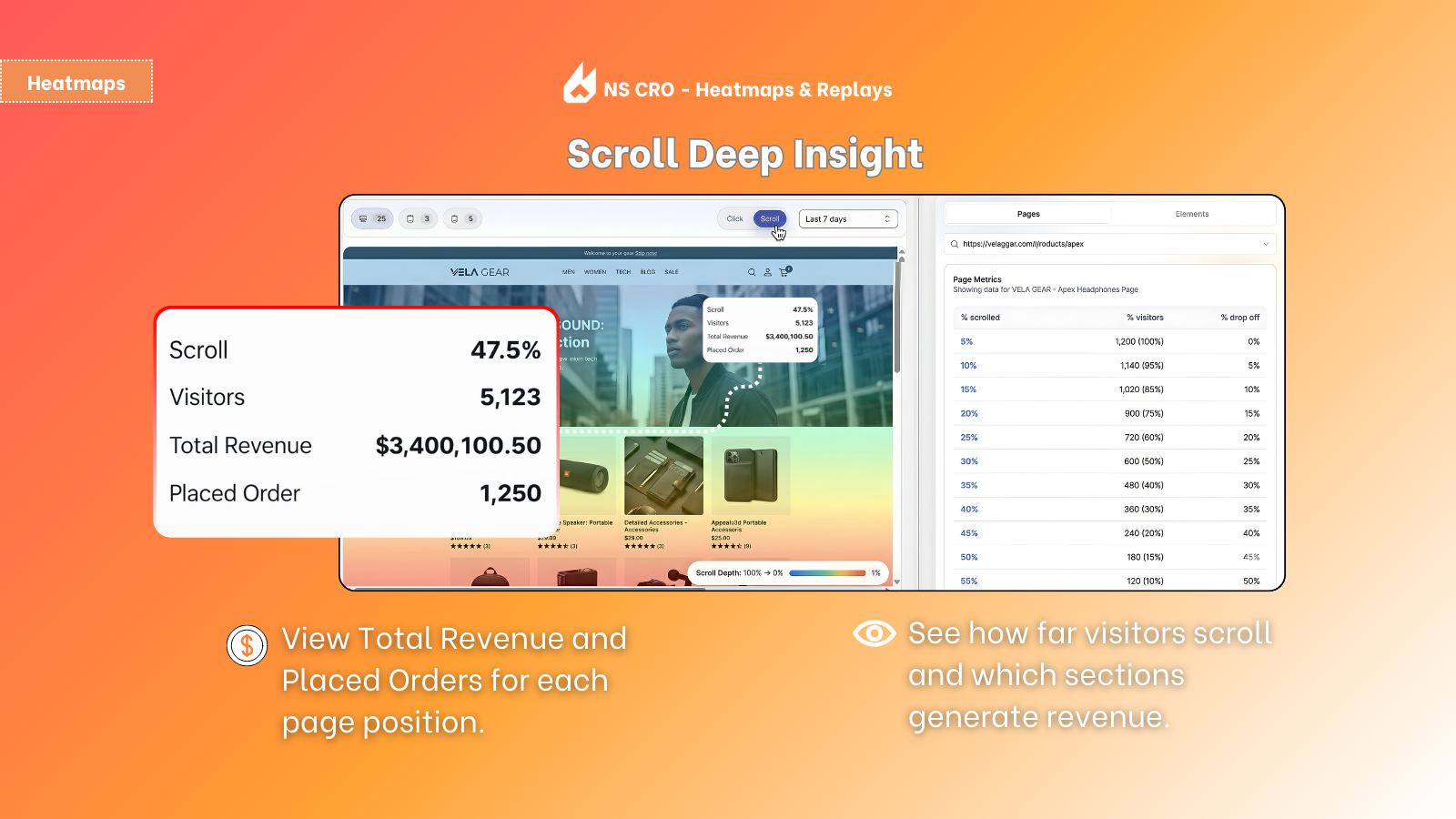
Live session recording & visual heatmap with conversion metricsAutomatically flag critical milestones such as "Add-to-cart" and "Placed order"Identify friction points for high-intent users that failed to purchaseDeep scroll insights to measure user engagement & each page position's revenueDetailed page-level analytics: track key metrics across all pages and elementsRevenue-based Heatmaps – Track clicks and scrolls with financial impactSession Recording – Record and replay visitor journeyRevenue dashboard - See page-level revenue and key performance metricsSmart filters - Focus on abandoned cart and drop-off sessions, and purchases

+1 more change in this update

Detected May 3, 2026

Integrations updated

Integrations

Integrations updated

Shopify Admin

App-store listing

About NS Revenue Heatmap & Replay

Know what clicks actually bring sales with revenue-based heatmaps. Reduce abandoned sessions.

Understand how visitor behavior connects directly to revenue. Revenue-based heatmaps reveal click or scroll activity, showing the financial impact behind every element. Session record helps replay customer journeys to identify drop-off points and highlight key events such as add-to-cart or checkout steps. A revenue dashboard delivers page-level metrics, helping you interpret behavioral data, refine UI/UX decisions, improve conversion quality, and strengthen customer retention.

Listing highlights

  • Revenue-based Heatmaps – Track clicks and scrolls with financial impact
  • Session Recording – Record and replay visitor journey
  • Revenue dashboard - See page-level revenue and key performance metrics
  • Smart filters - Focus on abandoned cart and drop-off sessions, and purchases

Features

Customer behavior

Activity tracking
Event tracking
Replay filtering
Segmentation
Session replay

Marketing and sales

Abandoned cart
Funnel analysis
Purchase tracking

Visuals and reports

Analytics dashboard
Heatmaps

Methodology

How to read these signals

Counts are based on Shoplist's latest available public crawl signal dated May 15, 2026.

Shoplist has not yet found reliable public storefront evidence connecting a Shopify store to this app. This does not mean the app has no users. Some apps are new, admin-only, server-side, theme-independent, or otherwise difficult to detect from public storefront signals.

Merchant rows are filtered to public brand profiles with enough public data to link safely. Full workflow, filtering, and monitoring stay behind signup.

Review, pricing, feature, screenshot, and listing-change data come from public Shopify App Store and Shoplist crawl records. Signals can change between crawls.

FAQ

Questions about NS Revenue Heatmap & Replay

Has Shoplist detected stores using NS Revenue Heatmap & Replay yet?

Shoplist has not yet found reliable public storefront evidence for NS Revenue Heatmap & Replay. The page tracks first merchant evidence as it appears.

What does first-adopter watch mean?

It means Shoplist is monitoring launch context, first storefront-detectable merchant evidence, and listing changes.

Can I get alerts when stores start using NS Revenue Heatmap & Replay?

Yes. Create a watchlist to get alerted when Shoplist finds public merchant evidence for NS Revenue Heatmap & Replay.

Keep watching NS Revenue Heatmap & Replay

Turn this public profile into a monitored app workflow for first detections, reviews, pricing, related apps, and listing-change history.

Get alerted when stores start using NS Revenue Heatmap & Replay