Autoprinter logo

Autoprinter Shopify App: Pricing, Features & First-Adopter Watch

Workflow automation & Shipping

Updated June 2, 2026

No signal

By Econocraft Materials LLC

Launched May 11, 2026. Shoplist is monitoring first merchant evidence, pricing, feature details, and listing changes for this Shopify app.

Shoplist public signals

What is visible for Autoprinter right now

Signal date June 2, 2026

Monitoring status

First-adopter watch

Monitoring first merchant evidence

As of Jun 2, 2026

Momentum

0 No signal

Install trend held steady over the last 28 days

As of Jun 12, 2026

No signal0% confidence

0 momentum score

Install trend held steady over the latest 28-day window.

Updated Jun 12, 2026

0 installs

Momentum inputs

28d installs

0

Prev. 28d

0

New 28d

0

30d reviews

0

Installs
0
Growth
50
Adoption
0
Reviews
0
Fit
80

Quick answer

Autoprinter launched on May 11, 2026. Shoplist is monitoring first public merchant evidence, pricing changes, and listing changes.

Pricing

Pricing and plan posture

Free

Free
  • 1 template routing rule
  • Access to the custom template library
  • Built-in packing slip design
  • Manual printing through Shopify

Basic

$10
  • Automated document printing
  • Automated shipping label printing
  • Everything in Free
  • Unlimited custom templates

Unlimited

$30
  • Everything in Basic
  • Multi-workstation print routing
  • Unlimited paired workstations

Activity and changes

Recent signals for Autoprinter

Recent detections and listing changes are public signals captured by crawl history.

App Store listing

Listing changes

5 updates

Detected Jun 5, 2026

Listing title changed +1 more

Positioning

Listing title changed

Customize and auto-print order documents and shipping labels — with a single click.Customize and auto-print order documents and shipping labels — with 1 click.

Description rewritten

Tired of clicking Print → PDF preview → Ctrl+P → Pick a printer → "Print" for every order? Autoprinter cuts that it to one click. click — the simple, low-cost ShipStation alternative. Build custom HTML/CSS templates for packing slips, invoices, gift receipts, pick … plate per order — by source, tag, value & more. Click "Print" and the doc fires straight to the right printer. Chain multiple docs together with every order print. Auto-printing function supported on Chrome on MacOS Chrome, macOS 13+ or Windows 10+.

Detected Jun 2, 2026

Listing title changed +3 more

Positioning

Listing title changed

Customize and auto-print order documents and shipping labels — no clicks in between.Customize and auto-print order documents and shipping labels — with a single click.

Description rewritten

Tired of click clicking Print → PDF preview → Ctrl+P → pick Pick a printer → print, "Print" for every single order? Autoprinter cuts that to one click. Build custom HTML/CSS templates for p … and returns. Routing rules pick the right template per order — by source, tag, value, anything. value & more. Click Print "Print" and the doc fires straight to the right printer. Chain multiple docs together with every order print. Auto-printing function supported on Chrome Browser on MacOS 13+ or Windows.Windows 10+.

Callouts updated

Print labels/docs with 1 click — no PDF previews, printer selection or dialogs.Print docs with 1 click — no PDF previews, printer selection or dialogs.

+1 more change in this update

Detected May 30, 2026

Description rewritten +2 more

Positioning

Description rewritten

Tired of click → PDF preview → Ctrl+P → pick a printer → print, for every single … ight to the right printer. Chain multiple docs together with every order print. Free up to 50 orders/month. Paid from $10. Auto-printing function supported on Chrome and Browser on MacOS 13+ required.or Windows.

Callouts updated

Print chain: print multiple documents per order, dynamically, in one click.Print chain: every document for every order, all at once, in one click.

Media gallery updated

7 added, 6 removed — “Autoprinter - a full solution to custom docs and auto printing”

Detected May 23, 2026

Description rewritten +5 more

Positioning

Description rewritten

Custom Tired of click → PDF preview → Ctrl+P → pick a printer → print, for every single order? Autoprinter cuts that to one click. Build custom HTML/CSS templates and auto-routing/printing for order documents including packing slips, invoices, gift receipts, pick lists, return slips and gift receipts. Edit document templates with the visual editor or write your own HTML/CSS with order-data variables. returns. Routing rules pick the right template per order — by source, tag, or value, with a built-in Rule Tester. Pair multiple Chrome extensions (label sources) anything. Click Print and Mac utilities (print stations) per workstation. the doc fires straight to the right printer. Chain multiple docs together with every order print. Free up to 50 orders/month; paid tiers orders/month. Paid from $10. macOS Chrome and MacOS 13+ required.

Callouts updated

Print docs with 1 click — no PDF previews, printer selection or dialogs.Custom HTML/CSS templates for invoices, slips, gift receipts, returns.Routing rules pick the right template per order — by source, tag, or value.Labels go to the label printer. Docs go to the doc printer. Always.Print chain: every document for every order, all at once, in one click.Auto-print any order documents (single or bulk) with a single click.Custom HTML/CSS templates with full order-data variable access.Chrome extension auto-captures and auto-prints shipping labels on purchase.Routing rules pick the right doc template per order — by source, tag, or value.Scale from 1 label source + 1 print station to unlimited as you grow.

Media gallery updated

3 added, 3 removed — “Print order docs in bulk or on a single order, like always”

+3 more changes in this update

Detected May 14, 2026

Description rewritten +8 more

Positioning

Description rewritten

Custom templates and auto-routing/printing for order documents including packing … ariables. Routing rules per source, tag, or value, with a built-in Rule Tester. Allows you to connect many computers Pair multiple Chrome extensions (label sources) and connected printers. 3 components: this Shopify app, a Mac desktop utility, and a Chrome extension for shipping labels. utilities (print stations) per workstation. Free up to 50 orders/month; paid tiers from $10. macOS 13+ at launch.required.

Integrations updated

Shopify Admin

Callouts updated

Scale from 1 label source + 1 print station to unlimited as you grow.Pair with as many workstations and connected printers as needed.

+6 more changes in this update

App-store listing

About Autoprinter

Customize and auto-print order documents and shipping labels — with 1 click.

Tired of clicking Print → PDF → Ctrl+P → Pick a printer → "Print" for every order? Autoprinter cuts it to one click — the simple, low-cost ShipStation alternative. Build custom HTML/CSS templates for packing slips, invoices, gift receipts, pick lists, and returns. Routing rules pick the right template per order — by source, tag, value & more. Click "Print" and the doc fires to the right printer. Chain multiple docs with every order print. Auto-printing on Chrome, macOS 13+ or Windows 10+.

Listing highlights

  • Auto-print any order documents (single or bulk) with a single click.
  • Custom HTML/CSS templates with full order-data variable access.
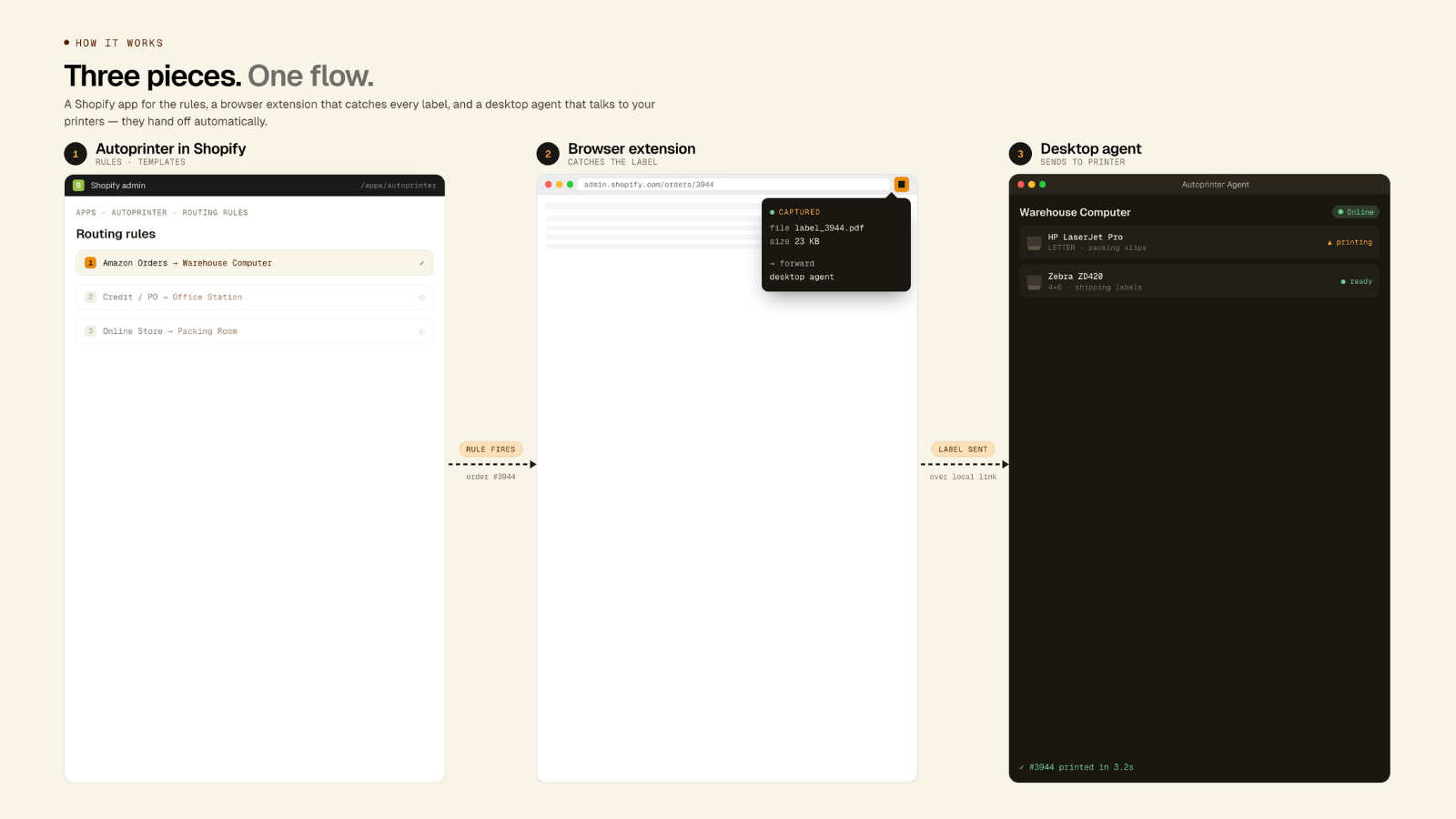
  • Chrome extension auto-captures and auto-prints shipping labels on purchase.
  • Routing rules pick the right doc template per order — by source, tag, or value.
  • Pair with as many workstations and connected printers as needed.

Features

Customization

Conditional logic
Custom triggers
Custom workflows

Automation tasks

Order fulfillment
Order processing

Labels and packaging

Bulk printing
Label creation
Packing slips
Pick lists
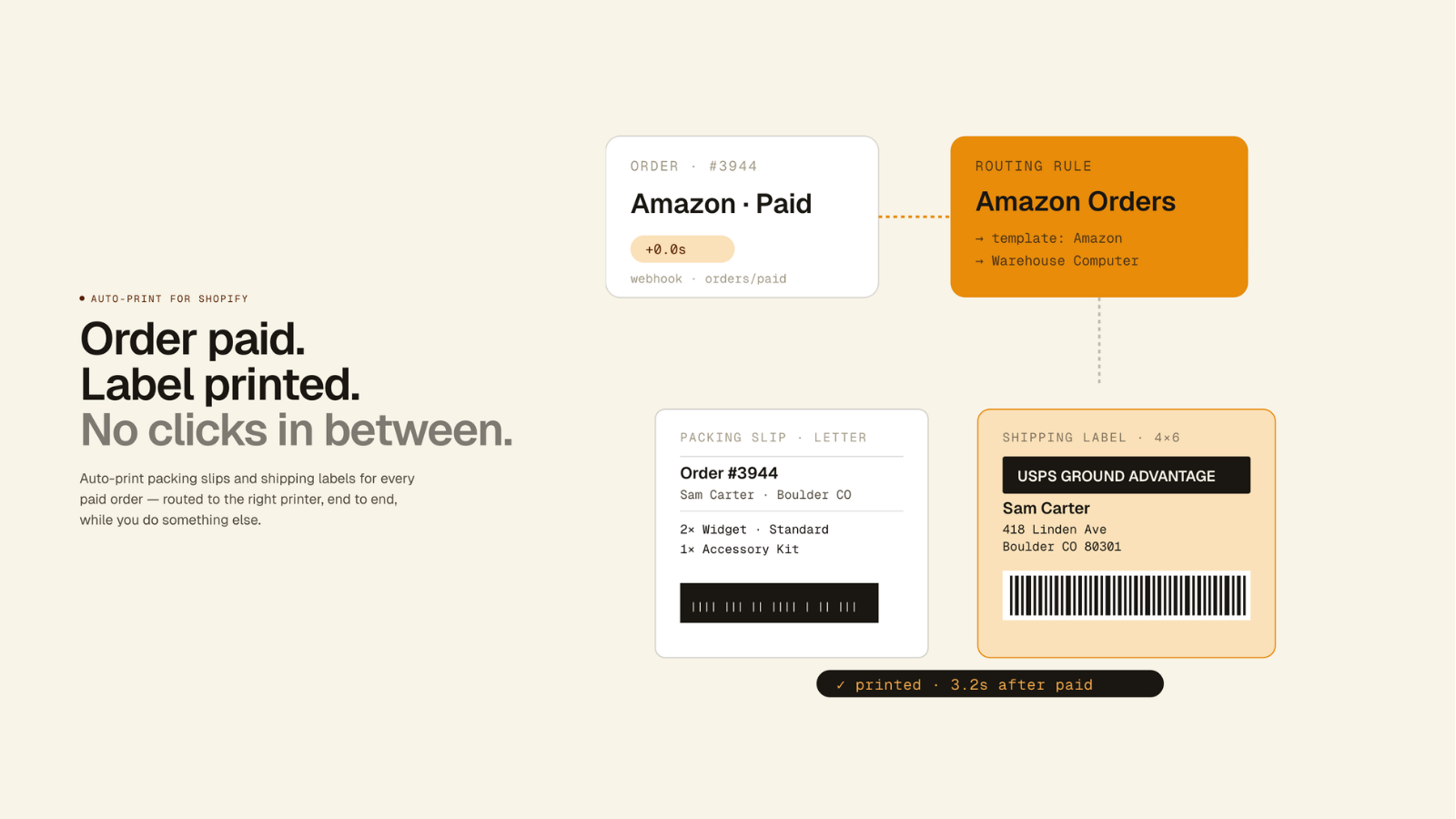
Autoprint your packing slips and labels on Shopify
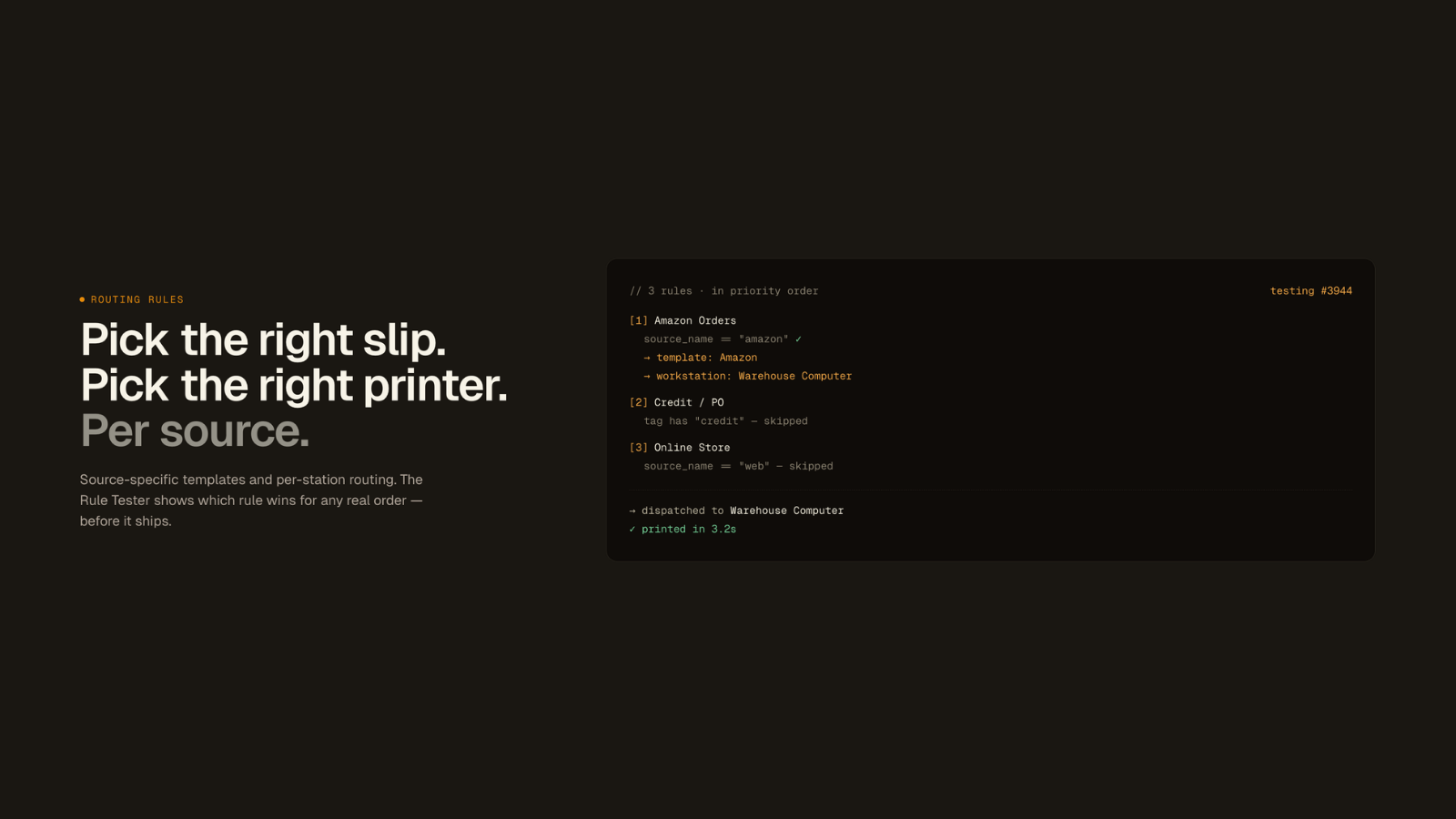
Routing rules define when each template should be printed
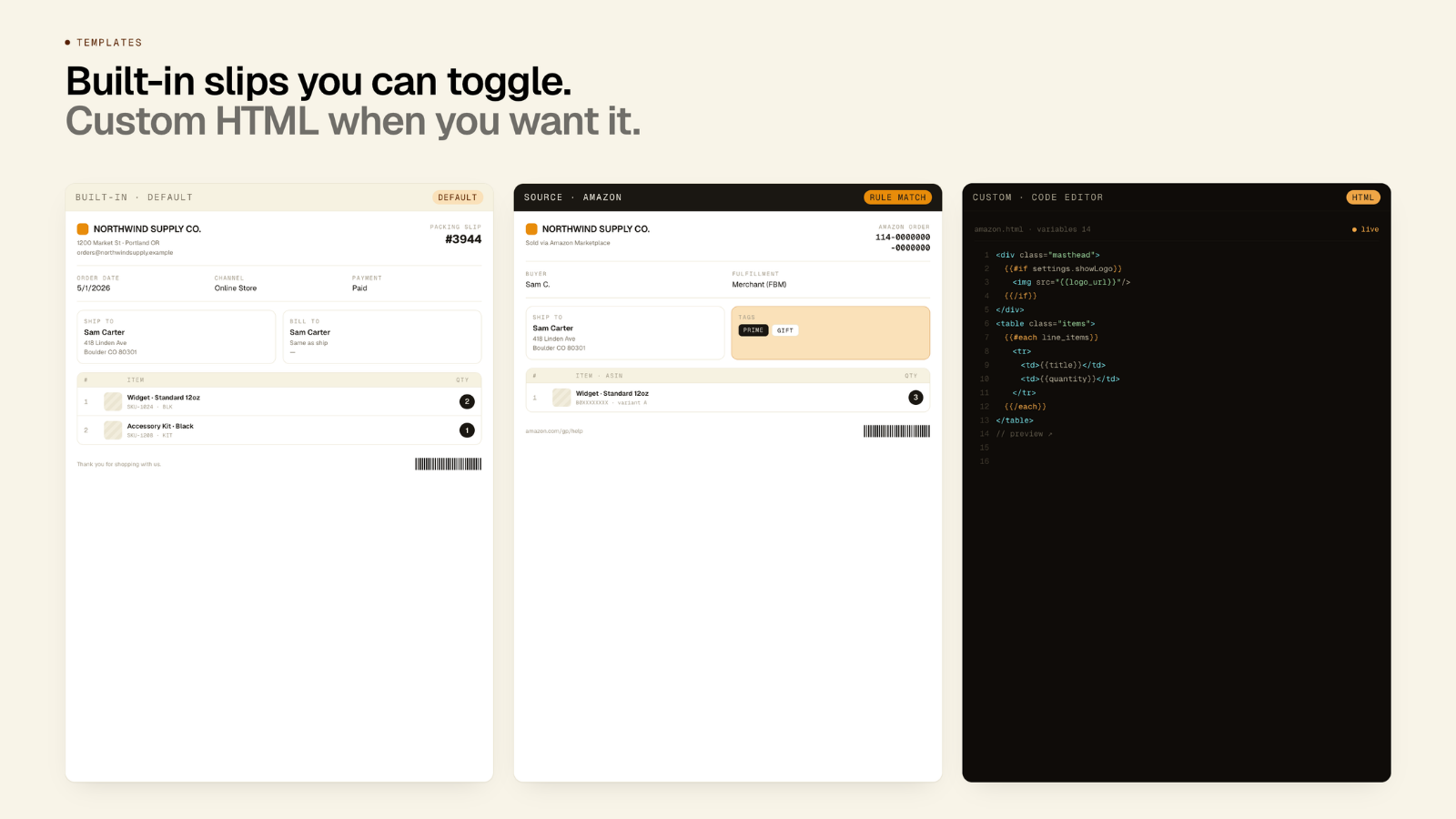
Create and manage custom document templates

Methodology

How to read these signals

Counts are based on Shoplist's latest available public crawl signal dated June 2, 2026.

Shoplist has not yet found reliable public storefront evidence connecting a Shopify store to this app. This does not mean the app has no users. Some apps are new, admin-only, server-side, theme-independent, or otherwise difficult to detect from public storefront signals.

Merchant rows are filtered to public brand profiles with enough public data to link safely. Full workflow, filtering, and monitoring stay behind signup.

Review, pricing, feature, screenshot, and listing-change data come from public Shopify App Store and Shoplist crawl records. Signals can change between crawls.

FAQ

Questions about Autoprinter

Has Shoplist detected stores using Autoprinter yet?

Shoplist has not yet found reliable public storefront evidence for Autoprinter. The page tracks first merchant evidence as it appears.

What does first-adopter watch mean?

It means Shoplist is monitoring launch context, first storefront-detectable merchant evidence, pricing, and listing changes.

Can I get alerts when stores start using Autoprinter?

Yes. Create a watchlist to get alerted when Shoplist finds public merchant evidence for Autoprinter.

Keep watching Autoprinter

Turn this public profile into a monitored app workflow for first detections, reviews, pricing, related apps, and listing-change history.

Get alerted when stores start using Autoprinter